At a Southern California outpatient mental-health practice, the average no-show rate sat at 23% across a 43-day stretch. Then the practice started sending a personalized text the day before each appointment, naming the patient, stating the time, and offering a clear way to cancel or reschedule. Over the following 37 days the average came in at 2.1%, a 20.9-point drop the practice recorded in its own quality-improvement write-up.
That's not a messaging story. It's a workflow story. The practice didn't find better words. It built a repeatable step that reached every booked patient the day before, collected an answer, and made changing the booking easier than ignoring it.
Most empty chairs come from the same broken loop. A booking is made by phone or online, then the appointment sits in a calendar nobody re-reads, and the only thing standing between the client and the slot is memory. Software that blasts a text without writing the reply back to the calendar doesn't close that loop. It adds a second list that drifts out of sync with the first.
So treat appointment reminder software as a workflow with three parts: a channel the client reads, a feature set that updates the calendar, and a send schedule the owner can edit without calling a developer. Get those three right and a lost slot becomes a rebooked one. Get them wrong and you've bought a notification tool.
Reminder Channels Compared for SMS, Email and Calls
Appointment reminder software sends automated messages before a booking and records the reply, so your staff don't have to call each client by hand. Everything else, the timing, the templates, the reporting, hangs off the channel decision.
Phone reminders remain the most commonly used method. In March 2025, the Canadian Drug Agency reported survey data from 85 Canadian medical-imaging centres, and phone reminders were the most common method used, according to OntarioMD's summary of the survey. That tells you what practices trust. It doesn't tell you what gets answered fastest.
| Channel | Reach and read speed | Response options | Relative cost | Best use | Main risk |
|---|---|---|---|---|---|
| SMS text | Reaches most clients, read within minutes | Reply to confirm, cancel or reschedule | Low per message | Default reminder for every booking | Preview may show on shared phones |
| Reaches everyone with an address, often read later | Click a link to confirm or change | Very low | Preparation instructions, forms, receipts | Easily missed or filed in spam | |
| Automated phone call | Reaches clients who don't text | Press a key or leave a message | Higher per call | High-value or unresponsive bookings | Can be missed or feel intrusive |
| Two-way SMS with call fallback | Combines fast reach with a backup | Reply by text, call if no reply | Low to moderate | Busy practices with mixed client ages | Needs a clear rule for when the fallback triggers |
Channel choice changes attendance, not just convenience. At a South Los Angeles community clinic, 115 adults who received a standardized bilingual phone reminder 24 hours ahead attended at 59%, while 119 adults who also received an automated bilingual text 72 hours ahead attended at 83%, a difference the UCLA project reported as statistically significant. Same clinic, same phone call, one extra earlier touch.
The two-way part matters as much as the channel. Riverside Medical Clinic started with a 15% baseline no-show rate on phone reminders and reported a decline to 10% within the first month of a HIPAA-compliant two-way text system, a 33% relative reduction covered by Dark Daily. Written reminders let the recipient reply without waiting on hold.
The rule to adopt: SMS as the default for every booking, a call for high-value or unresponsive bookings, and email reserved for documents, preparation notes and receipts.
One constraint that rarely makes the comparison tables. California patients can ask providers to limit how and where they're contacted, including a specific phone number, address or location, as set out in the California Attorney General's patient privacy guidance. Aesthetics and medical practices should keep service names out of message previews and honour the contact method the client chose, even when a different channel would perform better.
Core Features and Calendar Sync That Prevent Double Bookings
Start with the failure this feature set exists to prevent. A stylist moves a 2pm colour to 4pm by tapping her phone. The reminder tool still holds the old event, sends a text at 1pm the next day reminding the client about 2pm, and the client turns up to a chair that's occupied. The client isn't at fault. Two lists disagreed and nobody noticed.
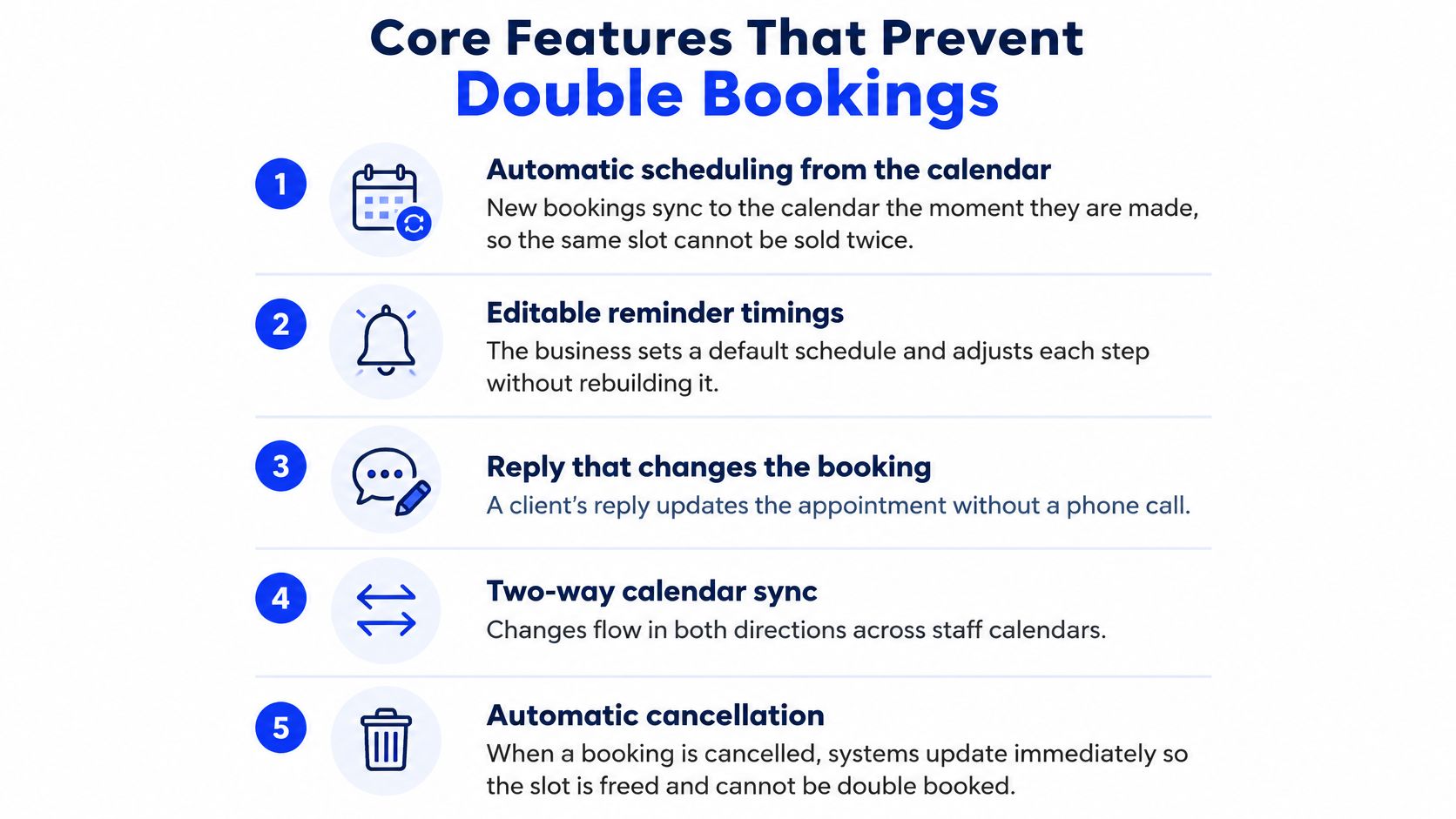
Calendar sync removes that failure. Put plainly, the reminder tool reads the live calendar rather than a copy of it. A cancelled booking triggers a different message than a confirmed one. A moved booking re-times its reminders. A released slot goes back into the pool of times you can offer the next caller or the next text.
Which means the integration direction matters more than the feature list. Read-only sync is not enough. The tool has to write back.
Check these items in priority order:
- Automatic scheduling from the calendar. New bookings should reach the reminder queue the moment they're created, with no export, import or manual list.
- Editable reminder timings. You should be able to change a send time in a settings screen. If a timing change needs a support ticket, you'll stop tuning it.
- A reply that changes the booking. "C" or "Cancel" should update the appointment without a staff member touching it.
- A cancellation or reschedule link. One tap, mobile-friendly, no login wall.
- A state log. Sent, delivered, confirmed, cancelled, no reply. Without those five states you can't tell a channel problem from a wording problem.
Test it this way: book a slot, cancel it by reply, then check whether the reminder sequence stops and the time reappears as bookable. If any step needs a human, the integration is decorative.
Google Calendar is the common case for small businesses. Heyline connects to the business's Google Calendar with one button and places booked appointments in the owner's own calendar, so the calendar a receptionist reads and the calendar a reminder tool reads are the same object. Without a connected calendar, a receptionist can still answer questions and take messages, but it cannot book.
If you're comparing tools across a team, the scheduling logic underneath matters too, and this breakdown of tutoring scheduling software is worth reading for how availability rules, buffers and provider calendars interact before you layer reminders on top. For practices weighing a reminder layer against a full booking rebuild, this guide to appointment scheduling software for a medical office covers where the two categories diverge.
How Reminders Lower No-Show Rates and Protect Revenue
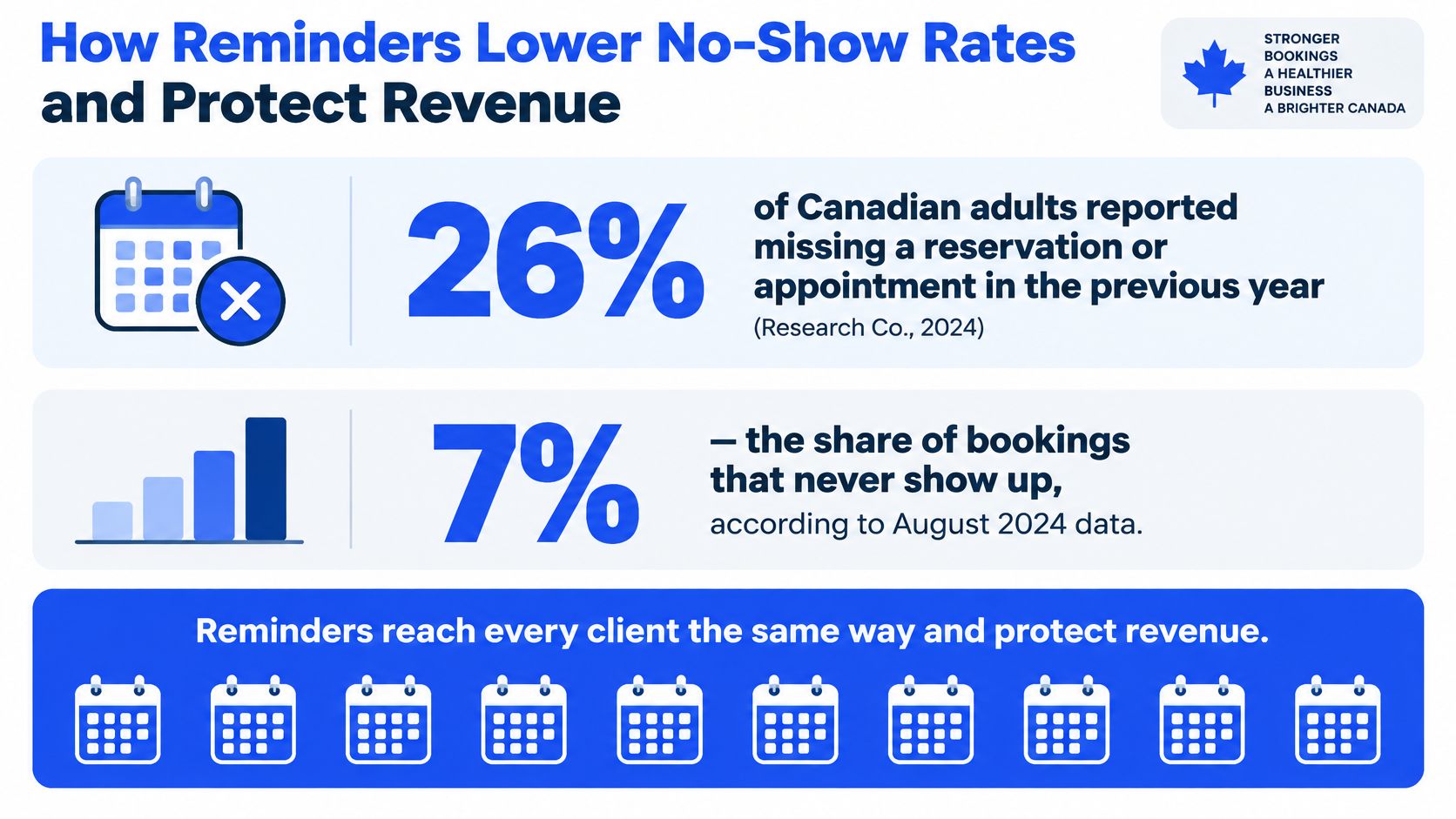
Missed appointments are common enough to count as normal behaviour. In 2024, 26% of Canadian adults reported missing a reservation or appointment during the previous year, according to Research Co.'s survey reported by Bookedin. In August 2024, 15% of Canadians surveyed said they had missed a doctor or specialist appointment, and 7% of those who missed one reported paying a no-show fee, per Research Co.'s figures published by The Globe and Mail.
Reminders move that number. At NorthBay Urology Specialty Care in Fairfield, California, a quality-improvement project that added personal reminder calls saw the total no-show rate fall from 13.33% to 6.00%, a 7.33-point reduction, though the reported comparison carried a p-value of 0.07, which makes it suggestive rather than conclusive. Treat it as evidence that a systematic touch helps, not as a guaranteed result.
Now run your own arithmetic. Twenty bookings a week at a 15% no-show rate is three empty slots. At an average booking value of $80, that's $240 a week walking out the door. Recover a third of those slots and you keep about $80 a week, roughly $4,000 across 50 trading weeks. Substitute your bookings and your average value and the answer is yours, not mine.
Reminders reduce no-shows. They don't eliminate them, and a badly worded text with no reply path performs about as well as no text at all. Pair the reminder with a deposit policy for high-value or repeat-offender bookings; these deposit policies that prevent no-shows explain how to set a threshold that holds the slot without scaring off good clients.
Track four numbers monthly, no more:
- No-show rate as a percentage of booked slots.
- Reply rate as a share of reminders sent.
- Slots rebooked after a cancellation or no-reply.
- Staff hours spent on manual reminders and confirmation calls.
Pricing Models and What Each One Costs
Four pricing models cover almost every product on the market, and each one hides a different trap. Since no published reminder-software price list holds up for long, work from the model rather than a number you read somewhere.
| Pricing model | How it is billed | Best fit | Cost trap to check |
|---|---|---|---|
| Per-message credits | Each SMS or call sent | Low-volume practices | Retries and multi-reminder sequences multiply the bill |
| Per-seat monthly | Fixed fee per staff user | Small teams with few users | Costs rise as staff are added |
| Flat monthly plan | Fixed fee with a message allowance | Steady, predictable volume | Overage charges and channel limits |
| Bundled in booking or practice software | Included in a wider system fee | Businesses already on that platform | Locked into a larger system |
Per-message pricing is the most honest model and the easiest to blow up. A four-step sequence on 300 bookings isn't 300 messages, it's closer to 900, and every retry, every long message split into parts, and every automated call adds to the count. Ask the vendor exactly what a credit buys and what happens when a message runs past the character limit.
Per-seat pricing punishes growth in a way owners don't anticipate. You add a second receptionist to cover evenings and your reminder bill rises even though your message volume didn't change. Flat plans look cleaner until you read the allowance, which is where channel limits hide: SMS capped but email unlimited is a very different product from the reverse.
Estimate your own monthly cost before you talk to anyone:
(bookings per month) × (reminders per booking) × (per-message rate) + fixed seat or plan fee
At 300 bookings and three reminders each, that's 900 messages a month before any fixed fee, which is the figure you take to a vendor and ask them to price.
Bundling deserves a separate warning. If reminders only come inside a booking suite, moving to a different reminder tool later means moving your calendar, your client records and your payment history. Ask what leaving looks like.
When you compare an AI receptionist on price, check what the plan includes rather than what the demo showed. On our three plans, booking into Google Calendar, message taking, intake questions, returning-caller recognition and transcripts are all included, so there's no feature gate on the core booking workflow.
Timing and Wording That Get Patients and Clients to Reply
A default schedule beats clever copy. Most practices that struggle with reminders are sending one message at the wrong moment, not three messages with weak wording.
Here is the sequence to start with. Adjust for booking lead time, not for taste.
| Send time | Purpose | Message content |
|---|---|---|
| Seven days before | Give time to reschedule | Client name, date, time, reschedule link |
| Forty-eight hours before | Confirm or cancel | Date, time, reply Y to confirm or C to cancel |
| Twenty-four hours before | Final reminder and preparation | Time, location, any preparation or documents |
| Two to three hours before, unconfirmed only | Recover unconfirmed slots | Short prompt, call fallback if enabled |
Each step earns its place. The seven-day message exists because a client who needs to move an appointment will do it politely when there's still a week to refill the slot. The 48-hour message is the one that produces a usable answer, early enough to resell the time. The 24-hour message carries the logistics, the address, the parking, the fasting instruction, the forms. The two-hour message targets only the bookings that haven't answered, which keeps it from annoying everyone else.
Wording does the rest. Name the person. State the exact time. Give one reply action. Include a way out.
"Reminder: you have an appointment" is a notification. "Hi Marina, you're booked Thursday 14 March at 10:15 with Dr Osei. Reply Y to confirm or C to cancel." is a workflow.
Copy matters, and these SMS reminders that fill the room are a reasonable starting library before you adapt anything to your own tone. Keep service names out of the body if the phone might be shared or face-up on a kitchen table. Adapt the templates rather than inventing from scratch, and check the reply wording against these text message appointment confirmation examples so the confirm and cancel commands are unambiguous.
Before you finalise a single template, test comprehension. California publishes licensed health-workforce language data across 47 major professions, searchable by language group, county and profession, through its health workforce languages dataset, and meaningful access can require interpretation, translation or an alternative format, not just an English text sent through a different channel. Ask each client which language they prefer, write the reminder in that language where you can, and test whether a real recipient would understand it, trust it and act on it.
Choosing Reminder Software or an AI Receptionist by Situation
These are two tools aimed at two halves of the same problem. Reminder software contacts clients who already have a booking. An AI receptionist answers incoming calls and books new appointments. Neither one substitutes for the other.
| Booking task | Reminder software | AI receptionist |
|---|---|---|
| Sending reminders before a visit | Yes, automated on a schedule | No, does not contact clients after a call |
| Answering incoming calls | Usually no | Yes, answers the business line |
| Booking a new appointment by phone | Usually no | Yes, books into Google Calendar during the call |
| Confirming or cancelling an existing booking | Yes, through reply or link | Yes, for callers who phone in |
| Taking messages when staff are busy | No | Yes, emails a recap afterwards |
Match the tool to the measured problem, not the other way around.
Situation one, a solo practitioner or two-person salon that keeps missing calls. The phone rings during a colour service, nobody picks up, the caller books elsewhere. Reminders won't recover a booking that never existed. Start with the receptionist: Heyline is built for businesses with one to five people, where the owner answers the phone and the schedule lives in Google Calendar. It picks up the business line, books jobs into the business's own Google Calendar, and emails a recap afterwards, so the call that would have gone to voicemail becomes a filled slot.
Situation two, a busy practice where the diary is full and the chairs still empty. Here the leak is after booking, and reminders are the fix. Start with a two-way SMS sequence, connect it to the live calendar, and measure the no-show rate for a month before buying anything else.
Situation three, multiple locations running both problems. Run both tools and give each one a single owner. The receptionist books; the reminder sequence confirms. The handoff point is the calendar, which is why sync quality decides whether the pair works or fights.
One limit to build around rather than discover later. The AI receptionist never contacts the client after a call, so reminders, confirmations and follow-up calls remain the business's own job. If you were expecting one purchase to close the whole loop, it won't. Test calendar booking and call follow-up in a trial using your own bookings and your own calls before you commit, and read up on AI receptionist pricing so you're comparing total monthly cost rather than entry price.
Set Up Your Reminder Process This Week
Six steps, one week, no developer.
- Audit the next 30 days. Open the calendar and mark every booking that has no confirmation recorded against it. That list is your revenue at risk, and its size tells you whether this is worth doing at all.
- Pick the default channel. SMS for most businesses, with a call fallback for clients who don't reply. Don't launch three channels at once, because you won't know which one did the work.
- Load the four-step schedule. Seven days, 48 hours, 24 hours, and a final unconfirmed-only prompt. Put the client's name, the exact time and one reply action in every message.
- Connect the live calendar. Then cancel a test booking by reply and watch the slot free up. If it doesn't, stop and fix the sync before sending anything to a real client.
- Send yourself a test. Read it on a locked phone screen and check what the preview reveals. A shared handset shouldn't display a service name.
- Measure for two weeks. Reply rate, no-show rate, slots rebooked, staff hours saved. Change one variable at a time, starting with send times before you touch wording.
You can also start with the other half of the problem. Building an AI receptionist requires no card and no setup, and you keep your own number through call forwarding or use a Heyline number, so there's nothing to migrate and nothing to cancel if it doesn't fit.
The decision in front of you is narrow. If your diary fills and then empties, buy reminders. If your phone rings and nobody answers, buy a receptionist. If both are true, run both and let the calendar be the thing they share.
Heyline answers the calls that would otherwise become voicemail, books the appointment into your own Google Calendar, and emails you a recap of every conversation, which leaves your reminder sequence to handle the clients already on the books. You can see how the two halves fit together and set up a receptionist in minutes at Heyline, with no card and no setup. Start with your next 30 days of bookings and let the size of that unconfirmed list tell you which half to fix first.