You've opened the clinic's booking page, but your doctor isn't listed, the next appointment looks too far away, and you're not sure whether to call or keep searching. You want a confirmed visit, not another message asking someone to call you back. If you're searching “book appointment doctor”, the useful starting point is knowing what to ask for, what to record, and what to do when the answer is that nothing's available.
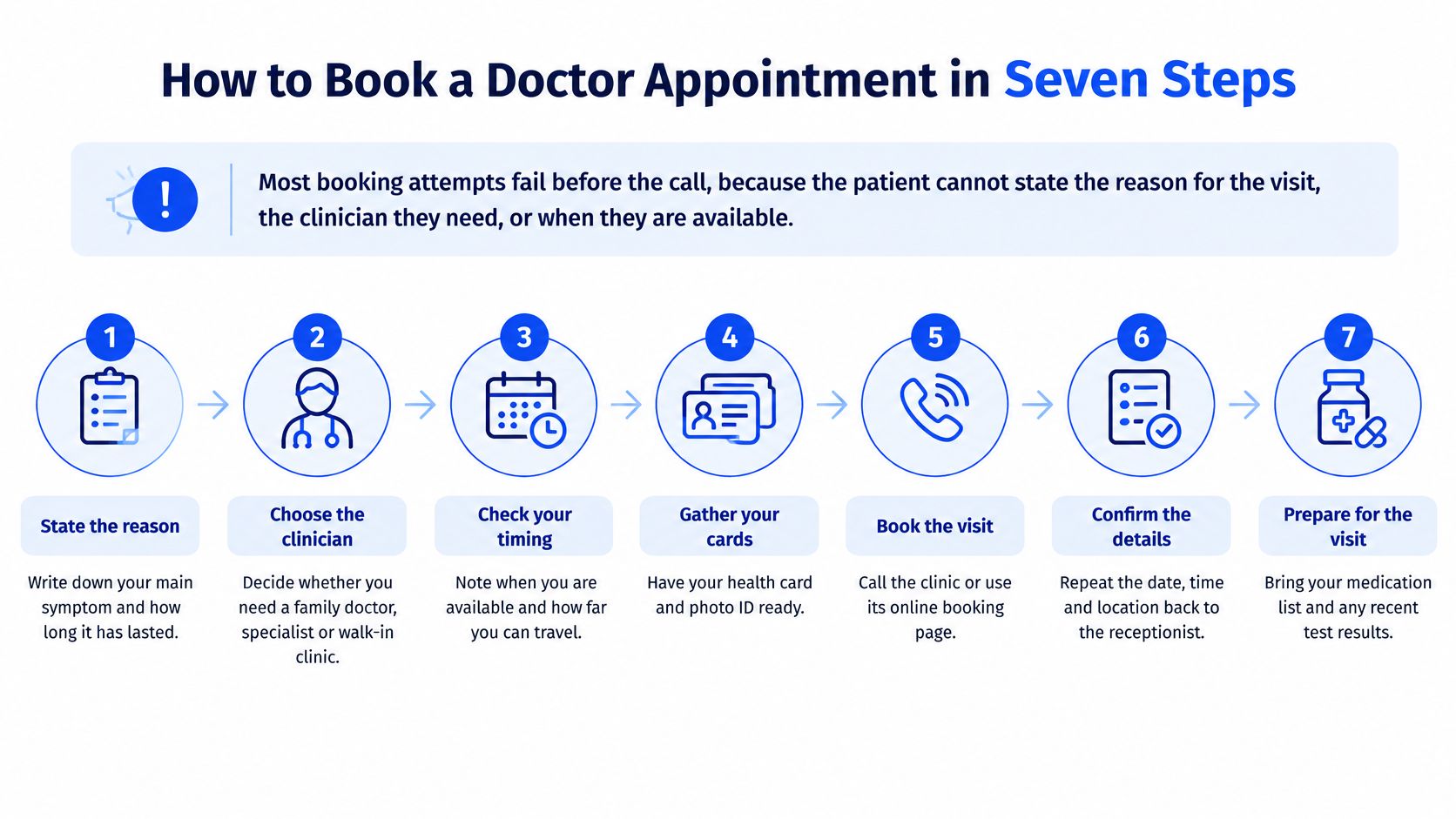
How to Book a Doctor Appointment in Seven Steps
A booking call can stall before anyone checks the calendar if you can't explain the problem, identify the clinician you need, or offer times you can attend. Prepare a short note before calling, rather than trying to remember everything while you're on hold. You don't need to diagnose yourself, just give the clinic enough information to route your request correctly.
Prepare your request before calling
Write the reason in one sentence, including how long it's been happening.
For example, describe knee pain that started after a fall and now makes stairs difficult. That gives the receptionist more useful information than asking for a general appointment.
Keep additional concerns on a separate list. Mention them when booking so staff can select the right appointment type, rather than discovering at check-in that you need a different service.
Gather the details the clinic will ask for.
Have your insurance member ID or applicable health card, date of birth, postal or ZIP code, phone number, pharmacy details, current medications and allergies nearby. If another doctor referred you, note their name and where they sent the referral.
For California appointments, confirm your insurance plan and county, not just the insurer's brand. Also say whether you're a new or established patient, because the calendar may separate those appointment types.
Describe urgency plainly, without trying to choose a diagnosis.
Explain whether this is a new or worsening symptom today, a follow-up, or a routine review. If you're unsure whether waiting is safe, request clinical triage rather than asking the receptionist to make that judgement.
Don't minimise symptoms to get through an online form. A routine booking category shouldn't replace an assessment of a potentially urgent problem.
Turn the request into a usable appointment
Ask for the earliest appointment and give workable alternatives.
Name your preferred clinician, then offer a couple of realistic availability windows. Add whether you could see another clinician or travel to another location.
For example, explain that you're free on weekday mornings or later in the afternoon, and could attend the group's other office. This gives staff something concrete to search.
Take the first slot that works for you, not just the first offered.
Check travel, work, childcare and accessibility before accepting. An appointment you already know you can't attend isn't a useful booking.
If you're considering private primary care alongside your existing options, Haven Medical's resource on how to skip the wait for a GP can help you frame questions about that route. Confirm the provider's location, fees and suitability before proceeding; a private booking isn't automatically covered by your California plan.
Ask for cancellation-list placement.
State how much notice you need and whether staff can leave a voicemail. If you can only attend at certain times, say so rather than accepting unrestricted callback requests.
Ask whether you should keep your existing appointment while waiting for an earlier opening.
Repeat the booking back before hanging up.
Read from your notes rather than memory. Ask whether the appointment is confirmed or whether you've only submitted a request awaiting approval.
A callback promise and a reserved appointment are different outcomes.
The sequence below provides a visual reminder of the preparation and booking process.
Preparation helps, but it can't fix a shortage of appointments. A simulated-patient study of California Medicaid primary-care clinics found that only 34% of contacted clinics had any appointment available, and only 19% could offer one within California's 10-business-day standard.
Reality check: A clinic offering an appointment doesn't necessarily mean it's offering timely access. Record the date offered, even if you can't accept it.
Which Booking Channel Gets You a Slot Soonest
Phone calls are the strongest starting point for complicated requests, because staff can clarify your circumstances while checking the schedule. They may be able to identify an appointment category that isn't visible online, check a referral, or offer a cancellation. That doesn't mean they can override clinical rules or create capacity.
Choose the route that fits the request, rather than assuming digital always means faster.
Booking channels compared
| Channel | Best for | What you need ready | Speed to a confirmed slot |
|---|---|---|---|
| Phone call to the clinic | New patients, urgent or complex requests, rescheduling | Member ID, reason for visit, availability windows | During the call if staff find and confirm a suitable opening |
| Patient portal message | Routine follow-ups, renewals, requesting a specific date | Portal account and login | After staff review the message; follow the clinic's stated response policy |
| Online booking page | Established patients booking standard visit types | Account, clinician name, visit type | Immediate when the page completes a booking, limited to published slots |
| Walk-in clinic or urgent care | Problems that need assessment sooner than a routine appointment allows | Insurance card or applicable health card and photo ID | After registration and triage; a place in the queue isn't a reserved appointment |
| Round-the-clock phone line or AI receptionist | After-hours requests and clinics with no online booking | Callback number, reason for visit, availability | During the call with a connected booking calendar; otherwise a message is taken |
Portal messages work well when staff need to review a routine request, but sending a message doesn't hold a slot. Check the acknowledgement for a response timeframe, and don't use a routine inbox when symptoms need prompt assessment.
Online booking pages can confirm a straightforward visit without phone tag. They can also show no availability because your visit type requires staff review, not because every clinician is fully booked.
For remote care, XO's guide to virtual clinician appointments offers additional preparation context. It's UK-focused, so don't assume its coverage arrangements apply in California.
Know what happens after hours
A connected calendar separates actual booking from message-taking. Our medical-office phone reception explainer describes that distinction: we check existing busy times before offering availability, so a booked time isn't offered twice.
We don't book more than 14 days ahead or inside the next hour. After booking, the business receives the event in its Google Calendar and a recap email. Without a connected calendar, we can answer questions and take messages, but can't reserve an appointment.
Call for a new, urgent or complicated request. Use a portal when the request can safely wait for the clinic's stated response period.
Neither a phone line nor a booking page is an emergency service. And neither can produce a specialist appointment that the clinic doesn't have.
Choosing the Right Clinician and Visit Type
Separate the decision into who should see you and how the visit should happen. A convenient video opening with the wrong service can leave you needing another appointment. Even the right clinician may need to see you in person for the concern you describe.
Who should see you
For an ongoing condition, your usual primary-care clinician may offer continuity with previous decisions and test results. Tell staff whether you're following an existing treatment plan or bringing a new concern, because these may need different appointment categories.
Be clear about whether you're new to the practice. A first visit may require additional intake, so don't select an established-patient appointment just because it appears sooner.
For specialist care, ask whether the office has received your referral, whether it needs clinical review, and whether supporting records are missing. A referral sent isn't necessarily a referral received or accepted. Write down its status so you know whether you're waiting for review or can book.
If you're arranging a mental-health assessment, Insight Diagnostics Global's questions to ask your psychiatrist can help you prepare questions about the assessment and clinician. Confirm the local service's referral and payment arrangements separately.
Clarify the clinician's role, too. If you're offered a doctor, resident or nurse practitioner, ask: “Does this clinician provide the assessment or treatment I need?”
Visit types and when to choose them
Choose the appointment category before accepting an opening.
| Visit type | Choose it when | Have ready |
|---|---|---|
| In person with your family doctor | An examination, vaccination or procedure may be needed, or imaging needs arranging | Insurance card, medication list, symptom timeline |
| In person with a specialist | The specialist has accepted the referral for a problem beyond primary care | Referral details, prior results, relevant imaging |
| Video visit | The clinician accepts the concern for remote review, such as results or a treatment follow-up | Reliable internet, camera, private space, questions |
| Phone or audio-only visit | Video is a barrier and the clinician considers telephone assessment suitable | Working phone, medication list, callback details |
| Annual physical or full review | Prevention, screening or a broader health review is due | Immunisation record and requested preparation |
Ask how much time the clinic allocates to your visit and whether your concerns fit that appointment type. A rash photograph may help, but doesn't establish that video is appropriate. A prescription change may require examination, measurements or testing.
The California Health Care Foundation's telehealth report describes how remote care can reduce transportation and time-away-from-work barriers while leaving difficulties involving broadband, devices, digital literacy and language access. Remote availability isn't the same as usable access.
If the portal won't load, request telephone booking. Before accepting remote care, ask whether audio-only assessment is suitable, whether an interpreter can be arranged, and what happens if video fails.
The distinction also matters when using medical-office appointment scheduling software: an open calendar space still needs to suit the requested service. State your concern, preferred format and accessibility needs, then record the agreed visit category alongside the appointment details.
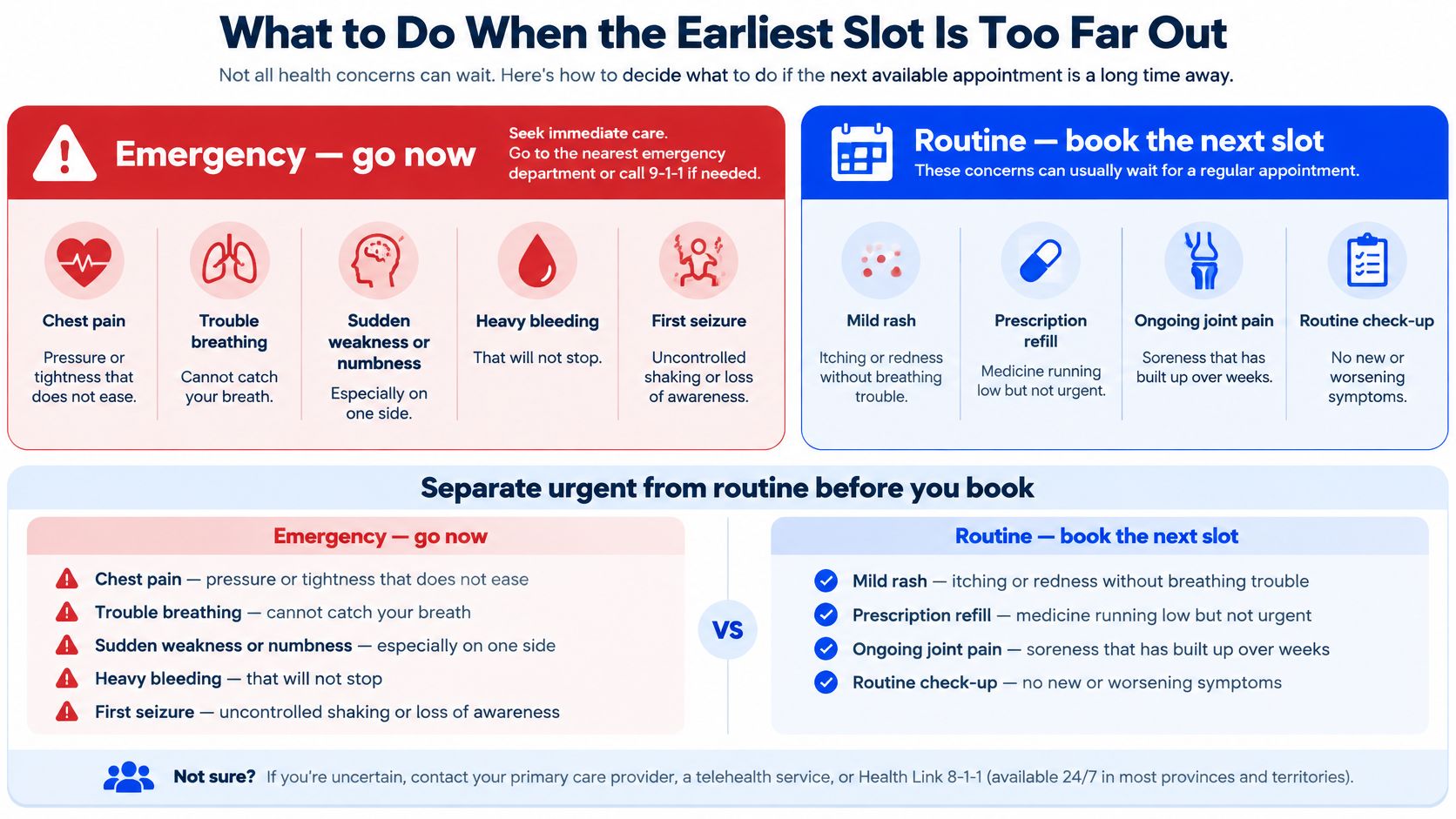
What to Do When the Earliest Slot Is Too Far Out
Emergency symptoms belong in emergency care, not a routine booking queue. Chest pain, trouble breathing, sudden weakness or numbness, heavy bleeding, or a first seizure warrant immediate emergency help. Don't wait for a portal reply or a receptionist's callback.
Use this visual as a reminder. It never replaces your own judgement when symptoms are severe, worsening or worrying.
California wait-time benchmarks and how often they are met
For Medi-Cal managed-care patients, the California Department of Health Care Services timely-access report sets out general benchmarks of 48 hours for urgent appointments without prior authorisation, 96 hours with prior authorisation, 10 business days for non-urgent primary care, and 15 business days for non-urgent specialty care.
How often are those standards met? Health Net's measurement-year 2025 Medi-Cal provider access survey results reported the standard met for 76% of urgent primary-care appointments without prior authorisation, 58% of urgent specialist appointments requiring authorisation, and 84% of non-urgent primary-care appointments. A specialty referral is the category most likely to outrun its window, which is exactly when the escalation steps below matter.
| Appointment type | Wait-time standard | First move if you cannot get a slot |
|---|---|---|
| Urgent primary care, no prior authorisation | 48 hours | Ask for an urgent opening with any appropriate clinician in the group |
| Urgent specialist care, prior authorisation required | 96 hours | Ask the clinic to flag the request for urgent clinical and authorisation review |
| Non-urgent primary care | 10 business days | Request the cancellation list and another location |
| Non-urgent specialty care | 15 business days | Ask about another in-network specialist |
Ask your plan which standard applies to your request, including any clinically appropriate exceptions. Appointments labelled urgent do not all follow the same authorisation pathway.
Escalate with a record of what happened
Keep the conversation factual. State the appointment type, when you requested it, and the earliest date offered. Those three details form the record you will rely on at every step.
- Widen the clinician search. Ask for the next suitable opening with any clinician in the same medical group.
- Request short-notice access. Join the cancellation list and state your callback availability.
- Ask for clinical routing. Find out whether a nurse, pharmacist or physiotherapist could appropriately begin care while you wait.
- Document the offer. Ask staff to record your request date and the appointment date offered, and keep your own notes too. Member services will ask for both dates.
- Contact member services. Ask your health plan to identify the applicable standard and help locate an appointment within its network.
- Request a grievance. If access remains unresolved, ask the plan how to file a timely-access grievance and obtain a reference number.
- Redirect a specialist referral. Ask the referring doctor whether another in-network specialist can assess you sooner.
Access principle: Better booking interfaces can reduce administrative delay. They can't create specialist supply, so network coordination and escalation still matter.
A request should stay visible even when it can't become a booking. For requests beyond the booking window, the AI receptionist names the last date it can accept and records the request as a to-do, not an appointment, so nothing is dropped.
The following video walks through the same access issues in more detail.
Confirm Every Detail and Save It in Writing
A successful booking ends with a visit you can attend, not just a date someone mentioned. The California Department of Health Care Access and Information primary-care snapshot reports that more than 12% of California adults had trouble finding and scheduling an available primary-care appointment in 2024. Getting the details right won't remove every access barrier, but it prevents avoidable confusion after you've secured a place.
Keep this checklist beside the phone
Before calling, make sure you have:
- Your reason for attending. Write a short symptom timeline or the purpose of the follow-up.
- Your identification. Keep your member card and photo ID within reach.
- Realistic availability. Include travel and any support you need to attend.
- A place for notes. Use paper or a note on your phone, with space for staff names and reference numbers.
- A place for confirmation. Know which email address, mobile number or portal account the clinic should use.
Don't send sensitive medical information to an unfamiliar address just because someone requests it. Use the clinic's established communication route and clarify what information it needs.
Use a line-by-line read-back
You can read the following prompts directly, adapting them to your visit. The aim is to resolve uncertainty while someone still has your appointment open.
- Clinician and role. Please confirm who I'm seeing and their clinical role.
- Date and time. Please confirm the day, date, time and time zone, and whether that's arrival time or consultation time.
- Location or connection. Which address, building and floor should I use, or how will I join the remote appointment?
- Arrival and access. How early should I arrive, where can I park, and is there an accessible entrance?
- Documents. Do you need my referral, medication list, previous imaging or test results before the appointment?
- Preparation. Are there any fasting, clothing or other instructions, and where can I find them in writing?
- Outstanding approvals. Who is following up on the referral or prior authorisation, and when should I contact you if it's unresolved?
- Cancellation terms. How much notice is required, is there a missed-appointment charge, and how do I reschedule?
- Final status. Is this confirmed now, or does someone still need to approve it?
Don't fast or stop medication solely because bloodwork might happen. Follow the clinical team's specific instructions.
We repeat the day, time, name and callback number before ending a booking call. We also place the appointment on Google Calendar during the call, with intake answers sent in the business's recap email beside the appointment.
Ask for your own written confirmation, rather than assuming the clinic's internal record reaches you. A text-message appointment confirmation, portal message or email should match the details you recorded.
Save the confirmation somewhere you can retrieve it, add a reminder, and keep the rescheduling number attached. Make the call now with your notes ready, then resolve any missing confirmation before the visit day.
Heyline offers phone answering and calendar-connected booking so appointment requests can become confirmed visits during the call, rather than another voicemail exchange. If you manage a practice and want clearer intake, availability checks and booking read-backs, visit Heyline to explore how it fits your reception process.