You're finishing an appointment when the phone rings. By the time you can answer, the caller has hung up. Later, another person calls after closing, hoping to book, and reaches voicemail instead.
A virtual receptionist in Canada can cover those gaps, but the right choice isn't automatically an AI voice or a remote human. It's the service that can handle your routine calls, recognise its limits and protect the information callers share.
Virtual Receptionist Options Compared at a Glance
Phone coverage options for Canadian businesses
| Option | Who answers | Hours covered | Books into calendar | Best fit |
|---|---|---|---|---|
| In-house front-desk staff | Your employee | Scheduled shifts | Yes, if staff have calendar access | Storefront or high call volume |
| Live virtual receptionist | Remote trained agent | Contracted hours, including around-the-clock plans | Often, through a shared schedule | Businesses wanting a human voice after hours |
| AI virtual receptionist | Automated voice assistant | Around the clock | Yes, during the call, within set booking hours | Appointment-based businesses with predictable questions |
| Voicemail and callbacks | No one live | Always available, but no live answer | No | Very low call volume |
Voicemail is the simplest option, but it leaves the next step with your team. Someone must listen, return the call and find a mutually convenient time. That can be workable when calls are infrequent and customers don't need an immediate answer.
In-house staff can do much more than answer phones. They welcome customers, notice problems in the waiting room and ask colleagues for clarification. However, their phone coverage ends when their scheduled shift ends, unless another employee takes over.
Say a dental patient calls after dinner to arrange a routine visit. Your daytime receptionist may be excellent, but that caller still reaches voicemail if nobody is covering the evening.
Human conversation or a completed task
A live virtual receptionist extends coverage without putting another employee at your front desk. The remote agent answers under your business name and follows your instructions. Before choosing this option, establish whether the agent can make a confirmed booking or send your team a request.
An AI virtual receptionist handles defined tasks through an automated conversation. It can answer routine questions and offer calendar availability, but it shouldn't improvise a refund policy, interpret symptoms or promise a service your business hasn't authorised.
Practical rule: Buy coverage for the calls you actually receive, not for the longest feature list.
These options can also work together. Your employee might answer during opening hours, with an automated service covering overflow and a human handling sensitive exceptions. The useful distinction is who owns the next action after the caller hangs up.
Our guide to call handling services offers another way to compare answering, message-taking and routing responsibilities. The deciding question is practical: Do your callers primarily need a human conversation, a confirmed appointment, or a reliable route to someone qualified?
How a Virtual Receptionist Handles One Call
Think of a website-configured receptionist as a front-desk employee who has read your website before starting a shift. That provides a starting point, not permission to guess when information is missing.
From ringing phone to a useful outcome
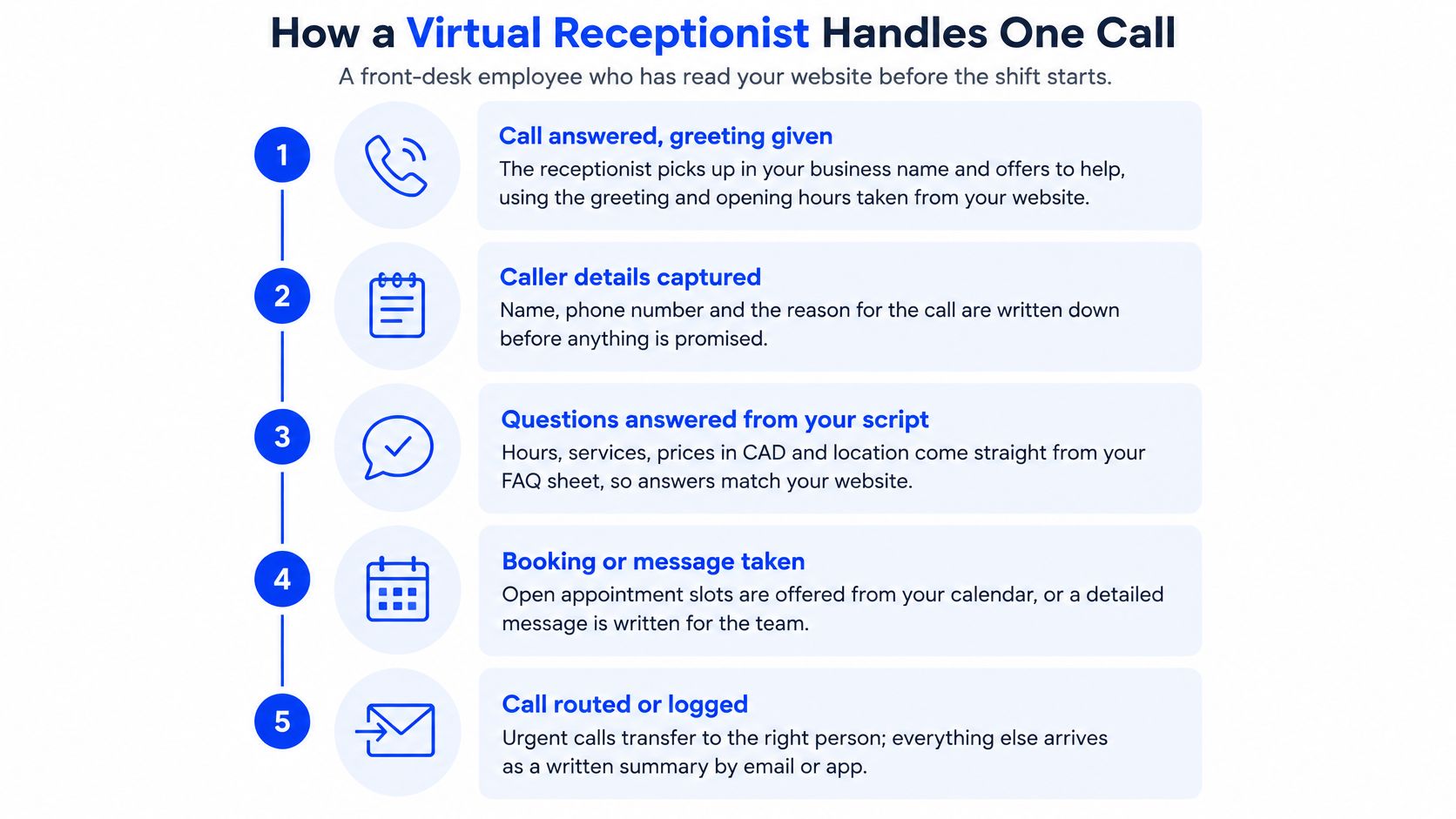
The caller reaches your business line. Calls can arrive through a dedicated number or through missed-call forwarding from your existing line. Customers don't need a special extension or a separate booking number.
The receptionist greets the caller and asks what they need. Our answering process picks up within two rings, speaks one to three sentences at a time and avoids a phone menu. Short exchanges give callers room to explain rather than listen to a lengthy script.
It answers questions your website covers. Services, opening hours and service area should match what customers read online. If your site leaves out a policy, add an approved answer rather than letting the receptionist infer one.
It checks availability before booking. For a first visit, our process puts the appointment into your Google Calendar within the hours you set. Calendar availability checks help prevent callers from being offered an occupied slot.
It records a request for human attention. When someone needs a person, our process captures their name, number and message, emails the owner a recap and opens a to-do. That's a message handoff, so your team still needs a clear response responsibility.
The workflow below illustrates how a conversation becomes a booking or a documented request. Treat live transfers as a separate capability to verify, not something every receptionist provides.
Check the information before opening the line
Calendar-connected answering fits an established pattern of Canadian business technology use: Statistics Canada reported that 48% of Canadian businesses used cloud computing in 2023. That supports the infrastructure case, not a claim that every business needs automated reception.
Our setup sequence is straightforward: paste your website, check what was learned, connect Google Calendar, then go live by publishing the dedicated number or forwarding missed calls. Review service names, appointment lengths and opening hours before accepting real bookings.
Use an initial week as an operational check. Review booking accuracy, requests needing staff attention and wrong answers, then correct the underlying information before expanding coverage.
Canadian Businesses Where Virtual Receptionists Fit Best
The strongest fit is a business with repeatable questions and a clear next action. For a salon, that might mean turning a service enquiry into an appointment while the stylist is with a client.
The reception area makes the competing demands easy to recognise.

Match the sector to the task
Salons, spas and barbershops receive questions about treatments, walk-ins and booking changes during appointments. A receptionist helps when it can distinguish a straightforward booking from a change that requires staff approval.
Dental, medical and aesthetics practices need routine new-patient intake separated from clinical questions. Reception can collect administrative details, but urgent symptoms need an approved escalation route rather than another available appointment.
Law firms and professional services benefit from structured contact capture without premature advice. Virtual Legal Assistants' resource on law firm receptionists provides context for legal reception roles, while our law firm receptionist guide focuses on appointment-based intake.
This video provides another way to consider the caller experience.
Give callers accurate boundaries
Home services contractors need enquiries captured while technicians are working on site. For cleaning businesses, our process draws answers from the website's listed cleans, hours and service area; emergency plumbing or HVAC requests need a separate urgent-response policy.
Restaurants and hospitality teams can delegate approved answers about hours, menus and reservations. Special events, allergy-sensitive questions and unusual requests should reach someone authorised to respond.
Statistics Canada reported that 78% of Canadian businesses used company websites in 2021. That's a useful foundation, but a website-configured receptionist can only work reliably from accurate, sufficiently detailed information.
Readiness test: write down your most common caller questions and check whether your website answers them plainly. Missing cancellation rules, service exclusions or accessibility information are content problems to fix before launch.
Calls to Automate and Calls That Need a Human
AI adoption doesn't establish that every call belongs with an automated assistant. Statistics Canada reported that 19.2% of Canadian businesses used AI to produce goods or deliver services in the second quarter of 2026, while 40.0% said AI wasn't relevant to them.
The useful test isn't whether a voice sounds natural. It's whether the receptionist can complete the requested task without exercising judgement it hasn't been authorised or qualified to use.
Call types by handling level
| Call type | Automate | Handling |
|---|---|---|
| Opening hours and location | Yes | Answer from the website |
| Prices and service descriptions | Yes | Give published prices and explain where a quote is required |
| Availability and new bookings | Yes | Book into the calendar within set hours |
| Reschedule or cancel a routine visit | Partly | Check supported calendar functions; take a message when policy needs a person |
| Routine intake questions | Yes | Collect approved details and email the owner a recap |
| Complaints or disputes | No | Take a message and escalate to the owner |
| Urgent medical symptoms or emergencies | No | Give approved emergency guidance or connect to a qualified human at once |
| Distressed or angry caller | No | Offer a human handoff; use message-taking only when appropriate |
| Complex legal matter | No | Take contact details only, give no advice |
| Accessibility needs | Case by case | Offer a human or another suitable channel |
Make escalation real
A routine question has a bounded answer. A caller asking whether you clean ovens can receive an approved service description; a caller reporting a gas smell needs emergency guidance, not a cleaning appointment.
An email recap is not an emergency response system. If your business receives urgent calls, establish an appropriate emergency message and a staffed route before using automated reception.
Our receptionist never dials out and never contacts the client after a call. Callbacks, reminders, confirmations and follow-up calls remain your business's responsibility.
Measure outcomes during the pilot
Use a pilot scorecard rather than judging only the voice:
- Answered-call rate: Compare incoming calls with calls successfully answered.
- Completed bookings: Check that appointments are valid, not merely entered.
- Transfer or handoff rate: Separate successful human connections from messages awaiting attention.
- Correction rate: Record bookings or answers staff had to fix.
- Customer complaints: Note requests for a person, confusing exchanges and abandoned tasks.
Review these measures throughout an initial month. If staff spend more time repairing conversations than handling the original enquiries would have taken, narrow the automated workload.
Privacy and Recording Setups for Canadian Calls
AI answering and call recording are separate decisions. Unnecessary retention, undisclosed reuse and voiceprint creation deserve close attention even when the booking conversation itself is straightforward.
For organisations subject to PIPEDA, the Office of the Privacy Commissioner of Canada says recording must serve purposes a reasonable person would consider appropriate, with callers informed at the beginning about recording and its purpose and asked for meaningful consent. A greeting alone doesn't resolve every privacy obligation.
Recording setups and what each requires
| Setup | When it fits | Disclosure needed | Retention |
|---|---|---|---|
| No recording, live processing only | Appointment details are all you need | Explain AI involvement and relevant processing | No stored audio; separately govern booking details |
| Transcript of booking details | Booking review for a stated purpose | Notice, purpose and meaningful consent where required | Short, fixed period, then delete |
| Full call recording | A justified dispute-resolution or training purpose | Notice, specific purpose, meaningful consent and an alternative when recording isn't integral | Defined period, then delete |
| Voiceprint or voice analysis | Rarely necessary for bookings | Express consent may be required for biometric identification | Avoid unless essential |
| Secondary use of transcripts | Marketing or unrelated analytics | Don't assume original booking consent covers reuse | Don't retain for an unauthorised purpose |
Write a greeting that matches the settings
Our opening line identifies the receptionist as AI and says the call may be recorded. Before enabling recording, make the actual recording state, narrow purpose and consent choice clear.
An illustrative script is:
You've reached the clinic's AI receptionist. With your consent, we'll record this call to review appointment-booking accuracy. Would you like to continue with recording, or use our non-recorded booking option?
Only offer that alternative if it exists. If recording is active, don't rely on ambiguous wording that merely says it might occur.
AI Forward's Canadian AI call-recording guidance distinguishes stored recordings and transcripts from live processing, and notes that voiceprints can be sensitive biometric information requiring express consent. Assess applicable provincial rules in Quebec, Alberta and British Columbia, rather than assuming PIPEDA alone governs every deployment.
Require operational controls
Use this vendor checklist before sharing customer information:
- Retention controls: Set deletion periods for audio, transcripts and extracted details.
- Encryption: Confirm protection in transit and at rest.
- Role-based access: Restrict records to staff who need them.
- Deletion workflows: Establish how requests reach all relevant systems.
- Processor inventory: Identify vendors, storage locations and subprocessors.
For a practical companion on documenting recording decisions, consult the VoxNote guide to recording client calls, without treating it as a substitute for applicable Canadian requirements.
Start by asking whether stored audio is necessary. If a limited booking record meets the purpose, prefer that over a full recording, with justified retention and appropriate consent. Don't create voiceprints unless essential and properly authorised.
What a Virtual Receptionist Costs in Canada
Compare billing models before comparing quoted totals. You may encounter a flat monthly subscription, usage billed per minute or call, per-seat charges for human coverage, or a separate setup fee.
Each model puts a different responsibility on the buyer. With usage billing, you need a realistic call pattern; with a subscription, you need to understand allowances and what happens when you exceed them.
Put quotes on the same basis
Ask vendors to price the same workload and coverage window. Include:
- Call handling: Expected volume, typical conversation length and overflow coverage.
- Scheduling: Calendar connections and supported booking actions.
- Storage: Recording, transcription, retention and retrieval charges.
- Language coverage: French-language answering, availability and any additional fee.
- Contract terms: Setup costs, post-trial pricing, overages and cancellation terms.
French-language support deserves a live test, particularly if your business serves callers in Quebec. Don't treat a language listed on a feature page as proof that the service can handle your terminology.
Our virtual receptionist pricing guide explains how to assess the components rather than relying on a headline rate.
Compare the complete monthly cost with the contribution from a genuinely additional appointment, not simply its advertised selling price.
Include staff time spent checking messages and repairing errors in that comparison. Ask for the post-trial price and allowance-exceeding charges in writing, then choose based on your own call pattern rather than the cheapest displayed rate.
Choose the Right Virtual Receptionist for Your Business
Match the coverage you need to the calls you get, and match the privacy setup to each processing purpose. A service is suitable only if your team can manage the exceptions it leaves behind.
Use a practical buying checklist
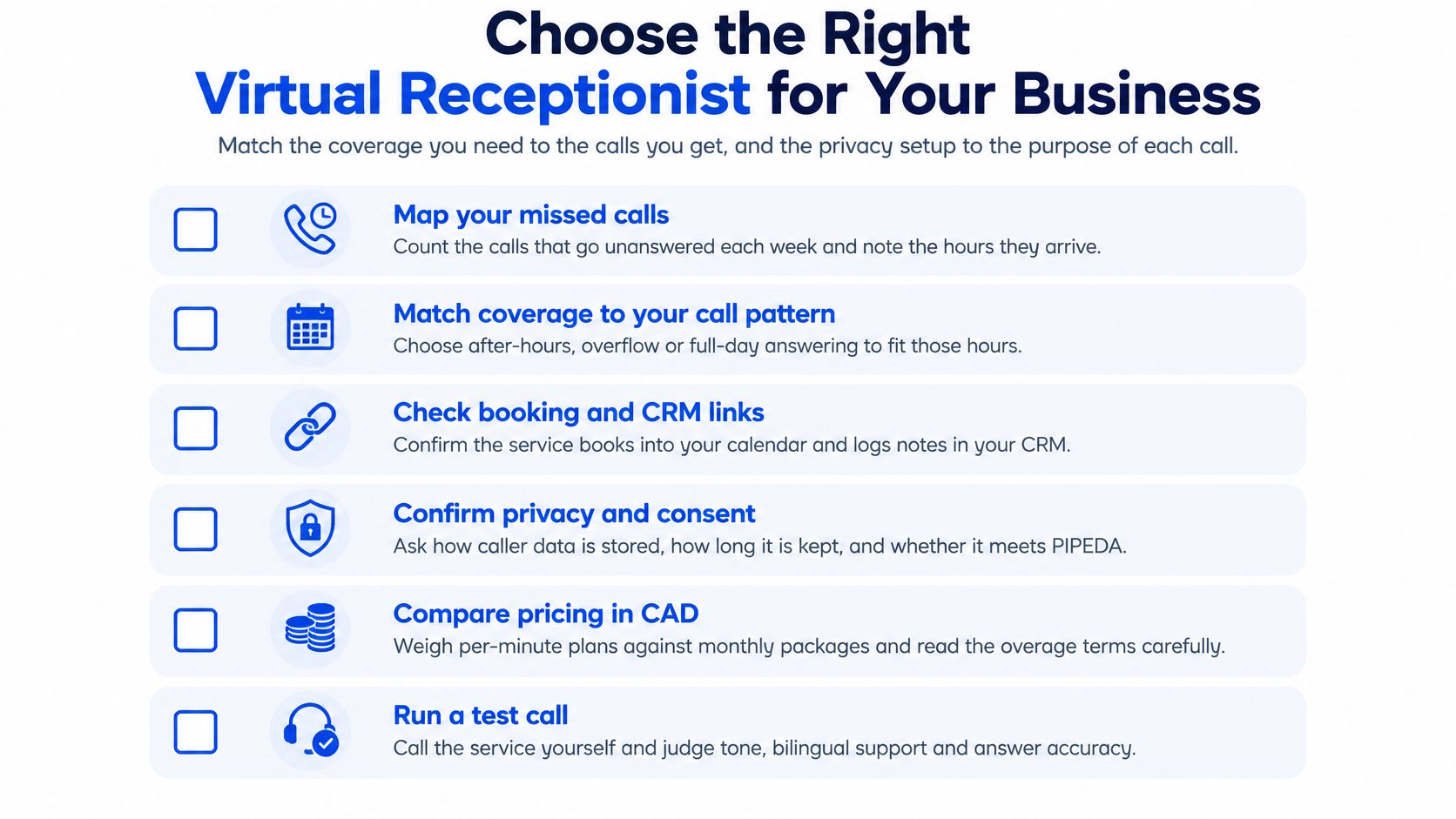
Map unanswered calls by day and time. Use your phone records to distinguish after-hours gaps from calls missed during busy appointments. That tells you whether you need overflow, evening coverage or a broader replacement.
Identify calls needing human judgement. Mark sensitive intake, disputes and urgent requests separately. If these dominate, a trained human may be the better starting point.
Inspect the knowledge source. In our setup, you can edit what was learned from your website. Check exceptions and exclusions, not just the main service descriptions.
Validate calendar behaviour. Test an occupied slot, an out-of-hours request and a request the system shouldn't accept. Check that the final calendar entry gives staff enough information.
Document data handling. Get written answers about storage, retention, access, deletion and processing vendors. Don't accept a general privacy assurance in place of operational details.
Test realistic conversations. Use ordinary questions, interruptions, uncertain callers and requests outside policy. Judge whether the receptionist recognises its limits.
Confirm the complete monthly cost. Include your expected usage, coverage hours, recording features and French-language requirements. Record any extra charges alongside the quote.
The visual checklist can help organise a discussion with your office manager.
Test before committing
If you also need someone to resolve enquiries, manage inboxes or coordinate follow-ups, compare broader staffing options. LatHire's resource for businesses looking to hire latin american virtual assistants is relevant to that separate staffing decision.
You can test our receptionist free in the browser before signing anything: paste your website and talk to it, without writing a phone tree or configuration rules. Use your real questions, assess an initial week of results against the pilot scorecard, and continue monitoring before expanding its responsibilities.
Heyline offers website-configured AI reception for Canadian service businesses, with incoming-call answering and Google Calendar booking. Visit Heyline to try your own caller questions in the browser for free, then decide whether the answers and booking process fit your business.