California dental practices already know the truth most software demos skip. A provider network survey found that 96% of responding dental offices said the average wait for a non-urgent appointment was under one week, with a maximum of three weeks, and 97% said they could accept an urgent same-day appointment, which means the schedule has to move fast once the phone rings California Department of Health Care Services provider network capacity survey. If your front desk can't turn that demand into a booked chair, you're not dealing with a calendar problem. You're dealing with a revenue leak.
| Software category | What it really does | Where it fits | Main risk |
|---|---|---|---|
| Lightweight cloud scheduler | Simple booking, basic sync, little rule depth | Small offices that need something quick | Looks easy, but breaks down with operatories and provider rules |
| Practice management suite with scheduling | Scheduling inside the PMS, chair and provider logic | Offices already committed to Dentrix, Eaglesoft, Open Dental, or curve Dental | Strong internally, weaker for patient-facing booking |
| Standalone patient communication platform | Adds reminders, messaging, and booking over the top | Practices that want better patient contact without replacing the PMS | Good on the phone, thin on true scheduling control |
| AI-voice front-desk layer | Answers calls and books into another system | Phone-heavy offices that lose inquiries after hours | Only as good as the calendar and rules behind it |
Why Dental Office Scheduling Software Is Now a Front-Desk Survival Tool
A dental front desk used to manage appointments. Now it has to defend them.
The practical problem is missed calls. An industry source focused on California DSOs says 11% of patient inquiries happen outside normal business hours, and practices lose 25% to 35% of potential new patients because calls aren't answered California DSO missed-call benchmark. That's not an inconvenience. That's a breakdown in intake. If a hygiene reappointment or a crown workup slips away because nobody picked up, the software didn't “save time”, it failed to capture demand.
Practical rule: if your office answers the phone poorly, start by fixing the call path before you shop for prettier booking pages.
The problem gets worse after 5 p.m. A California Dental Association survey noted that 41% of new-patient attempts happen after 5 p.m. or on Saturdays. That means the normal workday is no longer the whole scheduling window. If your scheduler only works when someone is at a desk, your practice is closed to a big slice of real demand.
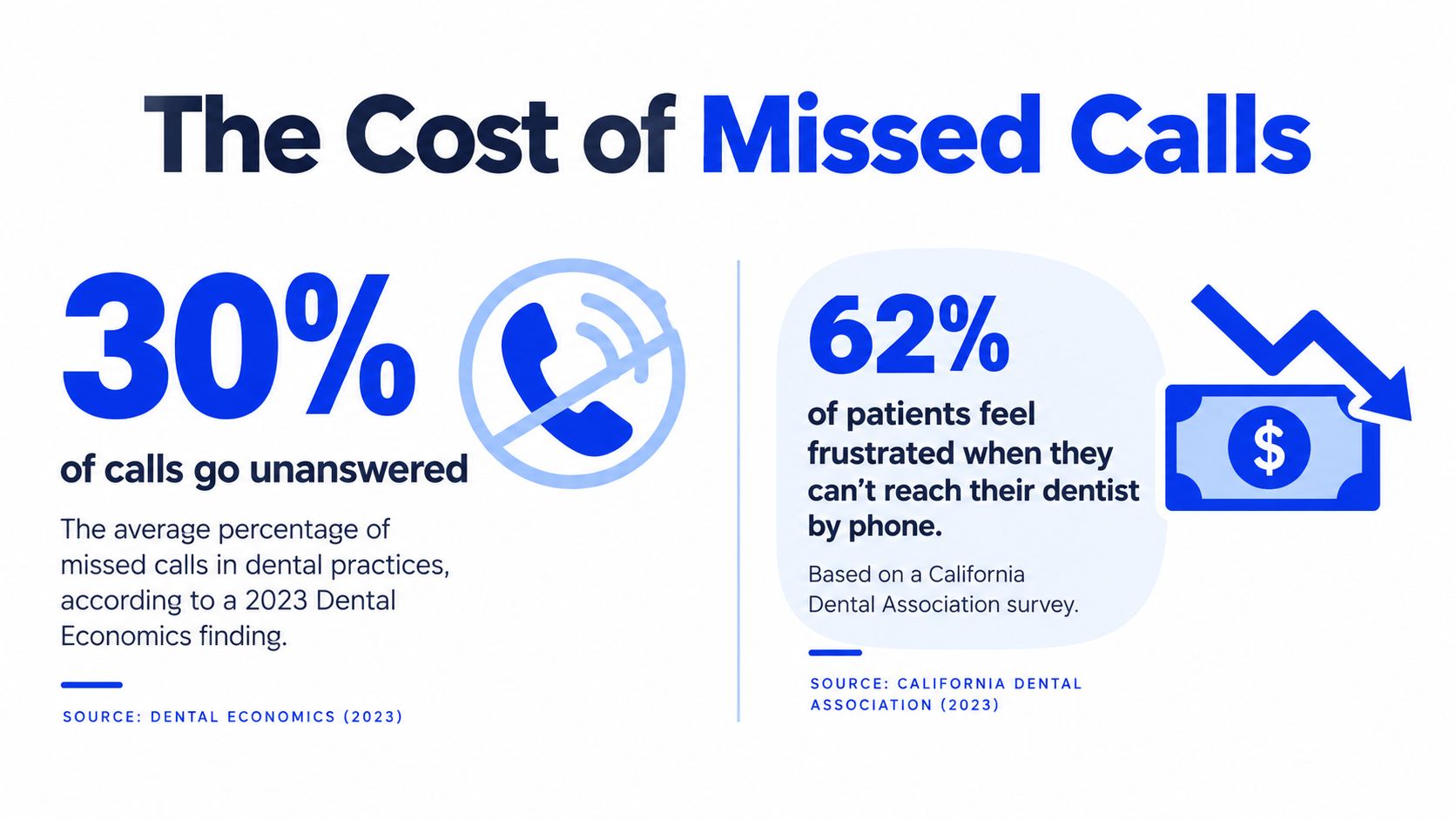
The right conclusion is blunt. Dental office scheduling software is no longer an admin convenience. It is the system that decides whether the front desk earns or loses money every hour the phone rings. That's why the category matters, and why phone capture, after-hours handling, and calendar-aware booking should come before any talk of nice-looking booking widgets.
The Four Categories of Scheduling Software for Dental Practices
Buyers get lost because vendors blur four different product types into one sales pitch. Don't let them.
Lightweight cloud schedulers
These are the simplest tools in the market. They usually handle basic calendar booking, reminders, and maybe a website widget, but they don't go deep on provider logic or operatories. They fit small practices that want a clean interface and don't need much operational complexity. The downside is obvious, once your chairs, hygienists, and providers start overlapping, the tool starts showing its limits.
Practice management suites with scheduling modules
Systems like Dentrix, Eaglesoft, Open Dental, and curve Dental sit here. Scheduling is built into the PMS, so the calendar knows the practice's internal rules better than a bolt-on tool ever will. That makes these suites the natural fit for multi-chair offices that care about chair control, recall management, and room assignment. The trade-off is that patient-facing booking is often less flexible, and these systems don't always feel modern on the front end.
Standalone patient communication platforms
Platforms such as Solutionreach, Weave, and RevenueWell usually sit on top of the existing PMS. They're designed to improve texting, reminders, outreach, and booking touchpoints. They're useful when the office wants better patient communication without replacing core practice software. They're weaker when the underlying issue is a complicated schedule that needs hard rules, not just more messages.
AI-voice front-desk layers
This category includes tools such as Agent, Aimee, Omev, and PolyAI. These systems answer calls, talk to patients, and hand bookings into the calendar behind them. They matter most in phone-heavy offices because they attack the actual intake bottleneck, not just the website side of scheduling. They are not a full replacement for the PMS or communications stack, they're a layer that only works well if the underlying schedule is clean.
If your team still lives on the phone, start there. A website booking button won't fix a front desk that misses calls.
| Category | Example Vendors | Typical Price Range | Best Fit |
|---|---|---|---|
| Lightweight cloud schedulers | General cloud booking tools | Lower-cost, usually simple subscription pricing | Solo or small offices with simple appointment logic |
| Practice management suites with scheduling modules | Dentrix, Eaglesoft, Open Dental, curve Dental | Bundled with the practice system | Offices needing internal control over chairs and providers |
| Standalone patient communication platforms | Solutionreach, Weave, RevenueWell | Mid-market subscription models | Practices that want reminders and patient messaging layered on top |
| AI-voice front-desk layers | Agent, Aimee, Omev, PolyAI | Usage-based or service-led pricing | Offices that lose calls and need after-hours capture |
How Calendar Integration and Workflow Rules Actually Differ
Most vendors say they “integrate with calendars.” That phrase hides a lot of bad behaviour.
What actually matters
A scheduler has to do more than display availability. It has to prevent a hygienist from being booked in a chair already assigned to a provider, respect buffers between procedures, and understand which appointment types are allowed in which rooms. California dental scheduling software should support provider-, operatory-, and location-level rules because multi-chair practices share rooms, overlap hours, and create conflict points that a simple calendar sync won't catch workflow rules in dental scheduling software.
That's the core divide between categories. Lightweight cloud tools often sync in one direction and can overwrite conflicts. Practice management suites usually enforce the operatory logic natively, but they don't always export gracefully to outside calendars. Patient communication platforms tend to sit on top and inherit whatever the PMS already knows, which means their scheduling strength depends on the system underneath them. AI-voice layers are even more dependent, because they can only book valid slots if the downstream calendar has valid rules.
How to score a shortlist
Use a simple lens and ignore the marketing language:
- Two-way calendar sync: Can the tool read and write without creating duplicate entries?
- Double-book prevention: Does it stop bad bookings before they land?
- Operatory rules: Can it respect room, chair, and service constraints?
- Provider chair preferences: Can it keep favourite providers tied to the right rooms?
- Recall intervals: Can it support hygiene rebooking rules without manual work?
- Handoff to AI voice: Can phone bookings land cleanly in the same calendar logic?
My advice: if a vendor can't explain what happens when two people try to book the same chair, it's not a scheduling system. It's a calendar app with a dental label.
| Category | Two-way Calendar Sync | Double-Book Prevention | Operatory Rules | Provider Chair Prefs | Recall Intervals | Handoff to AI Voice |
|---|---|---|---|---|---|---|
| Lightweight cloud scheduler | 2 | 2 | 1 | 1 | 2 | 1 |
| Practice management suite | 3 | 5 | 5 | 4 | 5 | 3 |
| Patient communication platform | 3 | 2 | 2 | 2 | 3 | 3 |
| AI-voice front-desk layer | 4 | 3 | 2 | 2 | 2 | 5 |
Matching Software to Real Office Scenarios
The wrong software choice usually shows up as staff frustration, not a crash screen. Office managers feel it first.
Scenario A, a two-hygienist single-location office
This practice lives on the phone and loses opportunities after hours. It needs a phone-native setup with a built-in AI receptionist and only light online booking. A lightweight cloud scheduler plus an AI voice layer makes sense here, because the immediate goal is to capture calls, not to run an elaborate scheduling engine. If you choose a stripped-down booking tool with no call coverage, the front desk will keep doing voicemail cleanup instead of real scheduling.
Scenario B, a four-provider multi-operatory practice
This office already runs Dentrix or Eagles. Its problem is usually internal complexity, not lead generation. An integrated PMS extension wins because it can respect operatory assignment, provider preferences, and recall workflows inside one logic layer. If you choose a standalone patient messaging tool here, you'll probably create a prettier front end but leave the scheduling rules unchanged.
Scenario C, a DSO-style group with multiple locations
This group needs role-based permissions, audit trails, and cross-location reporting. That pushes it toward an open-API platform or an enterprise-grade PMS stack with a separate intake layer. The failure mode with a consumer-style tool is predictable, one location gets what it needs while another location breaks the shared workflow. That's a governance problem, not just an IT problem.
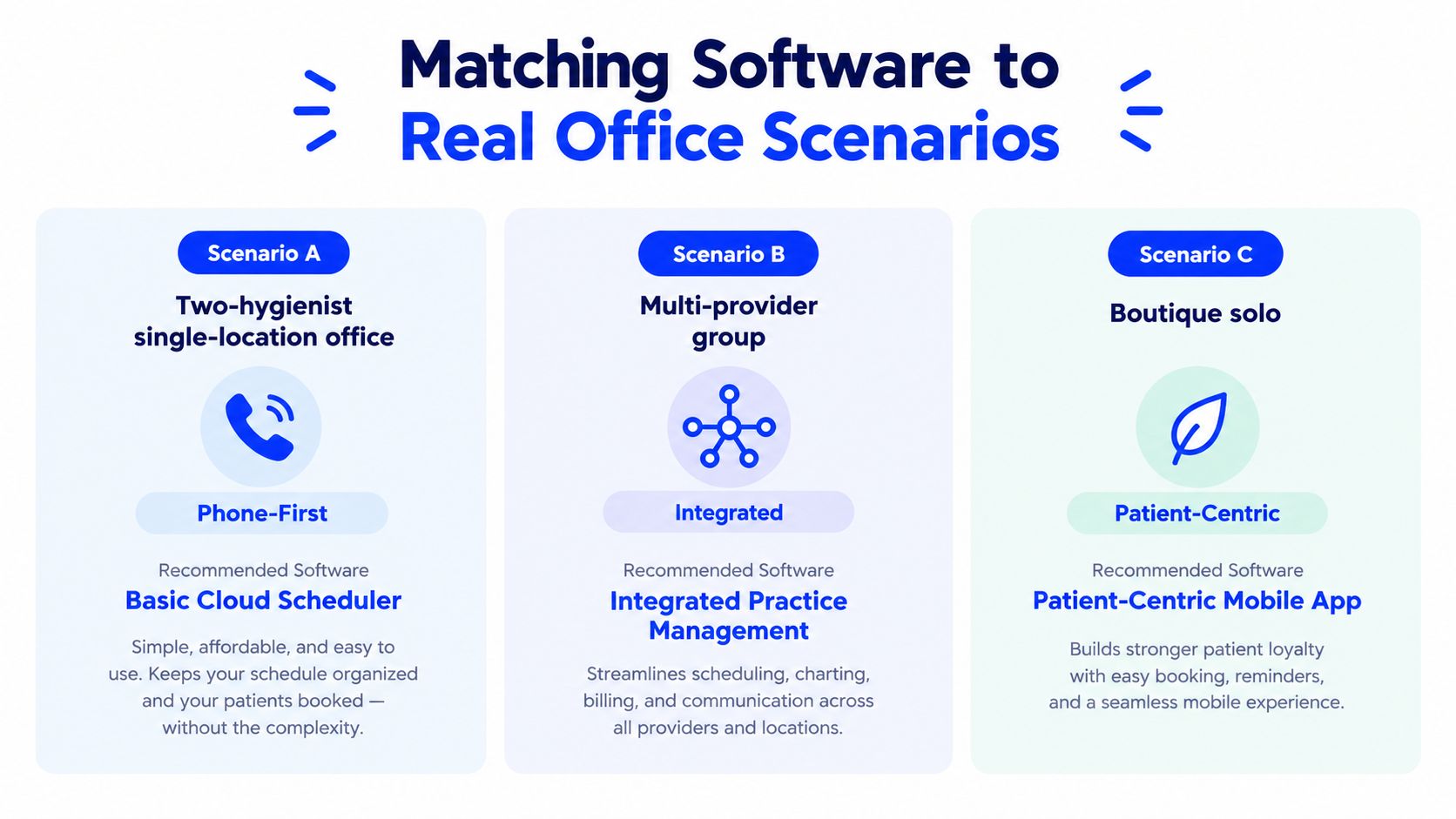
| Scenario | Best Software Family | Must-Have Feature | Failure Pattern if You Pick Wrong |
|---|---|---|---|
| Two-hygienist single-location office | AI-enabled phone-first scheduler | After-hours call capture | Voicemail backlog and missed new patients |
| Multi-provider multi-operatory office | Integrated practice management suite | Operatory-aware booking rules | Double-booking and chair waste |
| DSO-style group | Enterprise stack with API control | Role-based permissions | Reporting gaps across locations |
Pricing Models and the True Cost of a Dental Scheduler
Sticker price is the least useful number on the proposal. That's where vendors are most honest and least helpful at the same time.
Four pricing models you'll actually see
You'll usually see one of four structures. Some tools charge per provider per month, which can look cheap until the team grows. Some charge per location, which is easier to forecast but can hide add-ons. PMS-bundled scheduling seems simple because it's already inside the stack, but that's only true if you're not paying indirectly through a bigger software contract. AI-voice tools are often usage-based, which means the bill rises when call volume or after-hours use rises.
The line items that inflate the bill are the ones sales reps gloss over. SMS confirmation overage, after-hours AI-minute charges, per-chair add-ons, migration work, onboarding support, and higher support tiers all change the true annual spend. If the contract also auto-renews on a long term, the exit cost becomes part of the price whether the vendor mentions it early or not.
Here's the clean way to compare two offers for a small office. A mid-tier office-facing scheduler can look affordable on paper, but once messaging, support, and migration are included, the total climbs. A usage-based AI-forward system might look pricier in month one, but if it reduces missed calls and closes the phone gap, the cost logic is different. The point is not to buy the lowest monthly number, it's to buy the cheapest system that still captures demand.
Ask for the bill after a busy month, not the bill in the first demo. That's where the real pricing model shows up.
Pricing benchmarks for virtual receptionist services are useful when you're comparing AI voice layers against a plain scheduler, because the bill often lives in usage, not subscription.
| Pricing Model | Monthly Sticker | SMS & After-Hours Add-Ons | Migration & Support | True Annual Total |
|---|---|---|---|---|
| Per-provider monthly | Lower to mid-range | Can rise quickly with reminders and texting | Often separate | Depends on headcount and message volume |
| Per-location flat | Predictable upfront | Usually add-on based | Often one-time setup fee | Easier to forecast, but watch extras |
| Bundled inside PMS | Hidden inside broader contract | Sometimes bundled, sometimes not | Support may be tiered | Looks simple until renewal time |
| Usage-based AI-voice tier | Subscription plus call usage | After-hours and minute charges matter | Setup and training can be material | Best when call capture offsets the variable cost |
California Compliance, AI Voice, and the Phone-First Patient
California practices shouldn't treat AI scheduling as a pure productivity upgrade. The state is already paying attention.
The California Department of Justice issued a 2026 legal advisory noting that hospitals and insurers use non-FDA-approved AI for tasks including appointment scheduling California DOJ legal advisory on AI in healthcare. California also enacted AB 2905 in 2025, which requires disclosure when an automated call uses an AI-generated voice. That matters directly to any phone-based scheduling workflow that sounds like a receptionist. If your system answers the phone and books appointments, it has to be transparent about what it is.
What this means in practice
Phone-first patients still dominate scheduling behaviour in many offices, so the compliance issue isn't theoretical. The point isn't to avoid automation, it's to make sure automation is auditable and disclosed properly. A tool that can't identify itself clearly creates a legal and trust problem at the same time.
The other issue is operational. California dental offices need valid booking rules that line up with who can supervise what, and the scheduler has to respect that structure rather than force a one-size-fits-all template. Systems with a mature AI-voice layer are easier to configure cleanly because the voice agent can handle the call, then hand off to a calendar engine that already knows the office's rules. Tools that only bolt on AI late in the process usually need more custom work.
Medical-office scheduling guidance is relevant here because the same phone-first workflow problem shows up in dental offices that need live call handling, not just online booking. The article on appointment scheduling for medical offices is also useful if you're comparing how different appointment-driven practices handle phone intake and calendar handoff.
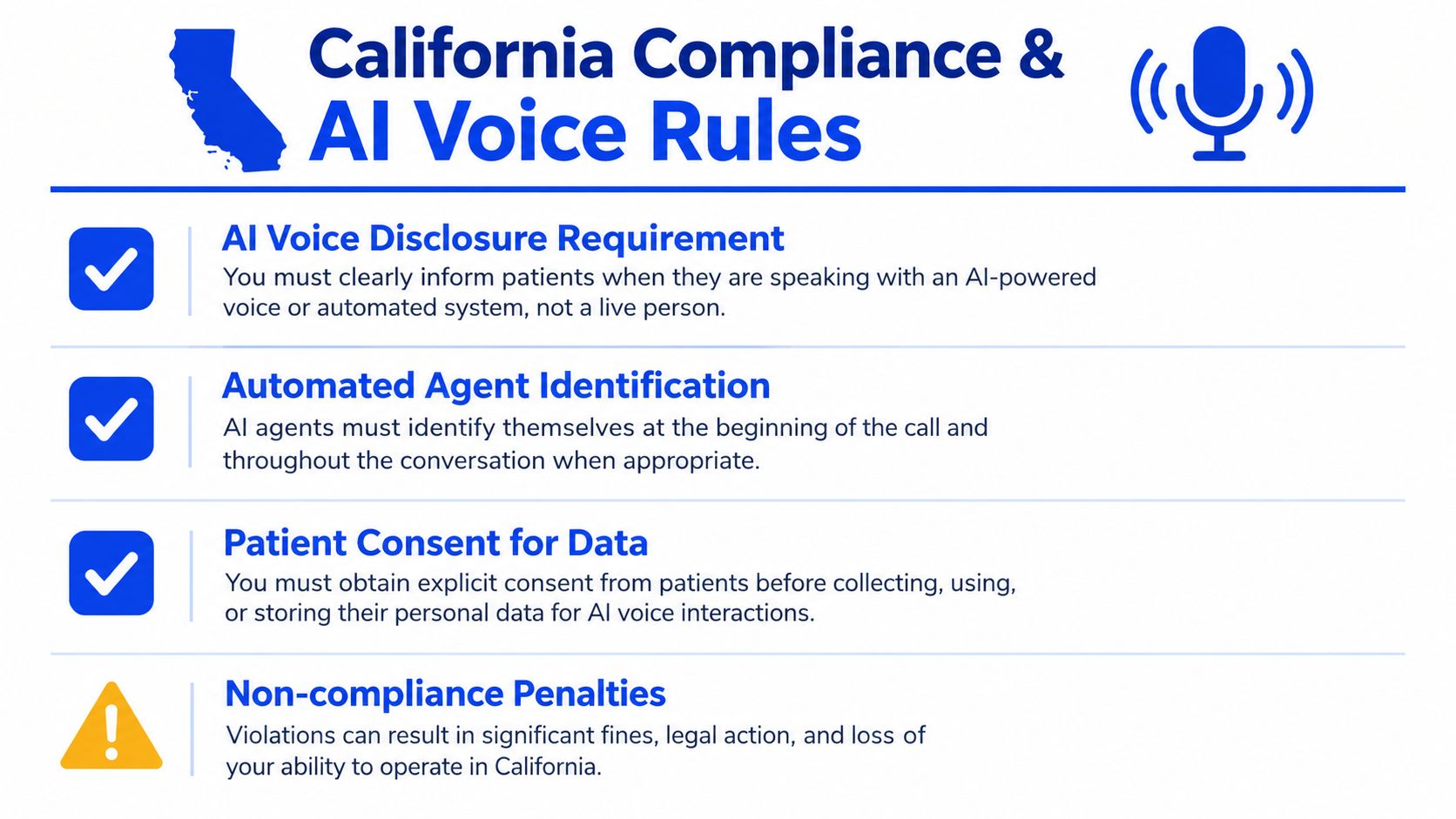
| Compliance issue | Why it matters |
|---|---|
| AI voice disclosure | Patients need to know when they're speaking with automation |
| Automated agent identification | The call should not pretend to be a human receptionist |
| Patient consent for data | Booking and call handling must respect privacy and disclosure rules |
| Non-compliance penalties | A sloppy phone workflow creates legal and reputational risk |
Which Scheduler to Choose by Practice Type
The fastest way to choose is to match the software to the way your office already works.
Solo general practice with one front-desk coordinator
Choose a lightweight cloud scheduler with strong phone handoff and a built-in AI receptionist. The representative fit here is a simple cloud booking tool paired with an AI voice layer such as Heyline, which answers calls and books directly into the calendar. The feature that matters is not a flashy dashboard, it's reliable call capture when the desk is busy or closed.
Multi-location DSO
Use an enterprise PMS plus a dedicated AI receptionist overlay. The representative pattern here is a core system like Dentrix Enterprise, Open Dental, or a similar stack, paired with an AI voice front end. The key feature is governance, because multiple locations need permissions, reporting, and a booking path that doesn't create local chaos.
Specialty practice, such as endo, perio, or ortho
Pick an operatory-rule-rich platform with referral and treatment-stage templates. The best fit is a PMS-style scheduler that can handle procedure staging and room constraints cleanly. The feature that justifies it is structure, because specialist scheduling breaks the moment every appointment is treated like a generic recall slot.
Fee-for-service or cosmetic practice
Choose a scheduler with strong two-way SMS, recall automation, and deposit collection. These offices usually care more about conversion and confirmation than high-volume chair routing. The feature that matters is friction control, because a deposit-backed appointment path filters out weak intent before it wastes chair time.
If phone calls drive 40% or more of your bookings, prioritise AI-voice-native schedulers. If they don't, prioritise deeper online booking and recall workflow.
| Practice Type | Recommended Scheduler Archetype | Representative Product | Key Feature That Justifies the Choice |
|---|---|---|---|
| Solo general practice | Lightweight cloud scheduler plus AI receptionist | Heyline | Phone capture and calendar booking |
| Multi-location DSO | Enterprise PMS with AI overlay | Dentrix Enterprise or similar | Role-based control and reporting |
| Specialty practice | Operatory-rule-rich PMS | Open Dental or similar | Treatment-stage and room logic |
| Fee-for-service or cosmetic practice | Communication-first scheduler | Weave, RevenueWell, or similar | SMS, recall, and deposit handling |
A Seven-Day Plan to Evaluate and Switch Scheduling Software
Don't buy a scheduler on Friday and hope the staff figures it out on Monday. A bad cutover is how offices create patient complaints.
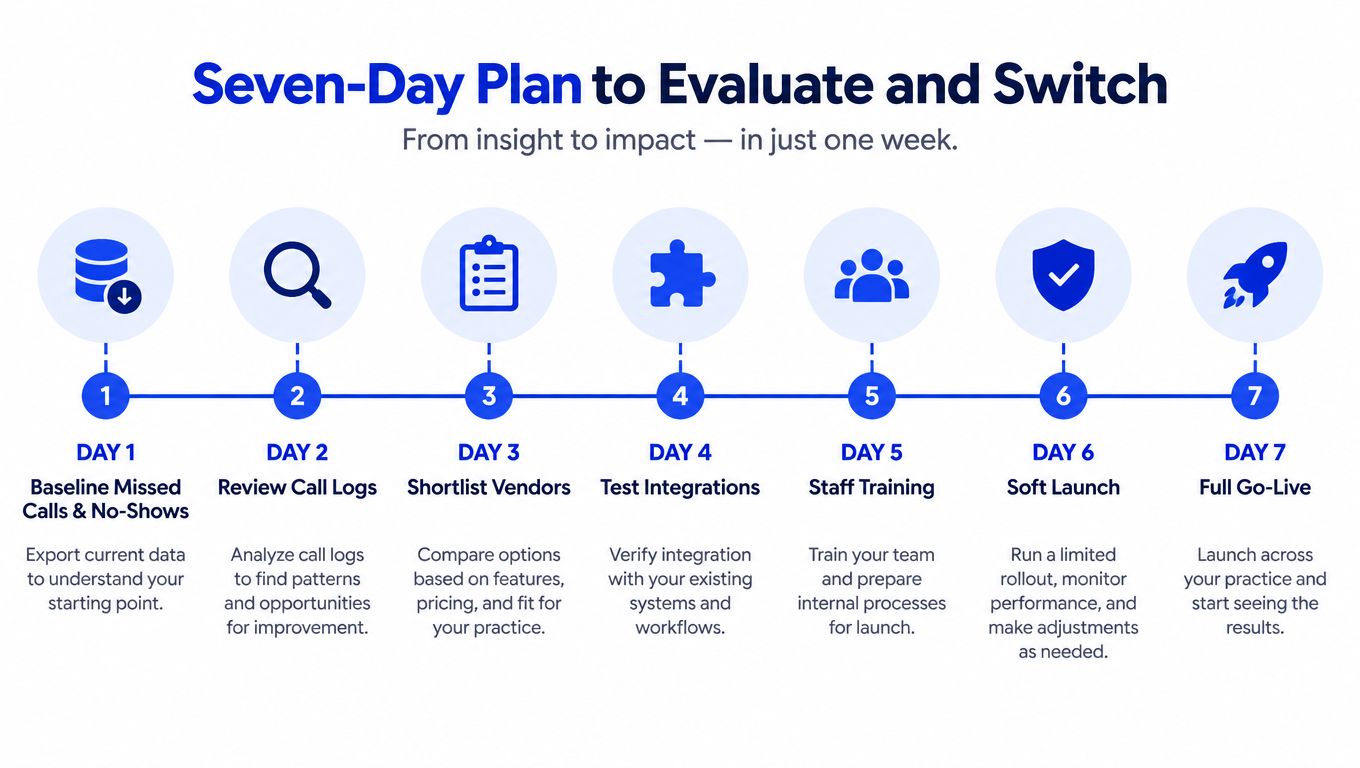
Day 1 to Day 3
Start by pulling 30 days of appointment data and front-desk call logs. You need a baseline for missed calls, no-shows, and where bookings come from. On day 2, shortlist three schedulers against the criteria that matter in your office, including AI-voice and California disclosure fit. On day 3, book demos and bring a fixed script with questions about operatory rules, provider-capacity limits, and recall triggers.
Day 4 to Day 7
Run the demos back-to-back and score them on one shared rubric. On day 5, request a sandbox with your real template schedule and test five hard scenarios, double-book conflict, hygienist swap, after-hours booking, recall reactivation, and AI-receptionist handoff to a live human. On day 6, negotiate the contract terms, especially export format and what happens to your data if you leave. On day 7, build the cutover plan, including a 72-hour parallel-run window and a patient communication script before go-live.
Do not let the vendor control the migration timeline. Your schedule should decide the cutover, not their implementation calendar.
| Day | Action | What Success Looks Like |
|---|---|---|
| Day 1 | Baseline current performance | You know where the calls and losses are coming from |
| Day 2 | Shortlist vendors | You can explain why each one is still in play |
| Day 3 | Prepare demo questions | Every vendor answers the same operational questions |
| Day 4 | Score demos | The comparison is evidence-based, not emotional |
| Day 5 | Sandbox testing | The system survives real-world edge cases |
| Day 6 | Contract review | Data access and exit terms are acceptable |
| Day 7 | Cutover planning | Staff knows what happens and when |
If your practice is losing calls, the scheduler isn't a background tool, it's the front door. Heyline gives local appointment-based businesses a phone receptionist that answers calls, talks naturally, and books straight into the calendar, which is exactly the kind of call handling this market needs. Visit Heyline if you want to compare a phone-first scheduling layer against your current front desk workflow and see whether it fits the way your office books patients.