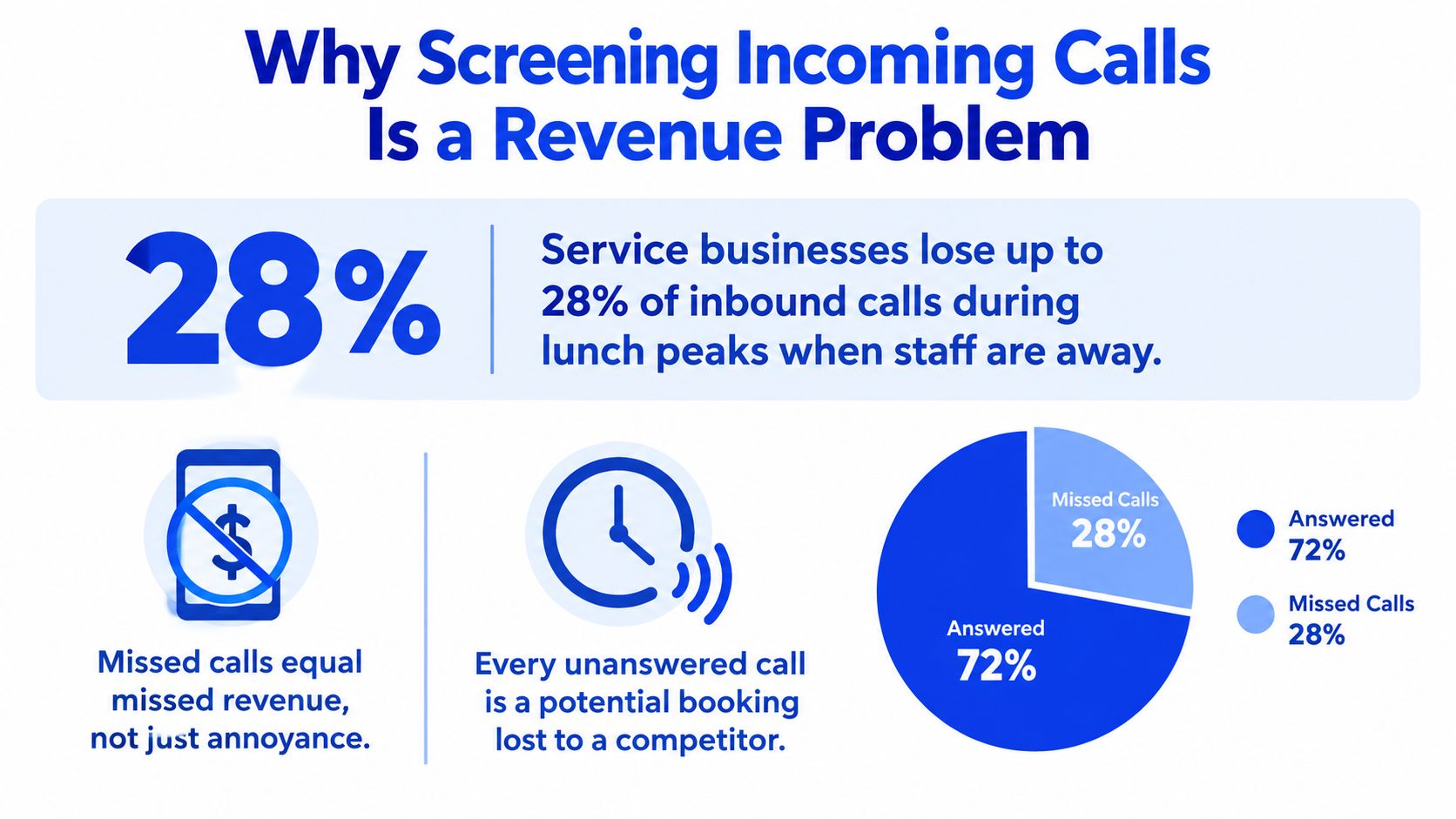
If you run a local service business in California, phone screening isn't a spam problem. It's a booking problem. A 2026 local-business dataset found that 72% of missed calls happen during the 11am to 2pm lunch window and after 5pm, and the average local business misses about 27% of inbound calls. It also found that when businesses rely on voicemail and manual callbacks, only 4 out of 100 missed calls convert to a booked appointment (local missed-call dataset).
That changes the conversation. If you screen phone calls badly, you don't just annoy callers. You lose people who were ready to book.
California adds another layer. Consumers already expect unknown calls to be junk because robocall traffic is massive, and businesses that buy inbound leads through call-driven channels now have even less room for sloppy handling. If your line rings, your system needs to answer, qualify, and route with almost no friction.
Why Screening Incoming Calls Is a Revenue Problem
California service businesses lose revenue on the phone for a simple reason. Calls come in when staff are busiest, and the line gets treated like an admin task instead of a booking channel.
Owners still treat call screening as a spam setting. That misses the issue. For salons, clinics, legal offices, med spas, and home-service teams, screening decides whether a new caller gets booked, delayed, or lost.
Small businesses answer only 37.8% of inbound calls, while 37.8% go to voicemail and 24.3% receive no response at all. The same reporting cites a separate analysis showing 62% of calls to small service businesses go unanswered and 85% of those callers never call back (small-business missed-call reporting).
California callers are already suspicious
Californians received 356.2 million robocalls in November 2024 alone, or 11.9 million per day, according to a statewide report. The same report estimated 7.6 calls per person that month, even after a 13.1% month-over-month decline (California robocall report).
That matters at the exact moment a prospect sees your number, hears your greeting, or gets pushed into voicemail. In California, callers are already skeptical. If your setup sounds generic, hides basic next steps, or makes them press through friction before speaking to someone, many will hang up and try the next business.
Practical rule: In California, a screening flow should reduce uncertainty fast. If it feels clunky, it suppresses bookings.
Paid leads turn missed calls into direct cost
If you buy inbound calls, bad screening hits twice. You lose the booking, and you can still eat the lead cost.
Google has announced it will start charging for missed calls that ring more than 20 seconds during listed business hours, scheduled to start October 1, 2026 according to coverage. Follow-up calls may also be billable within a 15-day window (LSA policy change coverage).
That changes the operating standard. Your phone system cannot just block junk. It needs to identify intent, answer during busy periods, and route serious callers before they abandon. Businesses dealing with high inbound call spikes during peak service hours need a setup that protects staff time without starving the schedule.
The Three Ways to Screen a Phone Call
Most businesses have three real options. Human screening, automatic screening, or an AI receptionist. Pick one based on call volume, booking urgency, and whether you need after-hours coverage.
Manual screening
A staff member answers, asks a few qualifying questions, and routes or books the caller.
This works when your office has low call volume and someone is free to answer every ring. That usually means a boutique legal practice, a concierge clinic, or a small office where the front desk isn't juggling check-ins, payments, and in-person traffic all at once.
The problem is labour. Manual screening collapses during busy windows, and it doesn't scale after hours.
Auto-screen tools
This is the carrier or device-level layer. It might flag likely spam, require a caller to identify themselves, or route unknown numbers differently. It's useful. It's also incomplete.
Auto-screening protects attention, but it usually doesn't capture bookings. If a legitimate new client gets pushed to voicemail or friction-heavy prompts, you haven't screened the call. You've delayed the sale.
If you're comparing options, it helps to understand how a phone tree differs from conversational screening. Menu trees sort traffic. They rarely rescue a caller who wants fast answers and a booked slot.
AI receptionist
An AI receptionist sits between your number and your calendar. It answers every call, asks intake questions, handles common requests, and routes exceptions to a human.
This is the right fit for busy salons, dental offices, med spas, home-service companies, and any practice where the phone rings while staff are serving someone else. It's also the cleanest way to screen phone calls without forcing every unknown number into voicemail limbo.
Phone Call Screening Methods Compared
| Method | Best For | Captures After-Hours | Upfront Cost |
|---|---|---|---|
| Manual screening | Low-volume, high-touch offices with dedicated staff | No, unless you schedule people to cover it | Labour-heavy |
| Auto-screen | Solo operators who mainly want spam reduction | Limited | Low |
| AI receptionist | Appointment businesses that need booking capture and overflow coverage | Yes | Software setup and subscription |
A missed call doesn't become less valuable because it arrived at lunch or after closing. It becomes harder to recover.
Designing a Call Screening Workflow That Books
The best screening workflow feels short to the caller and strict behind the scenes. That is the standard.
Your job is simple. Get enough information to book, route, or call back with context already captured. Anything else drags the call out and cuts conversion. In California, that matters even more because a big share of missed calls hit during lunch rush, job-site work, and after-hours windows when no one is free to pick up. If your screen adds friction, you do not just filter calls. You leak revenue.
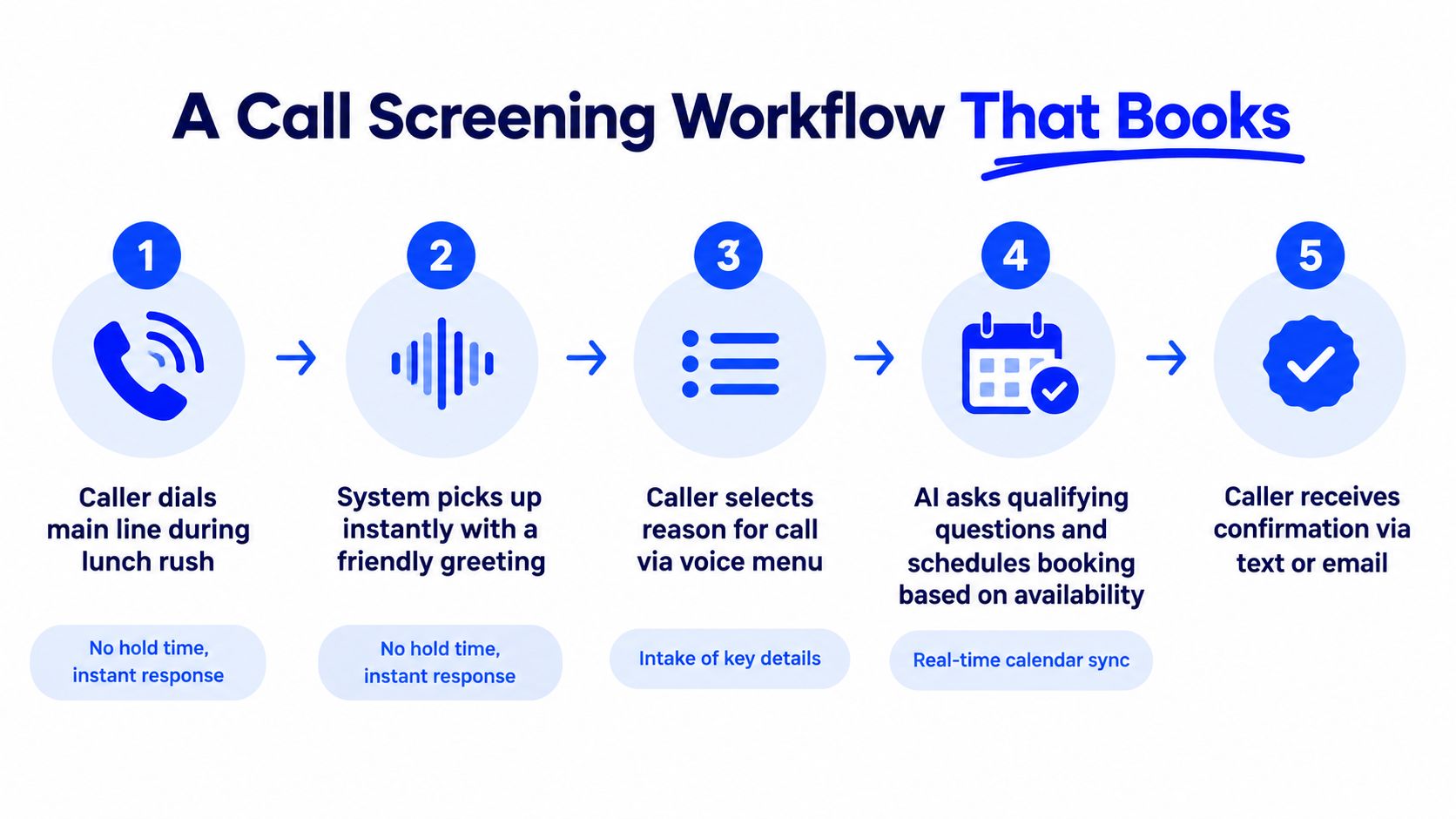
Start with the greeting. Answer fast, say the business name, and give the caller one clear choice: “Thanks for calling [Business Name]. Are you calling to book, reschedule, or ask a quick question?” That prompt works because it sorts intent without dumping people into a long menu.
The intake path for new bookings
Keep new-booking intake tight. Ask only for the details that affect the calendar or the handoff.
- Name: Get it first so the call feels specific and your team has a real record.
- Callback number: Capture it before the line drops or the caller hangs up.
- Service needed: This prevents bad notes and wrong appointment lengths.
- Preferred provider or no preference: This matters in salons, clinics, and other provider-based schedules.
- Two time windows: This books faster than asking open-ended availability.
That is enough.
If your system can check live availability during the call, use it. A practical version is an automated phone booking system that matches the caller to an actual slot instead of creating another round of phone tag.
Routing rules that actually help
Routing should follow booking logic, not phone-system logic.
Existing clients should go straight to reschedules, confirmations, or account-specific help. Spanish-language callers should reach a bilingual path if you offer one. Urgent matters should jump the standard queue. Spam-flagged calls should stay out of the front desk's day.
Set a hard outcome for every call. Book it, route it, or log a callback with the reason for the call and the next action. “We missed one” is not a workflow. It is a preventable loss.
One more point matters now. Google's Local Services Ads billing changes have pushed more owners to watch call quality, not just call volume. That means your screening flow has to separate real leads from noise without making good callers work for basic help. If you are paying for attention, you need a screen that captures revenue, not a developer-style flowchart full of dead ends.
This walkthrough shows the structure in action:
California-specific guardrails
California businesses need clean consent practices around call recording. The state has stricter rules than many owners realize, especially when confidential communications are recorded.
Put the disclosure in the greeting if your screening flow records calls or stores transcripts. Keep it plain. Keep it consistent. Then make sure your team uses the same process every time. That is how you stay compliant without slowing down bookings.
Caller Intake and Routing by Business Type
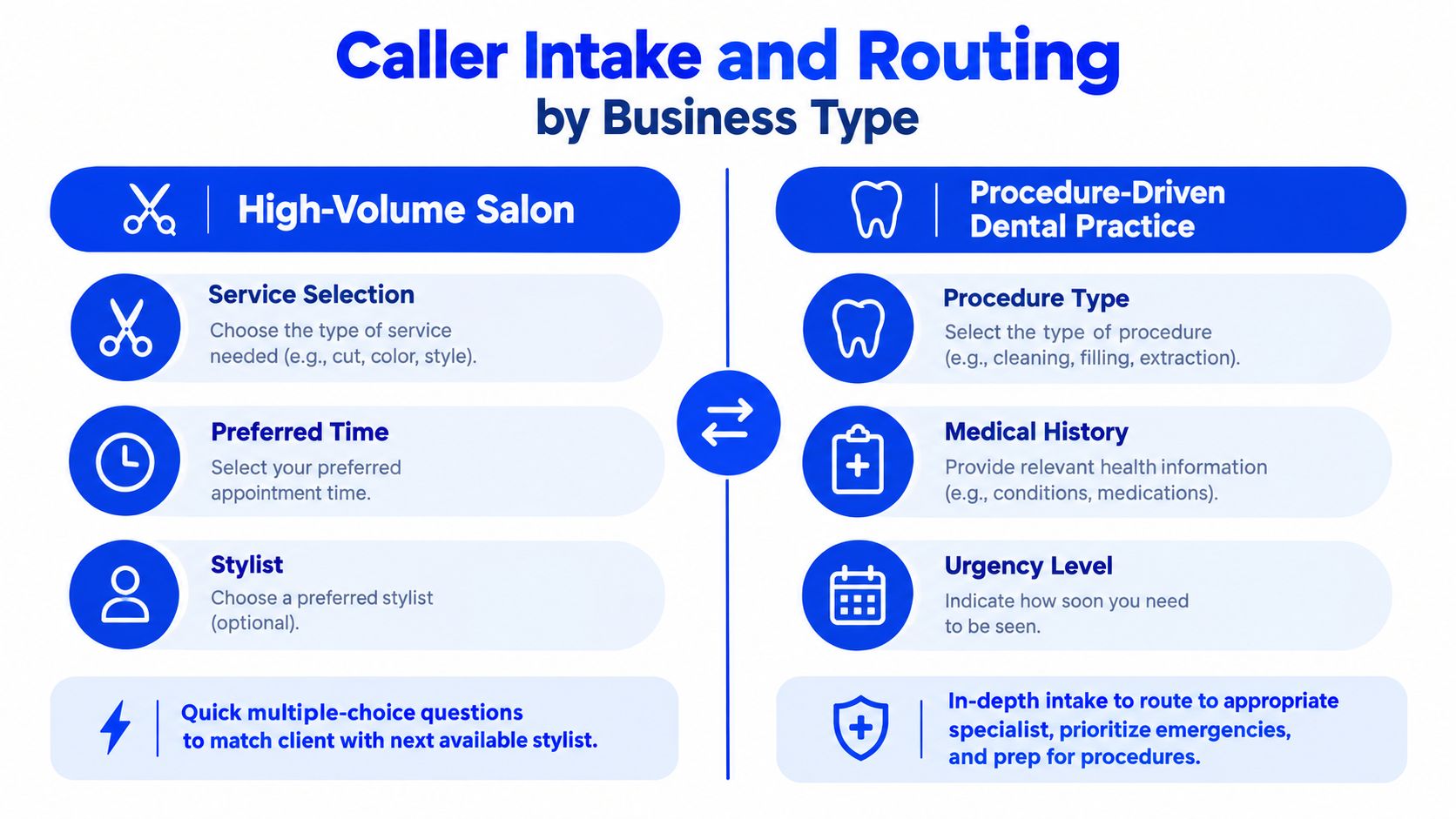
A salon and a dental office both need call screening. They should not use the same intake script.
The salon needs speed. The dental practice needs triage. If you use one generic script for both, you'll either slow down easy bookings or under-qualify complicated ones.
High-volume salon flow
A salon caller usually wants an appointment, a price range, or a reschedule. The intake should stay short.
Ask for the service, preferred stylist if any, and a time window. If they're a repeat client, route them straight into the booking path tied to that provider. If they're new and asking for colour correction, extensions, or another consult-heavy service, send them to a consult queue instead of forcing a standard booking.
That prevents two common failures. Wrong slot length and wrong staff assignment.
Don't make a haircut flow handle a consult call. That's how schedules break.
Procedure-driven dental flow
A dental office needs a more structured screen. The first branching question should sort emergencies from routine care. Then verify the visit type, insurance status if relevant to your intake process, and whether the caller is a new or existing patient.
A caller with pain, swelling, or a broken tooth should not sit in the same queue as someone booking a routine cleaning. The front desk knows that instinctively. Your call flow should reflect it.
Use plain-language routing rules such as:
- Emergency symptoms: Transfer to a live priority line or on-call process.
- New patient exam: Collect core intake details, then offer the next available suitable slot.
- Existing patient reschedule: Route to schedule management, not fresh intake.
- Procedure questions: Send to the clinical admin queue if a standard booking answer won't do.
Keep the map simple
You don't need a developer diagram. Write the routing map in everyday language your team can check in a minute. “If new colour client, offer consult.” “If dental pain, escalate.” “If pricing-only caller asks no booking question, answer then offer times.”
That's enough to build a screen phone call process staff can follow and software can mirror.
Where Default Call Handling Falls Apart
The standard voicemail-and-callback setup fails in predictable ways. Not because your team is lazy. Because the structure is wrong.
First, the call rings while staff are busy. Second, the caller hears a generic greeting. Third, the callback happens later, after the caller has already moved on. Fourth, the return call starts from zero because nobody captured intent the first time.
The voicemail trap
Recent summaries say fewer than 3% of callers sent to voicemail leave a message, and 2026 reporting puts unanswered-call rates for small and local businesses in a wide range from roughly 25% to 40%, with one source estimating 27% on average and another noting 62% of calls go unanswered (missed-call behaviour summary).
That's why voicemail isn't a screening strategy. It's a hope strategy.
Default Voicemail vs Screened Call Conversion
| Metric | Default Voicemail | Screened Call Flow |
|---|---|---|
| First response | Caller waits through ringing or hears a generic greeting | Caller gets an immediate business-specific answer |
| Intent capture | Usually none, unless caller leaves a message | Captured during the first interaction |
| Booking path | Delayed callback | Direct booking or qualified routing |
| After-hours handling | Passive | Active |
| Staff workload | Front desk reconstructs context later | Team receives context with the call outcome |
Old habits cost more now
California has a long history of large-scale phone screening and survey outreach. The California Health Interview Survey logged 1,764,935 screener interview call attempts for 223,509 telephone numbers in 2001, averaging 7.90 calls per number to complete 84,051 screener interviews. It later reported a 31.6% landline screener response rate in 2011 to 2012, while the overall completed screener rate was 19.4% of total numbers dialled (CHIS survey operations data).
Those aren't booking stats, but they make one thing clear. Reaching Californians by phone has never been a one-shot exercise. If your business waits for people to tolerate delays, menus, and callbacks, you're fighting caller behaviour the hard way.
Setting Up an AI Receptionist in Three Screens
Most owners don't need a telecom project. They need a setup they can finish today.
The cleanest path is a three-screen build. Connect the number, define the intake, then test real scenarios. That's it. If a tool requires flowchart software, prompt engineering, or a developer, it's already too heavy for most local businesses.
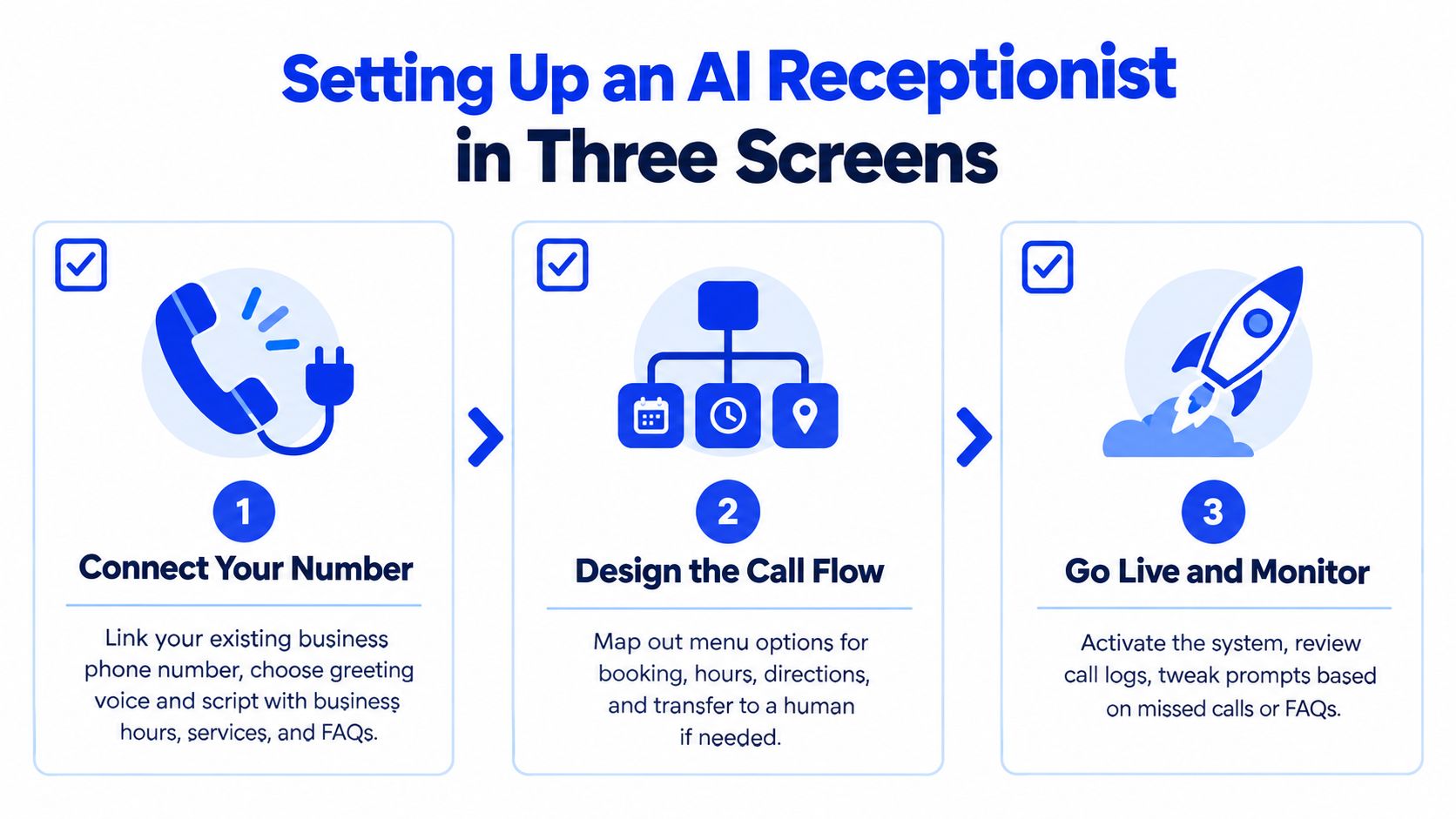
Screen one
Connect your business number. Then choose the greeting voice and write the opening script.
Include:
- Business name: So callers know they reached the right place.
- Hours: Especially if you'll take after-hours bookings.
- Core services: Enough to answer simple fit questions.
- Booking language: Tell callers they can book right now.
Screen two
Build the intake around the four questions that matter most to your category. For many businesses that means service, urgency, preferred staff member, and timing.
Then add routing rules for:
- New versus returning callers
- Urgent versus routine requests
- After-hours handling
- Transfer to a human on request
One practical option in this category is Heyline, which provides an AI phone receptionist for appointment-based businesses, configures itself from a company's public website, answers incoming calls, and books appointments directly to the calendar.
Screen three
Test the system with five real scenarios before going live:
- A spam robocall
- A new booking
- A reschedule
- A pricing question
- An after-hours urgent call
Review the transcripts or call notes. Tighten any prompt that causes confusion. If callers keep asking for a human, make that path easier. If the system over-accepts junk, adjust the spam threshold.
Owner checklist: The two settings people forget are spam filtering sensitivity and a clean fallback transfer when the caller asks for a person.
Tips and Next Steps for Better Call Screening
Here's the blunt version. Use manual screening only if a real person is available at every ring. Use auto-screening if you mostly need spam protection. Use an AI receptionist if your business lives or dies on booked calls and your staff can't reliably answer during service hours.
The method matters less than the discipline behind it. Businesses improve call capture when they treat screening as an operating system, not a phone feature.
Five habits worth keeping
- Review weekly call logs: Look for missed windows, repeat questions, and weak routing points.
- Update intake questions quarterly: Services change. Staff change. Your phone flow should change too.
- Set overflow rules: Decide what happens when the front desk is tied up, not after it happens.
- Separate new bookings from existing clients: They need different paths and different questions.
- Test the full ring-to-book path monthly: Call your own line and listen for friction.
The next move
Run a 14-day call log audit before you choose a tool. Check when calls come in, which ones go unanswered, which categories create phone tag, and how often callers are trying to book versus just asking a simple question.
That audit will tell you whether you need basic filtering, stronger routing, or a full booking layer. Don't buy from a demo. Buy around your actual call patterns.
If your staff keeps missing calls during busy windows, Heyline gives you a practical way to answer, qualify, and book without turning your phone setup into a software project. It's built for appointment-based businesses that need a live answering layer tied to real calendar availability. See how it works at Heyline.


