Saturday is full, two therapists are in treatment rooms, and the phone keeps ringing. One caller leaves a voicemail asking for a facial, another hangs up after waiting, and a third reaches the front desk only to hear that the requested therapist is already booked. By closing time, the team has spent hours returning calls, checking paper notes, and repairing gaps that a client never sees.
That's the everyday problem spa appointment scheduling software is designed to solve. It isn't merely an online booking button. A well-configured system coordinates clients, services, staff, rooms, treatment lengths, buffers, reminders, payments, and phone inquiries in one operating workflow.
The market reflects that shift. Spa scheduling software was estimated at USD 101.58 million in 2025 and projected to reach USD 205.33 million by 2032, with a 10.57% CAGR, while projected revenue for 2026 is USD 111.01 million according to 360iResearch's spa scheduling software market overview. Owners aren't adopting these systems because digital tools look modern. They're adopting them because manual booking struggles to keep up with demand.
This guide is for spa owners and managers who need a practical buying path. You'll learn what the software does, which features deserve close inspection, how to estimate return, how to configure the workflow, and how to test a vendor before committing. You'll also see why phone coverage, including an AI receptionist, belongs in the scheduling conversation when missed calls are costing you appointments. For a useful look at the problem from the phone side, review this guide to handling high call volumes.
What Spa Appointment Scheduling Software Really Does
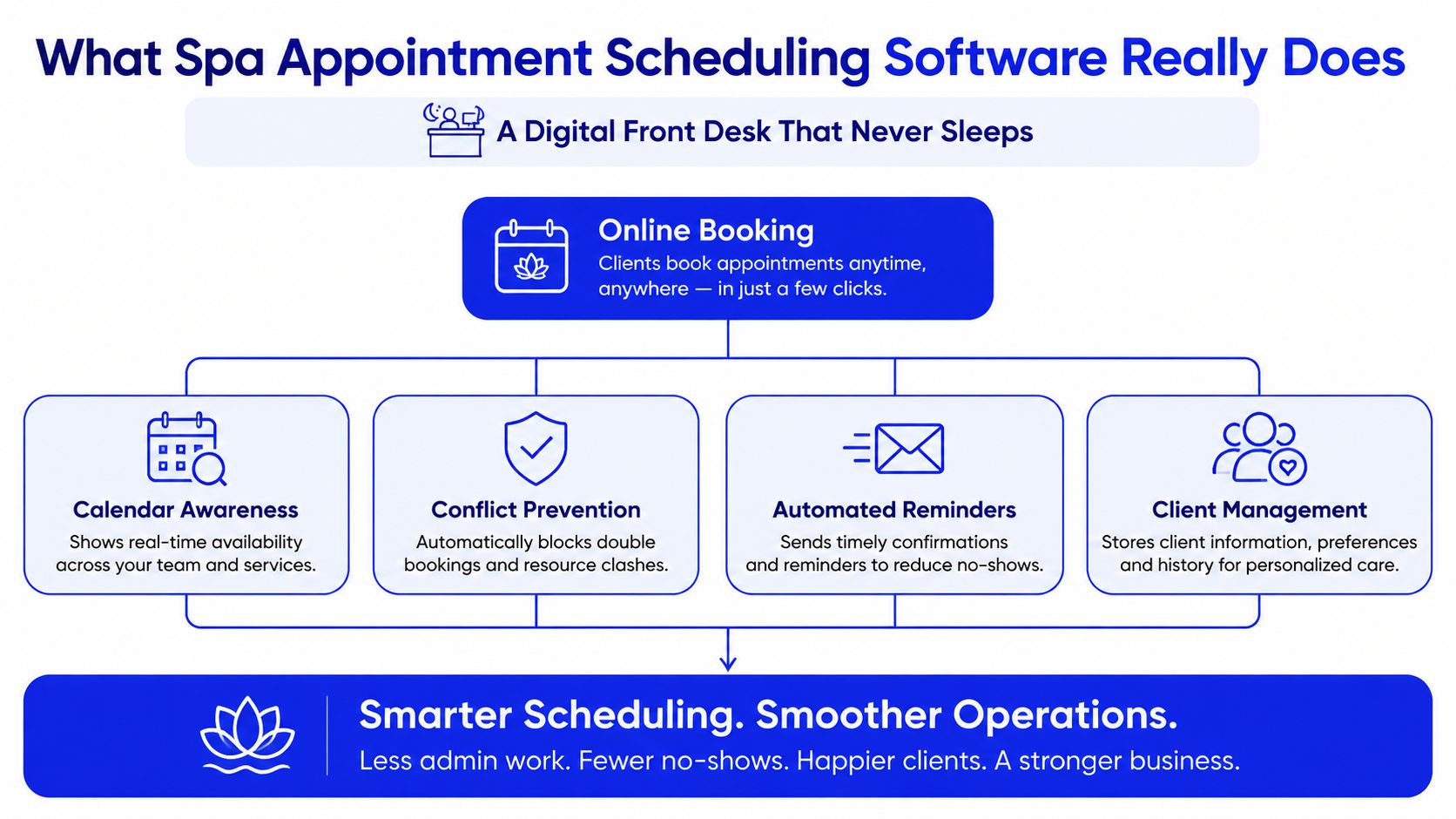
A fully booked afternoon can still produce an empty room if one therapist is unavailable, a treatment needs extra setup time, or a client's call goes unanswered. Spa appointment scheduling software connects those details so the front desk can sell appointments the business can deliver. It works like an operational layer, with the client-facing booking page as only its visible part.
Booking is only the first layer
The basic flow is straightforward:
- Service selection: The client chooses a massage, facial, body treatment, or add-on.
- Availability check: The system checks treatment length, working hours, eligible staff, and existing appointments.
- Resource matching: It verifies that the required room, equipment, and treatment space are available.
- Confirmation: It reserves the slot and sends the client the relevant details.
- Ongoing management: It manages reminders, changes, cancellations, waitlist opportunities, and payment rules.
This prevents a common scheduling error: showing a time that looks open but cannot support the selected service. A longer treatment may need a larger time block. A specialist service may require a qualified practitioner. A room can be occupied while the therapist is free, and a buffer may be needed for cleaning, setup, or turnover.
The calendar becomes operational infrastructure
A shared calendar records open time. Spa software evaluates whether that time is usable by combining staff assignment, room availability, service duration, buffer time, and practitioner qualifications. The front desk can work from one current schedule instead of reconciling a booking book, messages, personal calendars, and memory.
The same operating layer can connect with payment steps and phone coverage. Calls can be routed to reception or an AI receptionist that answers common questions, captures booking details, and passes suitable requests into the scheduling workflow. That matters because an online page cannot help a client who prefers to call or needs guidance before choosing a service.
Cloud delivery also lets authorized staff access the schedule from connected devices instead of relying on one computer or a physical book. In the broader spa booking and scheduling software market, cloud-based deployments represented around 65% of installations, while web-based systems represented 35%, according to Market Growth Reports' spa booking and scheduling software summary.
Practical rule: If the software cannot confirm the right person, room, treatment length, buffer, and payment path, it is a calendar with a booking page, not a complete spa operating layer.
Must Have Features Every Spa Should Demand
A vendor demo can make almost any scheduler look polished. The better test is whether it prevents the specific failures that interrupt your day. Evaluate features by the operational problem they solve, not by the size of the feature list.
Booking and calendar control
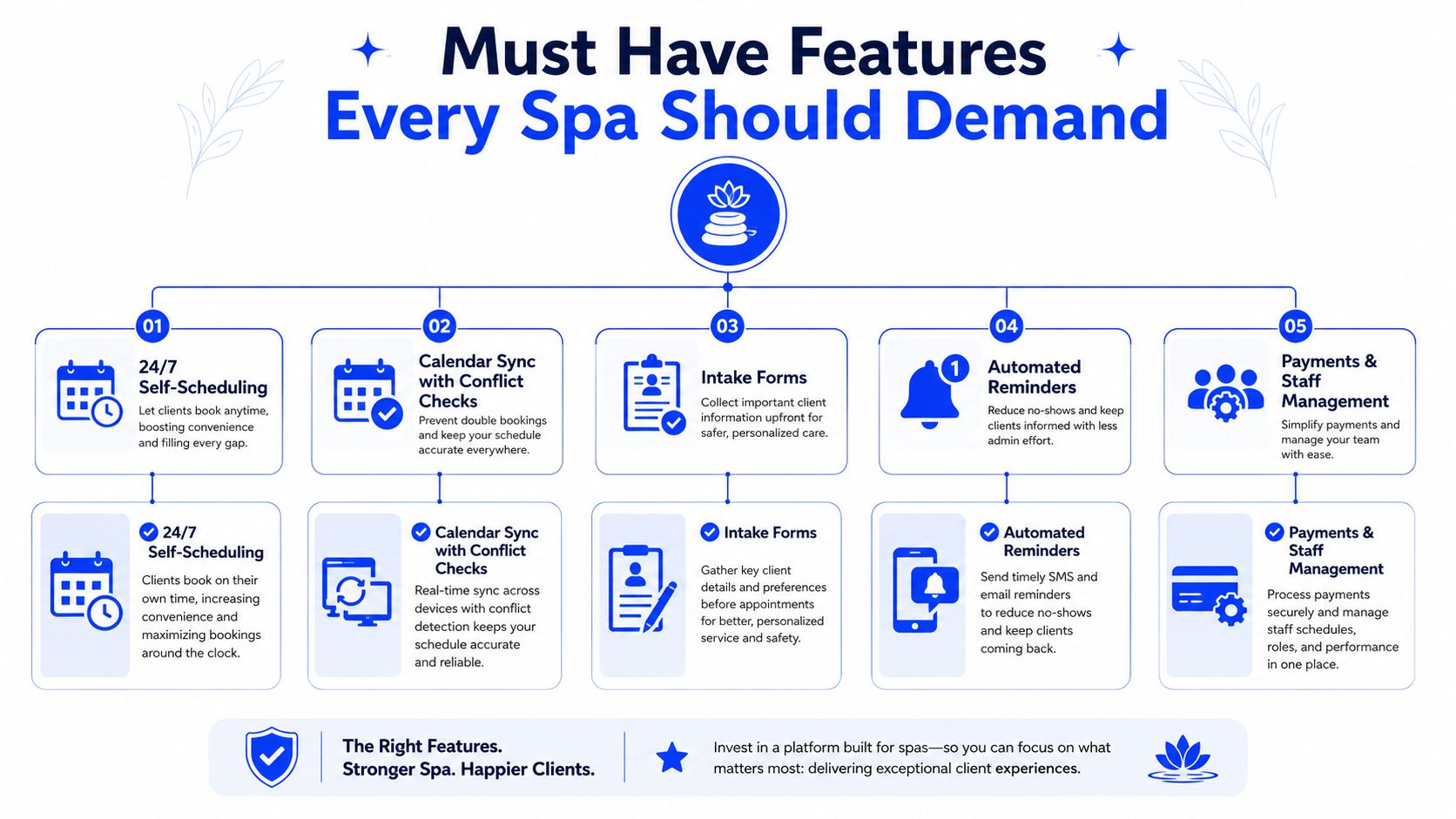
Clients should be able to book outside business hours through a mobile-friendly page. The booking engine must check connected calendars immediately and block conflicts before confirmation. Look for service-specific durations, staff availability, and support for preferred practitioners rather than a generic list of empty times.
A useful test is to create overlapping events in the connected calendar. Ask whether the booking page removes the unavailable slot automatically, and whether changes made by staff appear promptly in the public schedule.
Client information and intake
A spa needs more than a name and phone number. Client profiles should hold contact details, service history, preferences, intake responses, and relevant notes, with permissions that limit access appropriately.
Intake forms should appear at the right point in the journey. Some information belongs before confirmation, while other questions can be completed before arrival. If every client must answer a long form before seeing availability, the process may create unnecessary friction. If the system collects nothing useful, staff will repeat the same questions at reception.
Staff, services, rooms, and buffers
Configure each service with its correct length, price, eligible practitioners, required room, and transition time. The system should prevent a client from booking a treatment with someone who isn't qualified or placing a room-dependent service into an unsuitable space.
Ask how multi-service appointments work. If a client adds an enhancement, the schedule should expand and reserve the correct resources rather than leaving the team to adjust the appointment manually.
Reminders, rescheduling, and waitlists
Automated reminders should support more than one communication channel and include a direct path to confirm, cancel, or reschedule. Evidence summarized by AssistifAI's appointment scheduling analysis associates SMS and email reminders with missed-appointment reductions of about 39% to 60%, with some implementations reaching show rates near 90%. Treat those figures as benchmarks, not promises. Results depend on message timing, client behavior, policy design, and implementation quality.
The highest-value workflow continues after a cancellation. The system should release the time, identify suitable waitlist clients, and notify them quickly. Industry guidance reports that reminder, rescheduling, and waitlist workflows can reduce front-desk call volume by 35% to 45% and no-shows by 30% to 50% in real deployments, as described by Morelune's scheduling workflow guidance.
For message design and confirmation practices, see this guide to text message appointment confirmations.
Payments and reporting
Payment settings deserve a close review. Can you require a deposit for selected services? Can you make payment mandatory before confirming a treatment? Can you apply different cancellation windows by service or client type? Can the system explain the policy clearly before the client enters card details?
Clients often accept payment enforcement when the reason and terms are visible. Confusing checkout creates abandonment, while weak policies leave staff chasing confirmations. Setmore's spa booking guidance highlights the recurring customer question of whether payment can be made mandatory on the booking page, which shows why this capability shouldn't be treated as a minor checkbox.
Reporting should connect appointments to operations. Look for views covering utilization, cancellations, reschedules, waitlist activity, scheduled revenue, and staff performance. A report is useful only when it helps you change staffing, service availability, reminder rules, or room allocation.
Benefits and ROI That Justify the Investment
A busy Saturday shows the difference quickly. One client books online while the phone rings, another cancels late, and a therapist waits for a room to open. Scheduling software connects those moving parts, so the owner can measure recovered time and bookings instead of judging the system by convenience alone.
Online booking has become a common spa workflow. As noted earlier, 2023 figures indicated that about 62% of spa businesses globally had implemented online booking systems, covering more than 78,000 spa facilities worldwide. Mobile bookings represented about 59% of total reservations in the U.S. spa and wellness market. For many spas, mobile access and availability outside reception hours are practical operating requirements.
Four sources of return
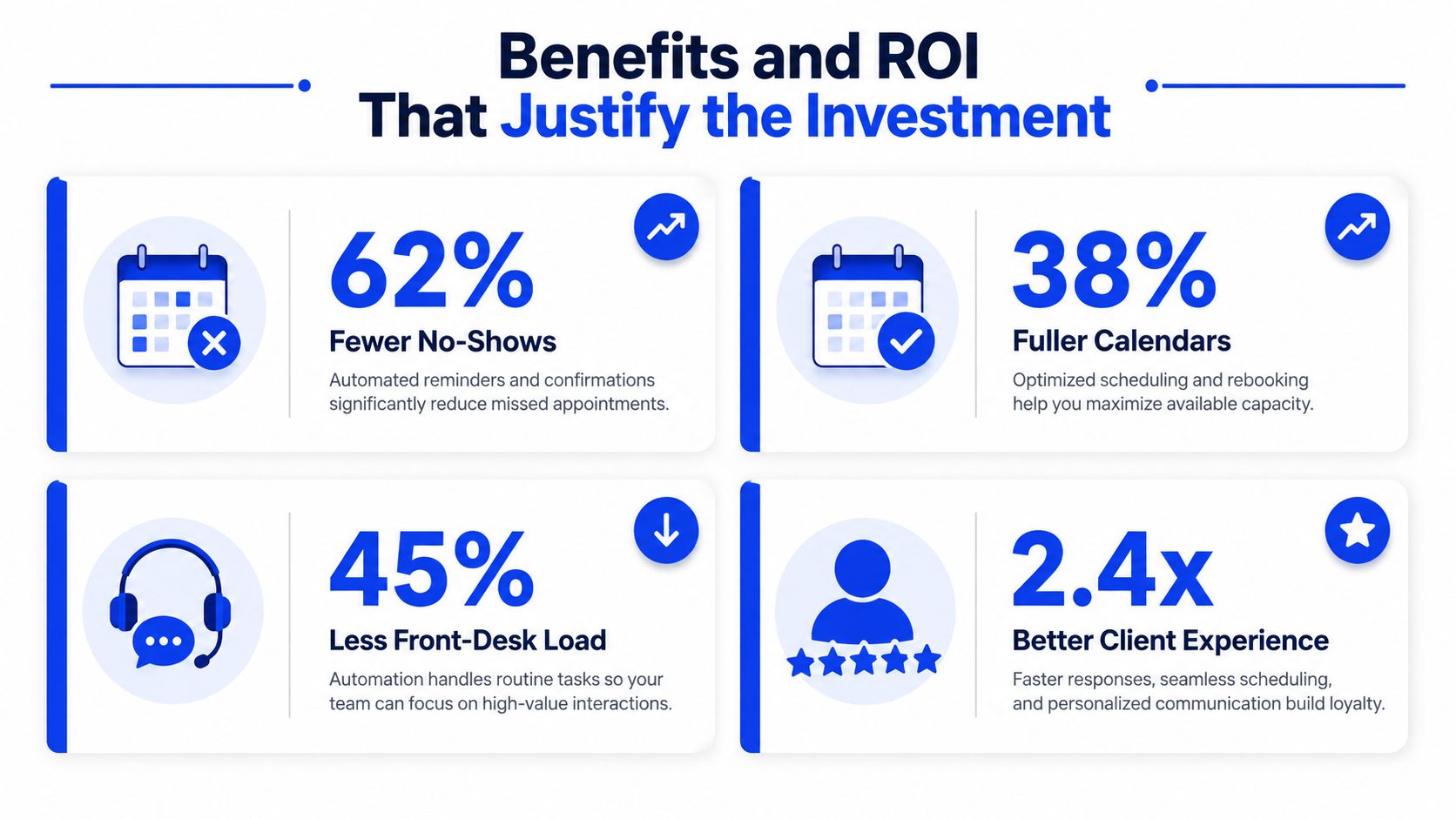
Fewer missed appointments
Reminders prompt clients to attend or change their booking. Two-way rescheduling can preserve a treatment slot, while waitlist outreach can offer a newly released opening to someone ready to book.
A fuller calendar
The booking engine presents eligible availability at any hour. Rules for staff, rooms, treatment duration, and buffers help sell usable capacity rather than times that create operational conflicts.
Lower front-desk pressure
Reception staff handle fewer routine availability questions, confirmation requests, and calendar changes. Phone or AI receptionist integration can capture inquiries after hours, while staff retain control over exceptions and sensitive client needs.
A more consistent client experience
Clients see current availability, receive instructions, and manage routine changes without waiting for a reply. Deposits and payment rules can also be applied consistently, giving the team one schedule and one set of expectations.
A simple owner-level estimate
Begin with your own baseline. Review missed appointments, late cancellations, manual rescheduling, unanswered calls, payment follow-ups, and time spent correcting calendar conflicts. Then estimate the value of the appointment time affected and compare the recoverable opportunity with subscription fees, payment costs, setup effort, and staff training.
Keep the calculation conservative. Count only observable changes, such as recovered bookings, shorter call handling, fewer calendar corrections, completed deposits, or better use of rooms and staff time. Separate revenue recovery from labor savings, because they affect the business in different ways.
A short pilot with before-and-after tracking provides a practical test. Record the same measures before setup, then review them after the team has used the software under normal conditions. If the improvement depends on rules nobody follows, the issue is implementation, not the booking button.
Setup and Implementation Checklist From Calendar to Phone
Implementation goes smoothly when you configure the system in the same order that an appointment moves through the business. Start with the calendar, then define capacity, then publish booking and phone access. Don't invite clients until the rules have been tested.
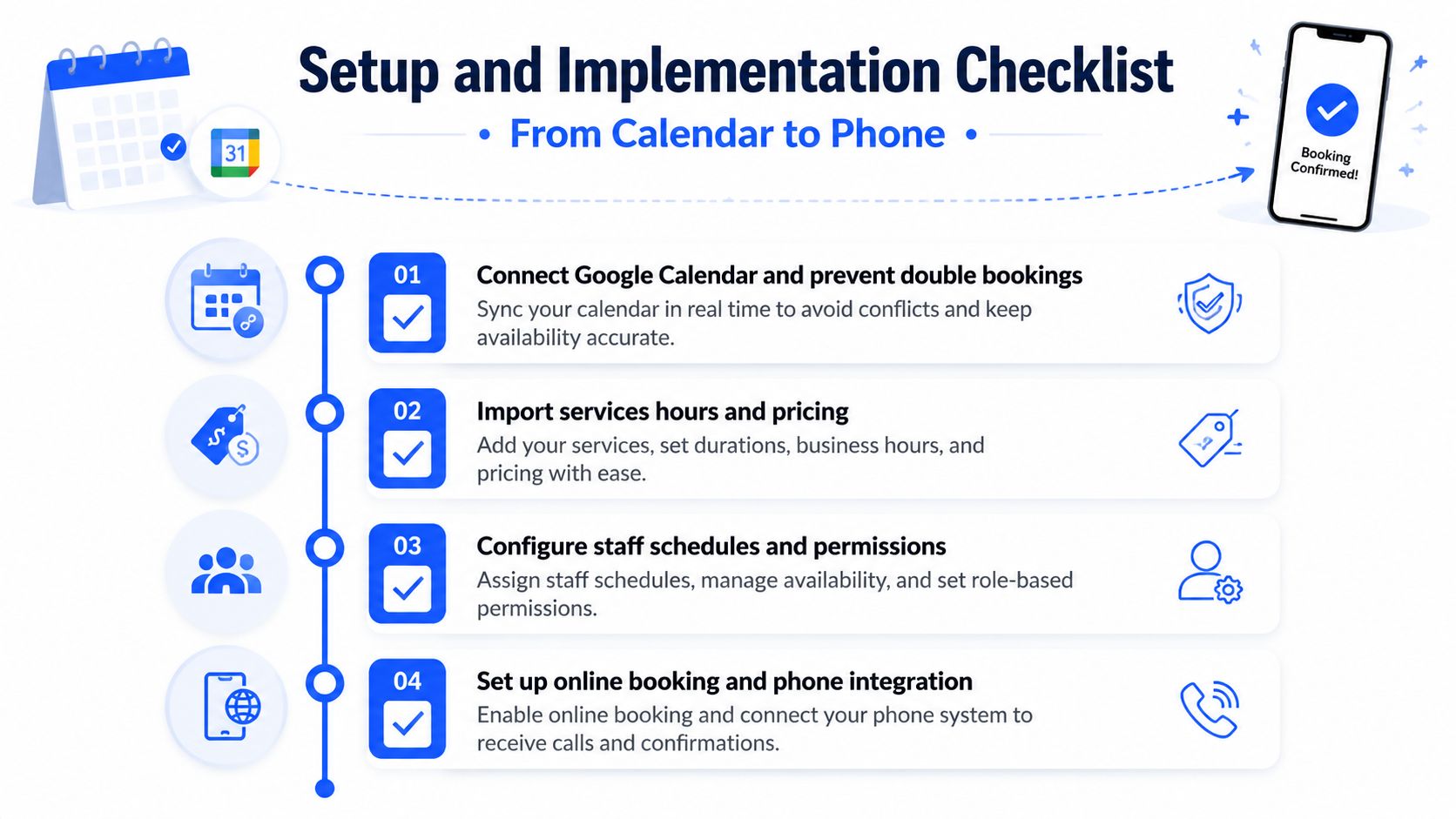
Connect the real calendar first
- Connect your primary calendar: Link the calendar that staff maintain, not an abandoned secondary calendar.
- Prevent double bookings: Confirm that existing events block availability and that new bookings appear in the team's working view.
- Set business hours: Add opening times, breaks, days off, and location-specific schedules.
- Check time zones: This matters if owners, managers, or remote support staff access the account from different locations.
For Google Calendar workflows, use a system that explains how conflicts are checked and how updates move in both directions. This Google Calendar appointment scheduling guide covers the calendar connection question owners often face during setup.
Build the service and resource rules
Import each service with its public name, price, duration, eligible staff, and required room or equipment. Add setup and cleanup buffers where the team needs them, then test a short treatment, a longer treatment, and a combined booking with an add-on.
Next, configure practitioner schedules and permissions. Staff should see what they need for the day, while owners retain control over services, policies, payments, and reporting. If you operate multiple rooms or locations, test a booking at each one before publishing the page.
Configure forms, policies, and reminders
Add intake questions that help the practitioner prepare without making the booking flow unnecessarily long. Make cancellation rules visible before confirmation, then decide which services require deposits or full payment.
Turn on confirmation messages, reminders, two-way rescheduling, and waitlist notifications. Send test messages to internal recipients and check every button, link, policy statement, and appointment detail.
Add phone handling and test real conversations
A phone layer matters because online booking can't capture a caller who never reaches the page. Heyline can take information from a business website, connect to Google Calendar, answer incoming calls, check availability, and book during the conversation through a three-screen setup. Owners can test the voice, edit knowledge, connect a phone number, and correct details before launch.
Test common questions aloud:
- Service questions: Can the receptionist explain treatment names, durations, prices, and preparation?
- Availability requests: Can it offer only times that fit the calendar?
- Policy questions: Can it state deposit and cancellation requirements accurately?
- Exceptions: Can it recognize when a request needs a staff member?
- Changes: Can it handle a reschedule without creating a duplicate booking?
Launch test: Have someone unfamiliar with the setup call as a real client. Their confusion will reveal gaps that an internal checklist often misses.
How to Compare Vendors and Choose the Right Fit
Feature counts don't tell you whether a platform will work during a busy shift. Compare vendors using the same sample services, staff schedules, rooms, policies, and test questions. The best fit is the one your team can maintain accurately after the excitement of launch has passed.
| Evaluation Criteria | What to Look For | Why It Matters for Spas |
|---|---|---|
| Setup effort | Clear configuration for services, staff, rooms, and policies | Owners shouldn't need a developer to correct a service duration |
| Calendar integration | Immediate conflict checks, reliable updates, and clear sync behavior | Prevents double bookings and keeps the team's view current |
| Spa workflow flexibility | Rules for durations, buffers, qualifications, rooms, and add-ons | Matches bookings to real treatment capacity |
| Payment enforcement | Deposits, mandatory payment options, cancellation rules, and clear checkout | Protects high-value slots without surprising clients |
| Client experience | Mobile-friendly booking, simple intake, confirmations, and rescheduling | Reduces friction before the visit |
| Phone connection | Calendar-aware call handling and a way to test answers | Captures callers who prefer speaking to the spa |
| Support and reliability | Responsive help, documentation, and visible status communication | Keeps scheduling usable when the team is busy |
| Pricing transparency | Clear costs for staff, locations, messages, payments, and add-ons | Prevents an affordable trial from becoming an unclear operating expense |
Run a practical vendor test
Ask each vendor to demonstrate a cancellation, a waitlist backfill, a multi-service booking, and a conflict with an existing calendar event. Watch what happens when a client chooses an unavailable practitioner or requests a service that needs a specific room.
Avoid systems that force your team into an elaborate flow editor for routine changes. A technically powerful platform can still create a maintenance burden if every policy update requires specialist help. Ask who will edit knowledge, adjust hours, change prices, troubleshoot failed messages, and review booking errors.
During a trial, score each workflow from your staff's perspective. Can a receptionist learn it quickly? Can a manager correct a mistake without fear? Can a client complete a booking on a phone? Can you explain the payment policy in one clear sentence?
Real World Use Cases and Your Next Steps
A solo esthetician may need a simple public booking page, intake forms, deposits, reminders, and a calendar that stays blocked during treatment. The priority is protecting hands-on time. Phone coverage can matter just as much because the practitioner can't answer while working.
A multi-room day spa needs deeper resource coordination. Each service must match the right practitioner, room, equipment, duration, and buffer. A cancellation workflow should release the correct combination of staff and space, then notify suitable waitlist clients without forcing the manager to search manually.
A multi-location wellness center adds permissions, location-specific hours, shared reporting, and consistent policies. The platform should give local teams control over daily details while allowing owners to see the broader operation.
Payment friction deserves a measured response. Don't make every service prepaid just because the setting exists. Test deposits or mandatory payment on the appointments most exposed to no-shows, explain the policy clearly, and watch whether clients complete booking or contact the spa with questions.
Use a focused launch plan:
- Choose one location or service group for the pilot.
- Configure the calendar, staff, rooms, buffers, forms, policies, and reminders.
- Test online bookings, phone calls, cancellations, rescheduling, and waitlist alerts.
- Train the front desk and practitioners on one shared process.
- Review booking errors, unanswered inquiries, no-shows, and recovered openings during the first month.
- Adjust the rules before expanding to every service and location.
The right system should make routine booking feel uneventful. That's a strength, not a lack of sophistication. Clients get a clear path, staff get a dependable schedule, and owners gain an operating layer that reflects how the spa works.
Heyline provides an AI phone receptionist that answers spa calls, gathers service details from your website configuration, checks Google Calendar availability, and books appointments during natural conversations. Visit Heyline to explore a phone-connected scheduling workflow and test whether it fits your spa's booking process.


