Saturday afternoon, a three-chair dental office is busy with check-ins, paperwork, and a patient who needs help at the front desk. The phone lights up with a new-patient booking request, but nobody can answer. The caller hangs up, searches Google again, and books with the next clinic that picks up.
That pattern is why an AI answering service matters. It isn't a digital version of “press 1 for appointments,” and it shouldn't be judged only by whether it answers every call. For a salon, clinic, law firm, or home-service company, the useful question is more specific: can an unanswered call become a qualified lead, a confirmed appointment, or a timely callback?
An AI phone agent can answer inbound calls, speak with callers, collect the details your team needs, and either schedule directly into an available calendar or send a structured summary for follow-up. The strongest setup connects three decisions that businesses often treat as one: after-hours coverage, calendar-aware booking, and missed-call recovery timing.
What an AI Answering Service Does for Your Business
An AI answering service is software that handles inbound calls in a natural voice and follows the operating rules you provide. It can explain services, answer routine questions, collect contact details, identify the caller's intent, and take the next action your workflow allows.
That next action matters. A message sitting in a voicemail inbox is only a possibility. A live calendar entry, confirmed appointment, or clearly organized callback gives your team something concrete to act on.
The missed-call-to-booked-appointment loop
The process usually follows a simple sequence:
- The call arrives. The agent answers when staff are occupied, the office is closed, or the team is already handling another caller.
- The agent identifies the request. It asks whether the person wants an appointment, pricing information, directions, a reschedule, or urgent help.
- The caller provides the required details. Depending on the business, that might include a service type, preferred time, location, insurance basics, or practice area.
- The system takes the correct next step. It books an available slot, sends a summary, routes the call, or triggers a callback and SMS workflow.
A published technical implementation combined telephony, an AI voice agent, and Google Calendar and Sheets so the agent could collect appointment details, check live availability, and confirm a booking without human involvement. The implementation treated calendar state as the source of truth, which helps reduce callback delays and double-booking risk. You can review the technical implementation of an AI voice-agent booking workflow for the underlying architecture.
Three outcomes owners can measure
Never missing a call means more inquiries receive an immediate response, including calls that arrive during lunch, evenings, weekends, or peak service periods.
Faster booking response removes phone tag. If the agent can see real availability and schedule during the call, the caller doesn't need to wait for someone to return the message.
Consistent intake information gives staff the same useful details each time. A dental team might receive the caller's name, reason for calling, and insurance question. A law firm might receive the practice area and urgency. A plumber might receive the address and type of problem.
The global virtual receptionist and answering-services market has been estimated at $4.64 billion in 2026, with projections placing it above $10.85 billion by 2035 at a 9.8% CAGR, while another estimate places the broader category near $15.93 billion in 2025. These figures come from Business Research Insights' virtual receptionist service market overview, and the variation in estimates reflects different market definitions. The practical point is that automated phone coverage has become an established business category, not a fringe experiment.
How the Technology Behind AI Phone Agents Works
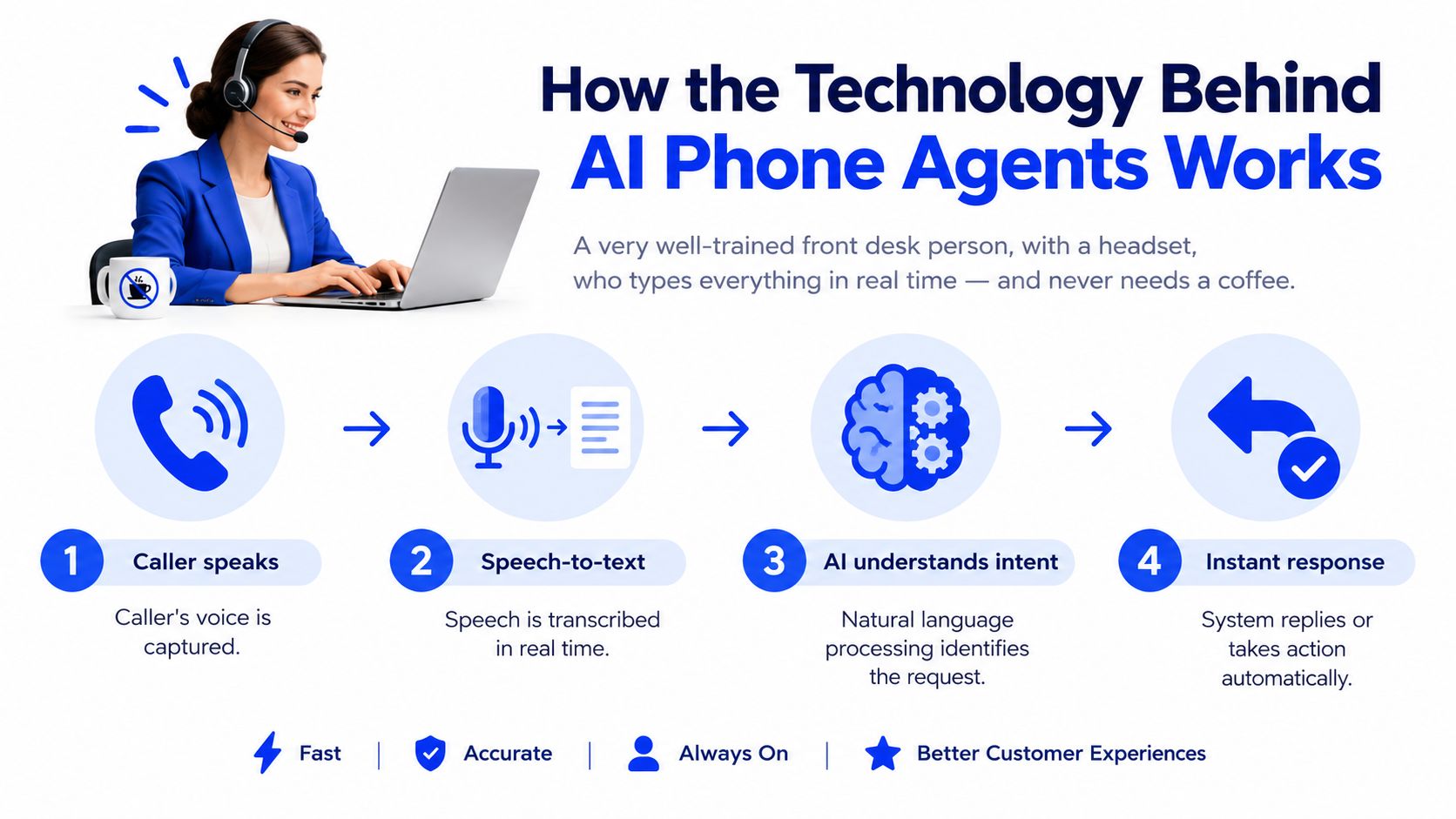
Think of an AI phone agent as a well-trained front-desk person wearing a headset. The difference is that the system transcribes the conversation as it happens, checks business rules instantly, and doesn't need a coffee break or a shift change.
Four components work together
Telephony connects the service to the business number. Calls may be forwarded from an existing line, or the provider may supply a new local number.
Speech recognition turns the caller's voice into text in near real time. This is the part that must cope with background noise, accents, interruptions, and ordinary conversational speech.
The language model interprets the text, identifies intent, chooses an appropriate response, and keeps the conversation within the business's hours, policies, service information, and escalation rules.
Integrations let the system act on the conversation. A confirmed appointment can be written to Google Calendar, Outlook, or compatible industry software, while a call summary can go to email, SMS, or a CRM.
The order is important. If speech recognition mishears “cleaning” as another service, the language model may follow the wrong path. If the calendar connection shows outdated availability, a polite conversation can still produce a bad booking.
Why speech quality deserves careful testing
Telephony speech recognition remains a major technical constraint because real calls rarely sound like scripted demonstrations. A 2026 benchmark on real-world English telephony audio reported word error rates from 28.6% for one mainstream streaming ASR model to 7.7% for the strongest model tested. The results are documented in this real-world telephony speech-recognition benchmark.
Those errors affect more than the transcript. They can change the captured intent, appointment details, fallback rate, and booking accuracy. Ask a provider to let you test real customer-style calls, including older callers, people with accents, interruptions, and noisy environments.
Latency also shapes the experience. Short pauses feel conversational, while long delays make the caller wonder whether the line has dropped. You don't need to understand every technical component, but you do need to judge whether the exchange feels calm, responsive, and trustworthy.
AI Answering Service Compared to Other Call Handling Options
Appointment-based businesses usually choose from four imperfect approaches. A human receptionist offers warmth and judgment, but coverage depends on staffing. An IVR phone tree reduces basic handling work, yet callers must work through menus. Voicemail costs little, but it asks the caller to do the follow-up work. An AI answering service provides broader coverage and automation, while still needing clear boundaries for complex situations.
| Option | 24/7 Coverage | Books Into Calendar | Cost Per Call | Handles Complex Questions | Consistent Intake |
|---|---|---|---|---|---|
| Human receptionist | Limited by shifts and staffing | Often, if trained and given access | Usually highest labor burden | Strongest judgment and empathy | Depends on training and workload |
| Basic IVR phone tree | Yes, for recorded menus | Rarely | Low | Weak outside predefined choices | Structured, but limited |
| Voicemail box | Yes, for message capture | No | Lowest direct cost | No live handling | Inconsistent, caller-dependent |
| AI answering service | Yes, including overflow and after-hours | Yes, when connected to a live calendar | Variable by provider and usage model | Good for defined questions, with escalation needed | Strong when scripts and fields are maintained |
The table shows why “available all the time” isn't enough. A voicemail box can technically receive a call at any hour, but it doesn't preserve the same opportunity as a conversation that answers a question and offers an appointment.
A basic IVR can tell a caller the office hours. It usually won't understand that the caller needs a first-time consultation, check whether the right appointment length is available, and write the booking into the calendar. A human can do that well, but a receptionist may be checking in patients, assisting a customer, or away from the desk.
Practical rule: Choose the option that removes the next bottleneck, not the option with the longest feature list.
The decision becomes clearer when you separate three jobs. Coverage answers whether someone or something picks up. Recovery answers what happens after a missed call. Conversion answers whether the interaction ends in a confirmed booking or a well-structured next step.
One 2026 comparison argues that AI callbacks within 5 minutes can outperform full-time live answering as an entry point for many small businesses, particularly when the priority is recovering a missed lead rather than maintaining a live receptionist presence. The AI missed-call recovery comparison also emphasizes callback or SMS follow-up, transcript capture, and rapid booking as central workflows.
A useful caution is that no verified data here supports a universal threshold for when AI outperforms every alternative. Track your own missed calls, booking rate, and follow-up speed before making that claim about your business.
Core Features That Matter for Appointment-Based Businesses
A polished demo can hide the features that determine whether callers book. Focus on the parts of the system that connect a conversation to a real appointment.
Coverage must include the gaps in your day
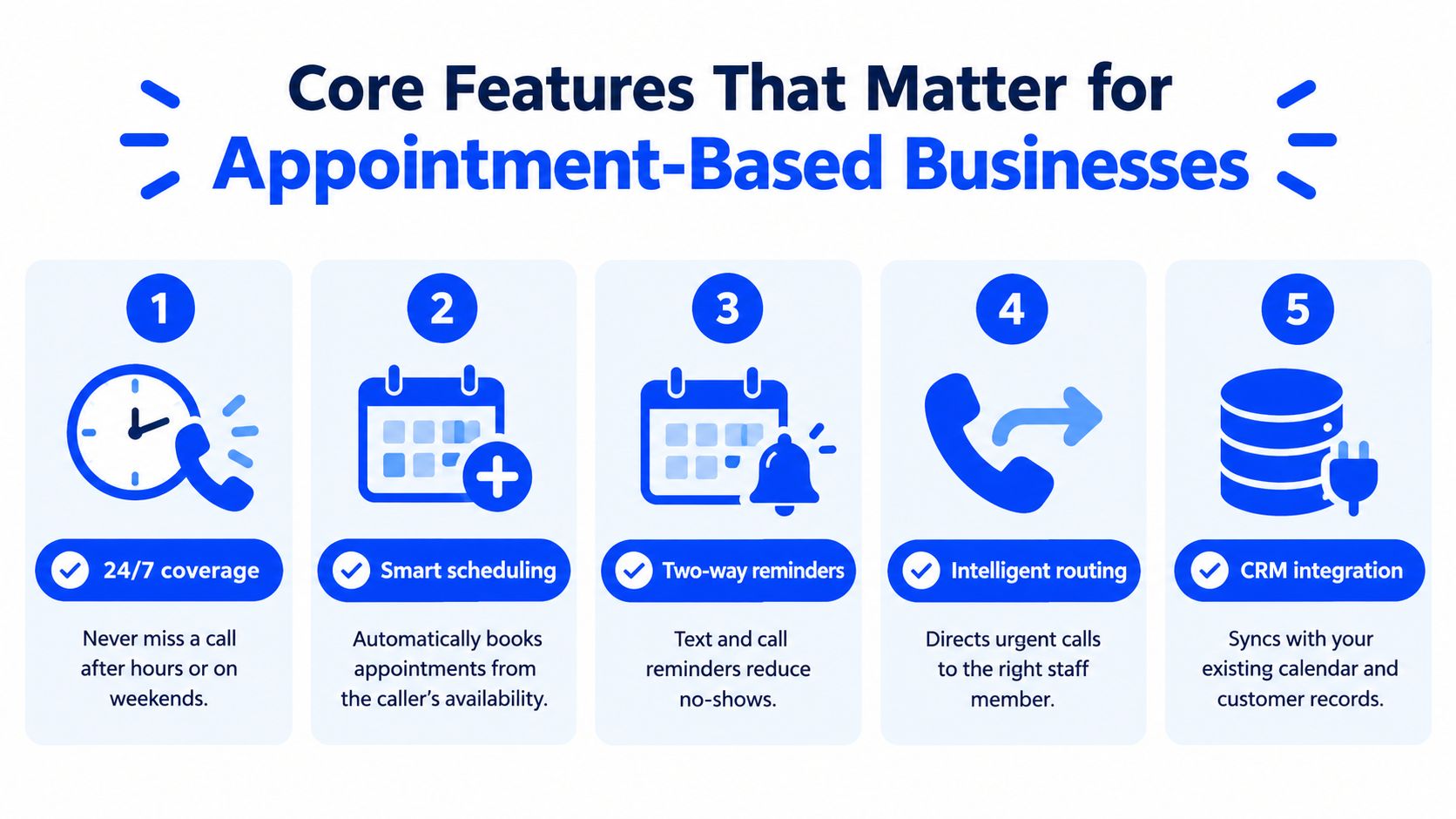
24/7 coverage captures calls after closing, during lunch, on weekends, and while staff are helping people in person. You may not need the AI to handle every call. You may need it to answer the calls your team can't safely take.
A natural conversational voice keeps the caller in a dialogue rather than forcing them through rigid menus. The agent should recognize ordinary phrasing, ask one useful question at a time, and avoid making the caller repeat information.
Two-way calendar integration is the feature that turns intake into revenue. The system should check current availability, respect appointment duration and buffers, and write the confirmed booking back to the calendar. A scheduling link sent after the call can help, but it still leaves the caller with another step.
Your knowledge base and escalation rules need ownership
An editable knowledge base should cover services, prices where appropriate, opening hours, location, cancellation policies, preparation instructions, and common questions. It must be easy for an owner or office manager to correct when a service changes.
Smart escalation protects the moments when automation shouldn't guess. A clinic needs a clear emergency rule. A legal practice needs boundaries around legal advice and urgent matters. A home-service company may need to route active hazards to a human immediately.
The best call flow isn't the one that keeps the AI speaking longest. It's the one that knows when to answer, when to book, when to collect information, and when to hand the conversation to a person.
For a deeper look at the scheduling workflow, see this guide to an automated phone booking system.
The video below can help owners visualize how voice automation fits into a wider booking process.
Some demo features matter less than they appear. A large voice library, decorative analytics, and elaborate workflow screens won't compensate for poor recognition, stale calendar data, or weak escalation. Test the complete journey from greeting to confirmation.
Real Use Cases for Salons, Clinics, Law Firms, and Home Services
The same AI answering service can support very different businesses, but the call flow should reflect the risk and value of each interaction.
A salon captures the appointment after closing
A single-chair salon has no receptionist. During the day, the stylist works with clients and lets calls go to voicemail. After the stylist leaves, a caller asks for a color appointment.
The AI greets the caller, asks what service they want, checks the available color-service slots, and offers suitable times. Once the caller chooses, the system creates the appointment and confirms the details. Calendar synchronization matters most here because the salon has little spare capacity for manual back-and-forth.
A dental office separates routine booking from urgency
At a dental office, the front desk is helping walk-in patients when a new caller asks about becoming a patient. The AI collects the caller's name, contact details, appointment reason, and basic insurance information, then offers an available cleaning or consultation slot.
The workflow also needs an emergency escalation. If the caller describes a situation the practice has classified as urgent, the AI should follow the office's approved instruction, route the call, or collect the required details for immediate human review. It shouldn't improvise medical triage or offer unsupported clinical guidance.
A law firm qualifies the consultation
A two-attorney firm receives an after-hours call from someone looking for help. The AI asks which practice area applies, captures a short description, identifies urgency according to the firm's rules, and records contact information.
If the matter fits the firm's intake criteria, the system can offer a consultation appointment or send a structured summary for the next morning. Lead qualification is the critical feature because the firm needs to distinguish relevant inquiries from matters it doesn't handle, without presenting the AI as a lawyer.
A plumbing or HVAC company follows the same basic pattern, but location and urgency become central. The agent can ask what happened, where the property is, whether immediate danger exists, and whether the caller wants the next available service window. The right escalation path matters more than a clever greeting.
Across industries, the reliable sequence is consistent: greet, understand, qualify, schedule or escalate, confirm. The business-specific rules determine what the agent is allowed to say and do.
Calculating the ROI of an AI Answering Service
You can estimate the business case without building a complicated financial model. Start with three figures from your own records:
- Missed calls per week: Count calls that reached voicemail, were abandoned, or required a delayed callback.
- Average booking value: Use the revenue from the first appointment or job, not an optimistic lifetime-value estimate.
- Current coverage cost: Include receptionist time, answering-service fees, overtime, and the owner's time spent returning calls.
Then separate missed calls that represent genuine demand from spam, wrong numbers, existing customers, and callers who weren't ready to book. Apply your actual booking rate to the remaining pool. The calculation is:
Recoverable bookings per month × average booking value, minus the AI service fee and any remaining follow-up cost.
A verified technical example shows how an AI agent can book from live calendar availability without human involvement, but the source doesn't establish a universal revenue result for every business. Use your own call recordings and appointment records rather than copying a vendor's assumptions.
| Metric | Example Value | Monthly Impact |
|---|---|---|
| Missed calls | Your recorded baseline | Calls available for review |
| Bookable demand | Your filtered estimate | Potential appointment pool |
| Average booking value | Your actual average | Revenue per captured booking |
| Confirmed bookings | Your observed conversion | Recovered revenue |
| AI service fee | Provider's quoted charge | Direct monthly cost |
| Net benefit | Recovered revenue minus costs | Payback decision |
Guardrail: Treat the first estimate as a hypothesis. Review transcripts, confirmed appointments, cancellations, and calls that required human correction before expanding the calculation.
Pricing models vary by provider. Some charge by minute, some by call, some by interaction, and some combine a subscription with usage. For a practical overview of how to compare plans, review this guide to AI receptionist pricing.
The most useful ROI may come from missed-call recovery rather than replacing a full-time receptionist. If the system helps a caller book quickly, the value comes from recovering demand your current workflow already created.
How to Evaluate and Choose the Right AI Answering Provider
Treat a provider call like a structured interview. A polished voice demo proves very little if the system can't understand your callers, access your calendar, or escalate safely.
| Evaluation Criteria | What to Ask the Vendor | What Good Looks Like |
|---|---|---|
| Setup and onboarding | “Can we go live with our existing number, and what must we prepare?” | Clear setup steps, defined responsibilities, and a realistic launch path |
| Speech recognition | “Can we test real customer-style audio, including accents and background noise?” | Transparent testing, usable transcripts, and a clear fallback process |
| Calendar integration | “Does the connection read availability and write bookings back with duration and buffer rules?” | Two-way synchronization and visible booking controls |
| Human escalation | “What happens when the agent is uncertain or the caller asks for a person?” | Named routing paths, business-hour rules, and safe handoff behavior |
| Pricing | “Are we billed by minute, call, interaction, or a bundled allowance?” | A simple invoice model and clear overage terms |
| Data handling | “How are recordings stored, how long are they retained, and are they used to train shared models?” | Written policies, consent controls, and understandable retention terms |
Ask to test the same call scenarios with two providers. Use your real services, real appointment lengths, common customer wording, and the questions your staff hear repeatedly. Include callers who interrupt, change their minds, ask for a human, or provide incomplete information.
Warning signs during the sales process
Be cautious if a vendor refuses a trial, hides the speech-recognition provider, or can't name the calendar systems it supports. A provider should also explain what happens when the calendar is unavailable, a caller gives an ambiguous answer, or a requested service doesn't exist.
Check whether the system can edit business knowledge without developer help. If a changed price or holiday schedule requires a ticket, the information may remain wrong longer than your team can tolerate.
Data handling deserves the same attention as voice quality. Ask how the provider obtains recording consent, who can access transcripts, how long recordings remain available, and whether the system uses your calls to improve a shared model. Don't accept vague assurances when the agent may handle medical, legal, payment, or personally identifying information.
Choose a short trial before an annual commitment. Compare answered calls, completed intakes, booked appointments, incorrect answers, escalations, and missed follow-ups. The best provider is the one that performs reliably inside your actual operating rules.
Getting Started and Making the Switch This Week
A careful launch doesn't require a large technical project. It requires a clear baseline and a small set of rules.
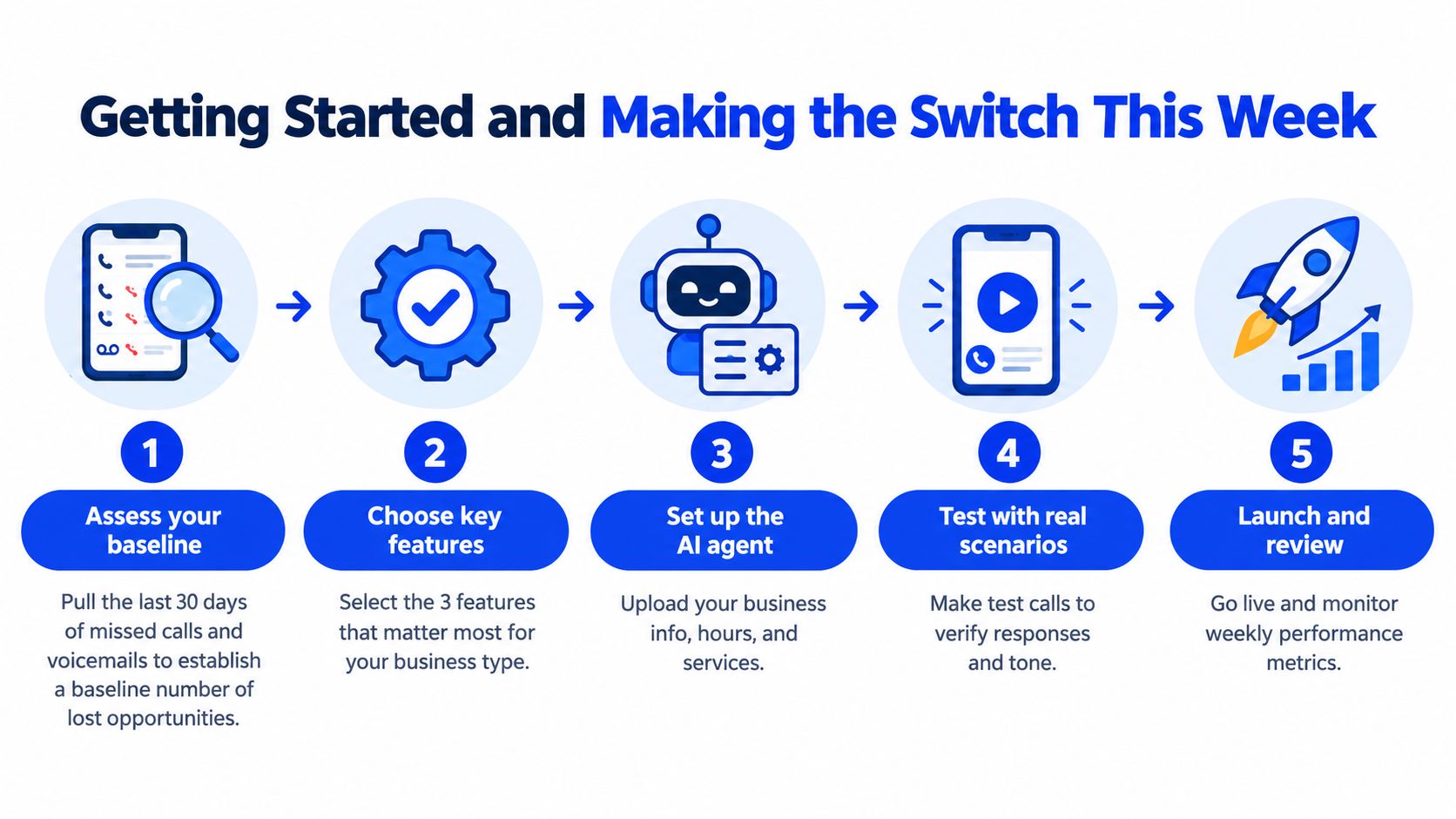
- Assess your baseline. Pull the last 30 days of missed calls and voicemails. Mark which callers wanted appointments, information, rescheduling, urgent help, or something else.
- Write the essential call script. Include the greeting, your top caller intents, approved FAQ answers, appointment types, and escalation rules.
- Run parallel trials. Test two shortlisted providers on alternating days or call windows so both face comparable customer questions.
- Review real conversations. Check transcripts, bookings, confirmations, misunderstandings, and every escalation. Edit the knowledge base from what callers asked.
- Launch with measurement. Port the number or use conditional forwarding, explain the after-hours process to staff, and review performance regularly.
The first week is for learning, not pretending the script is perfect. For practical setup guidance, use this AI answering service implementation guide.
Heyline provides an AI phone receptionist that answers incoming calls, uses your business information, and books appointments into Google Calendar during the conversation. Visit Heyline to see how a local business can test calendar-aware call handling and build a missed-call-to-booked-appointment workflow.


