You're halfway through a haircut when the business phone rings. A second line starts buzzing, a client is waiting at the desk, and nobody can answer. The caller reaches voicemail, searches for another salon, clinic, or contractor, and books with whoever responds first. The same pattern repeats after hours, during lunch, and whenever a technician is inside a customer's home.
That's the practical reason to consider an AI assistant for small business. Not because every owner needs another productivity dashboard, but because customer intake fails when people can't reach you. The right assistant provides front-office coverage, captures intent, books what it can, and sends the exceptions to a human.
The Missed Call Problem Every Owner Recognizes
A missed call rarely announces itself as lost revenue. It appears as an empty calendar slot, a quiet afternoon, or a customer who never calls back. A salon owner may be mixing color while a new client asks about availability. A dental office may have both receptionists helping patients when someone calls about a first appointment. An HVAC technician may be driving between jobs when a homeowner calls about a broken system.
The operational gap is measurable. A 2024 study covering 85 small businesses across 58 industries found that only 37.8% of inbound calls were answered live, while 37.8% went to voicemail and 24.3% received no response. The findings are summarized in Ascero AI's missed-call report. For an appointment-based business, that isn't a minor service flaw. It's a break in the sales process.
Practical rule: Treat every unanswered call as an unprocessed lead until you know who called, what they wanted, and whether they booked elsewhere.
The economics depend on your offer. A salon appointment, dental consultation, legal intake call, or home-service repair can represent very different value, but each begins with the same event: a person wants to speak with the business now. An owner doesn't need a chatbot novelty to justify coverage. They need to compare the value of recovered conversations with the cost of answering them.
AI adoption has moved beyond early testing. The JPMorgan Chase Institute's analysis of small-business AI use found that about 17.7% of firms were paying for and consistently using AI tools by the end of 2025. Broader 2025 survey measures were higher, including 58% of small businesses using generative AI, while 76% said they were using or exploring AI. The useful question is no longer whether small businesses will use AI. It's where the tool can protect customer demand first.
Four categories matter at the front office: phone reception, scheduling, web questions, and inbox triage. The rest of this guide separates them so you can buy coverage instead of paying for features that never touch a customer.
The Four Types of AI Assistants Small Businesses Actually Use
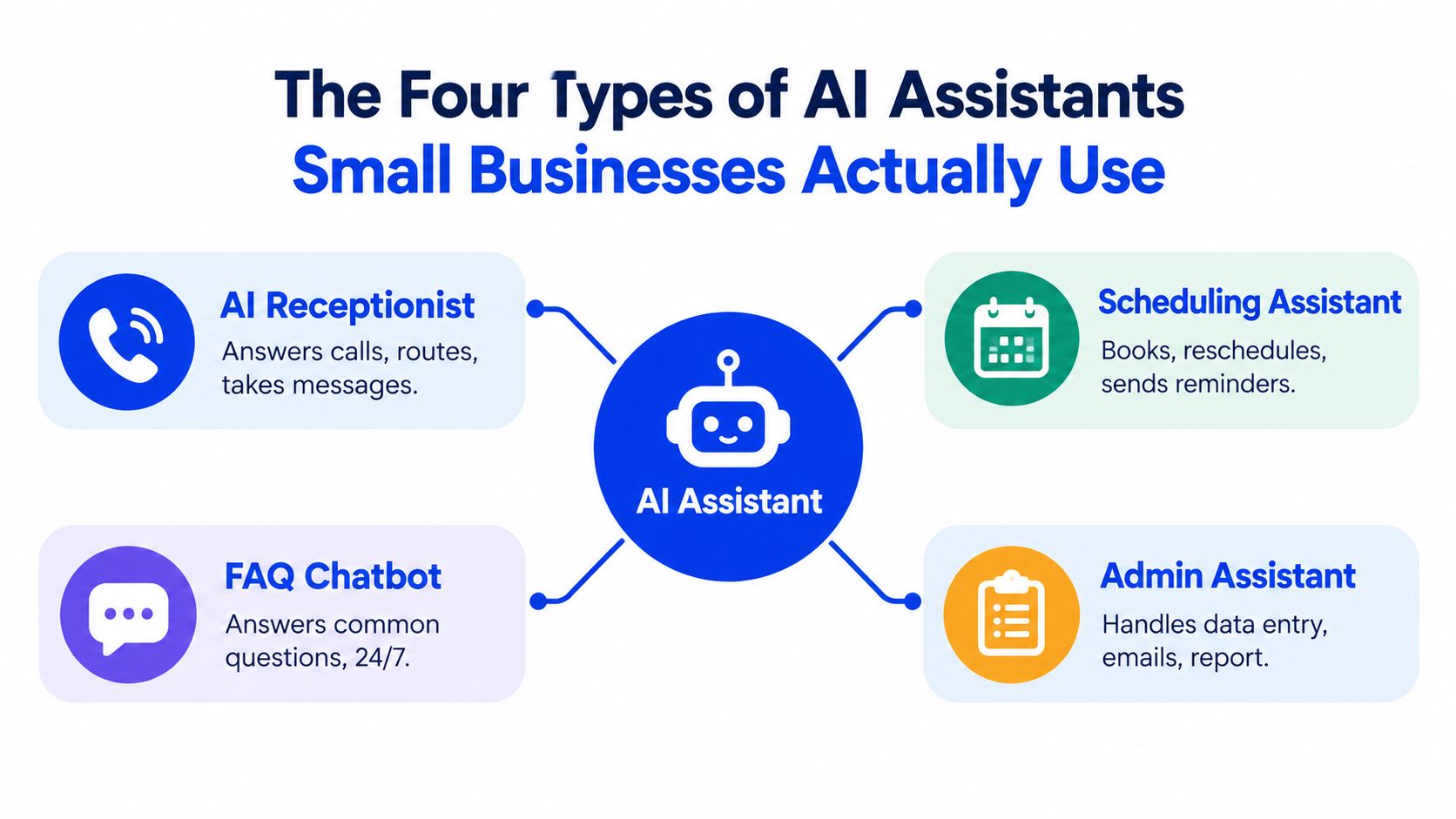
Small-business AI tools usually fall into four practical roles. Think of them as different members of a front-office team, even when one vendor bundles several roles together.
The AI receptionist
An AI receptionist answers incoming phone calls, identifies why someone is calling, provides approved information, routes the conversation, takes a message, or starts a booking. It's the closest substitute for a front-desk employee when the owner is serving a customer, driving, or away from the office.
The useful test is simple: can it handle a real caller who says, “I need an appointment next week, but I'm not sure which service I need”? A receptionist that only reads a script won't help much. One that captures the request and follows a defined handoff process can reduce the number of calls that disappear into voicemail.
The scheduling assistant
A scheduling assistant acts like a calendar coordinator. It checks availability, offers suitable times, books an appointment, handles rescheduling, and may send reminders. It must write to the actual calendar or practice-management system. A bot that says it booked an appointment without changing the calendar creates more work and can cause double-bookings.
Google Calendar, Calendly, and clinic scheduling systems each have different rules. Confirm the integration before you judge the conversation quality.
The FAQ and web-chat assistant
An FAQ bot is the knowledgeable guide on your website. Customers pull information from it by asking about hours, services, cancellation policies, insurance, pricing, or service areas. A web-chat widget is more proactive. It greets visitors, asks qualifying questions, and can turn a browsing session into an estimate request or appointment inquiry.
The inbox and ticket assistant
An inbox assistant works like a triage clerk. It sorts email, contact forms, and text messages, identifies urgency, drafts replies, and assigns follow-up work. A home-services company might use it to separate routine quote requests from urgent repair messages. A professional office might use it to flag messages that need a licensed person.
Some vendors sell these functions separately, while others bundle them. Start with the customer-facing gap, not the largest feature list.
Phone Answering and Appointment Scheduling in Practice
Phone answering and scheduling belong together because a captured call has limited value if the assistant can't move the customer toward a confirmed next step. The experience should feel less like a phone tree and more like a disciplined receptionist following business rules.
A strong call flow usually follows this sequence:
- Greeting: The assistant identifies the business and opens with a short, natural prompt.
- Intent capture: It determines whether the caller wants an appointment, a reschedule, a quote, directions, a policy answer, or a human.
- Calendar lookup: It checks live availability, including service duration, staff schedules, location, and time zone.
- Booking or confirmation: It books directly, or holds the information for staff confirmation when the request falls outside defined rules.
- Message taking: It records the caller's name, contact details, request, and urgency when no immediate action is available.
- Handoff summary: It sends staff a clean record instead of forcing them to replay an entire conversation.
The calendar connection is the dividing line between a real scheduling assistant and a talking FAQ. Google Calendar, Calendly, or a clinic PMS should reflect the appointment immediately. The system also needs rules for buffers, unavailable staff, holidays, time zones, and services that require a specific provider.
A caller who asks for a human should get a clear path, not an endless loop. During business hours, that may mean a live transfer. After hours, it may mean a message with a stated follow-up expectation. You'll find a useful operational breakdown in this guide to an automated phone booking system.
The IrisAgent voice-agent benchmark overview reports automated resolution for booking-and-change flows in the 65% to 80% range, with tightly defined booking tasks commonly targeting 90% to 95% or higher. Mixed inbound calls are harder, with blended resolution commonly targeted at 45% to 65%. Those figures reinforce one point: scope controls performance. An assistant should book routine appointments confidently and escalate ambiguous requests early.
Every answered call also creates a trackable event. You can review call intent, booking outcome, escalation reason, and unresolved question. That turns phone coverage from a vague service expense into an operating channel you can improve.
Customer FAQs, Web Chat, and Inbox Automation
Phone coverage gets attention because missed calls feel urgent, but customers also arrive through your website, contact forms, email, and text. These channels need different automation behavior.
A FAQ bot answers questions when visitors ask. A dental practice could use it for insurance participation, cancellation rules, office hours, and preparation instructions. It should answer only from approved information and direct clinical questions to staff.
A web-chat widget starts the interaction. A landscaping company might ask whether a visitor needs routine maintenance, a one-time cleanup, or an estimate for a larger project. The assistant can collect the address, service type, preferred timing, and contact details before passing the request to a person.
An inbox assistant handles volume rather than conversation design. An HVAC firm could have it classify messages by urgency, identify service addresses, pull out preferred appointment windows, and flag potential emergencies for immediate human attention. The value comes from reducing sorting and data entry, not from pretending every message can be resolved automatically.
One knowledge base should govern every channel
If your phone assistant says one cancellation policy, your website says another, and your inbox template uses an outdated fee, customers lose confidence. Keep services, hours, policies, service areas, and escalation rules in one maintained knowledge source whenever possible.
The U.S. Census Bureau Business Trends and Outlook Survey data summarized by Presenc shows that small-business AI use is expanding across business functions, with production-focused use among firms with fewer than 250 employees rising from 6.3% to 8.8% over six months in the cited period. The same compilation reports customer-service use at 29% and marketing use at 41%. For owners, the implication is practical: customers increasingly encounter automation before they reach staff, so consistency matters.
A scripted bot that can't handle an edge case will frustrate a customer faster than a clear “a team member will respond.” Give every channel a graceful exit, preserve the customer's context, and make the handoff visible to staff.
Implementation Decisions Owners Should Make First
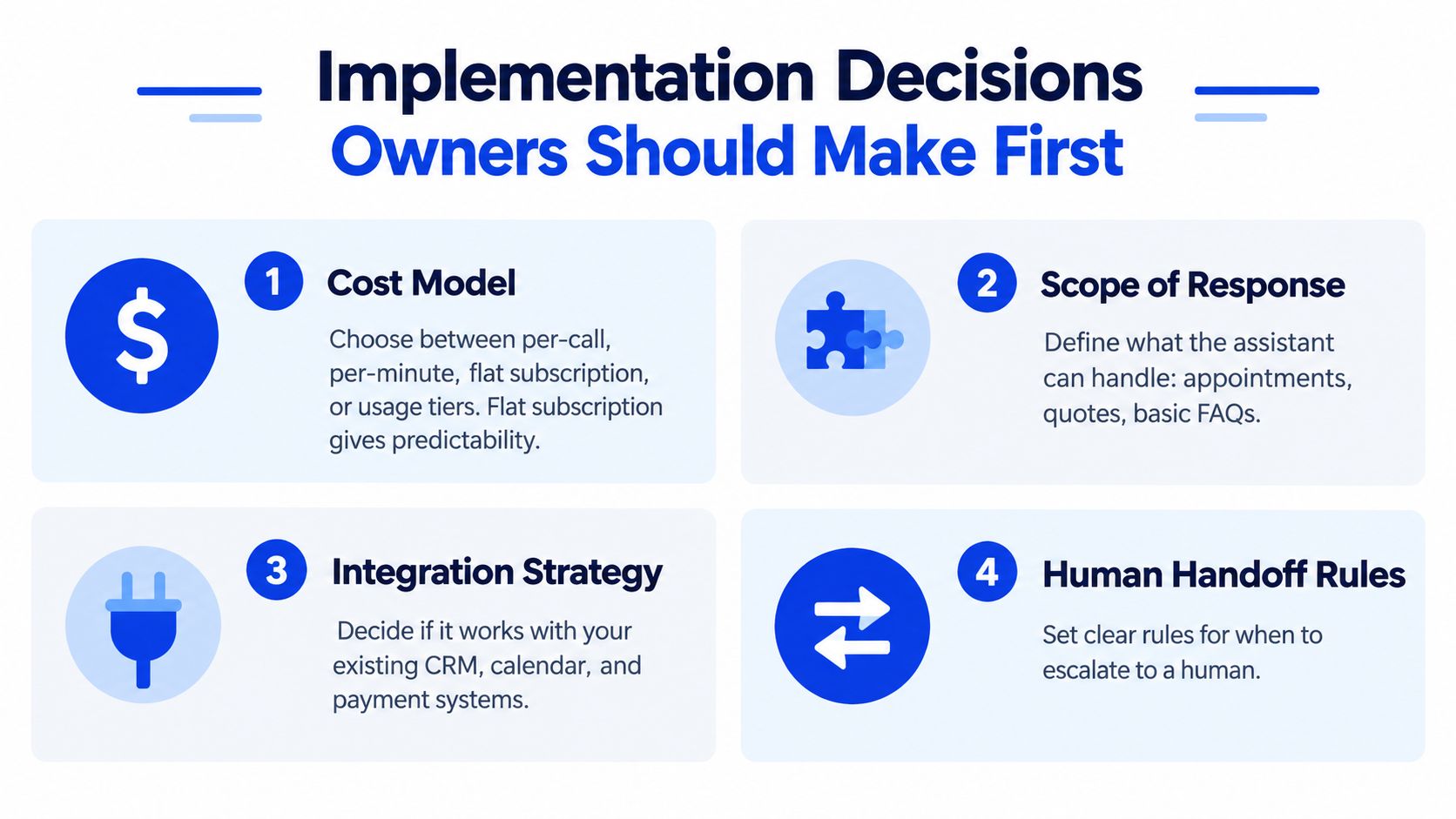
Don't sign a contract until you've decided how the assistant will fail. Most buying conversations focus on features. Operations-minded owners focus on exposure, integration, data, and workload.
Start with the cost model
Vendors may charge per call, per minute, through a flat subscription, or with usage tiers. Predictable appointment volume generally fits a flat subscription more comfortably because the monthly expense is easier to budget. Per-minute pricing can become unpleasant when callers spend time asking broad policy questions, comparing services, or repeating information.
Ask for examples of what counts as billable usage. Clarify whether transfers, recordings, retries, text follow-ups, and calendar actions create separate charges. Review the AI answering service setup guide before you compare providers, because setup effort is part of the cost even when it doesn't appear on the invoice.
Decide how deep the integration must go
A standalone assistant can answer questions, but staff may still copy names, phone numbers, and appointment details into a calendar or CRM. That manual step is the hidden cost of weak integration. Require the assistant to write into the system your team already trusts, or define exactly who reviews each captured request.
Review data handling before launch
Ask where recordings, transcripts, contact details, and calendar information live. Check who owns the data, how long the vendor retains it, who can access it, and how deletion requests work. A basic compliance review should produce clear answers, not a promise that security is “built in.”
Choose build or buy based on the failure you can afford
A custom GPT wrapper may look inexpensive until someone has to maintain prompts, integrations, authentication, testing, fallback behavior, and updates. A hosted receptionist usually costs more per month but shifts maintenance to the vendor. Custom builds rarely pencil out when the business has a modest call volume and no technical owner to maintain the system.
Decision criterion: Choose the model whose failure mode is cheapest to live with. A missed routine inquiry may be recoverable. A false booking, incorrect policy answer, or lost urgent message may not be.
Building the ROI Case With Real Numbers
Start with the calls your business currently loses. Earlier missed-call data showed that 37.8% of calls went to voicemail and 24.3% received no response. Those figures are a warning, not your forecast. Pull your own records before paying for an assistant.
Use a simple worksheet:
- Missed calls per week: Count them in your phone system, voicemail log, or manual tally.
- Recoverable booking rate: Estimate how many missed callers would have qualified for an appointment.
- Average job value: Use the first appointment or job value, not an optimistic lifetime value.
- Assistant cost: Include subscription, usage charges, setup, transfer fees, and staff review time. Compare vendors with this AI receptionist pricing breakdown.
- Contribution: Multiply recoverable calls by booking rate and average value, then subtract total assistant cost.
Do not build a forecast from invented business assumptions. The available data does not verify weekly call volume, average ticket, miss rate for a specific salon or contractor, or a monthly AI price. Use your own records instead of presenting a made-up two-chair salon example or an unsupported subscription range.
| Business Type | Weekly Inbound Calls | Avg. Job Value | Estimated Miss Rate | Monthly AI Cost | Net Monthly Contribution |
|---|---|---|---|---|---|
| Salon | Enter your data | Enter your data | Calculate from call logs | Confirm vendor quote | Recovered bookings minus cost |
| Dental or aesthetics practice | Enter your data | Enter your data | Calculate from call logs | Confirm vendor quote | Recovered bookings minus cost |
| HVAC or home services | Enter your data | Enter your data | Calculate from call logs | Confirm vendor quote | Recovered jobs minus cost |
For appointment businesses, separate routine bookings from mixed calls. The IrisAgent benchmark reporting places tightly defined booking and change automation in the 65% to 80% resolution range. Mixed inbound calls are commonly targeted at 45% to 65% blended resolution. Use the lower assumption when callers request quotes, file complaints, ask complex eligibility questions, or report urgent service needs.
Measure labor savings separately. Fewer voicemail callbacks, duplicate entries, and after-hours messages can return staff time without reducing headcount. A 2026 small-business AI adoption survey reported that 51% of U.S. small businesses said they already used AI in customer service, while 94% expected staffing to grow or remain stable. Count recovered front-office capacity alongside recovered bookings, then judge whether the assistant earns its place.
Where AI Assistants Fall Short and How to Avoid It
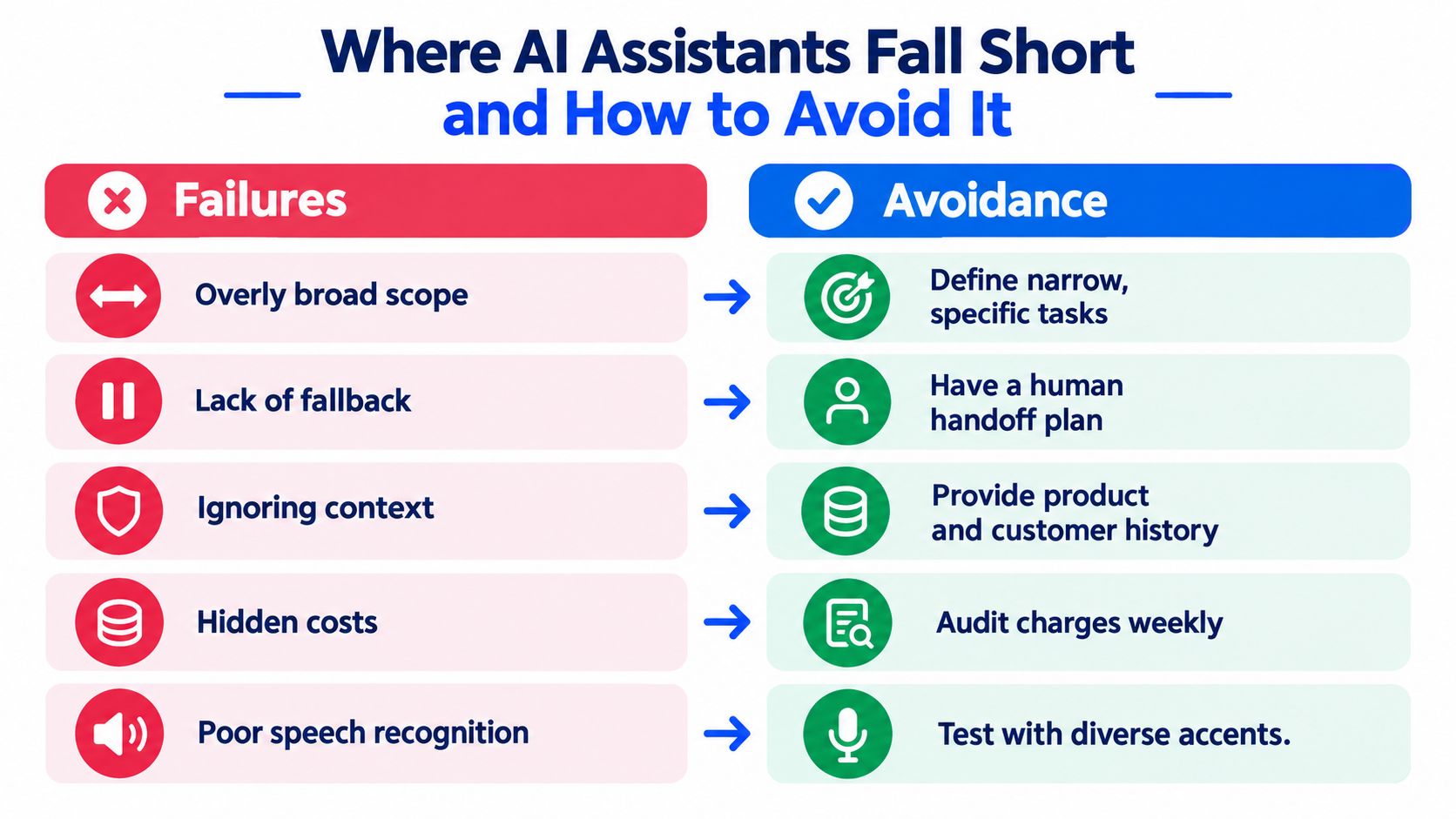
An AI receptionist won't “just work” because it can speak naturally. It works when the owner gives it a narrow job, accurate information, and a reliable escape route.
The first failure is over-scoping. Owners load every service, exception, pricing rule, and hypothetical situation into one assistant, then wonder why it guesses. Limit the first version to routine bookings, basic FAQs, message taking, and clearly defined routing. Keep quotes, disputes, clinical questions, legal advice, and unusual requests with a person.
The second failure is a weak handoff. If the assistant transfers callers to a full voicemail box, the automation has only moved the problem. Define what happens after one failed conversational turn, when a caller asks for a human, or when the calendar can't satisfy the request.
Put an owner on the knowledge base
Menus change. Hours change. Staff availability changes. A knowledge base that was accurate at launch can become dangerous after a policy update if nobody maintains it. Assign a specific person to review call failures, outdated answers, and booking exceptions on a recurring schedule.
Speech recognition also deserves real testing. Try different accents, background noise, fast speakers, names, addresses, and phone numbers. Don't test only with the owner reading a clean script in a quiet office.
Finally, keep emotionally charged conversations human. Complaints, cancellations after a bad experience, billing disputes, and sensitive personal situations need empathy and judgment. The Synabot analysis of small-business AI adoption notes uneven adoption between the smallest firms and larger small employers, which is a reminder that micro-businesses need simpler systems, not broader automation.
Good deployment doesn't aim for mistake-free automation. It makes mistakes visible, bounded, and easy for a human to correct.
Choosing and Launching the Right AI Assistant
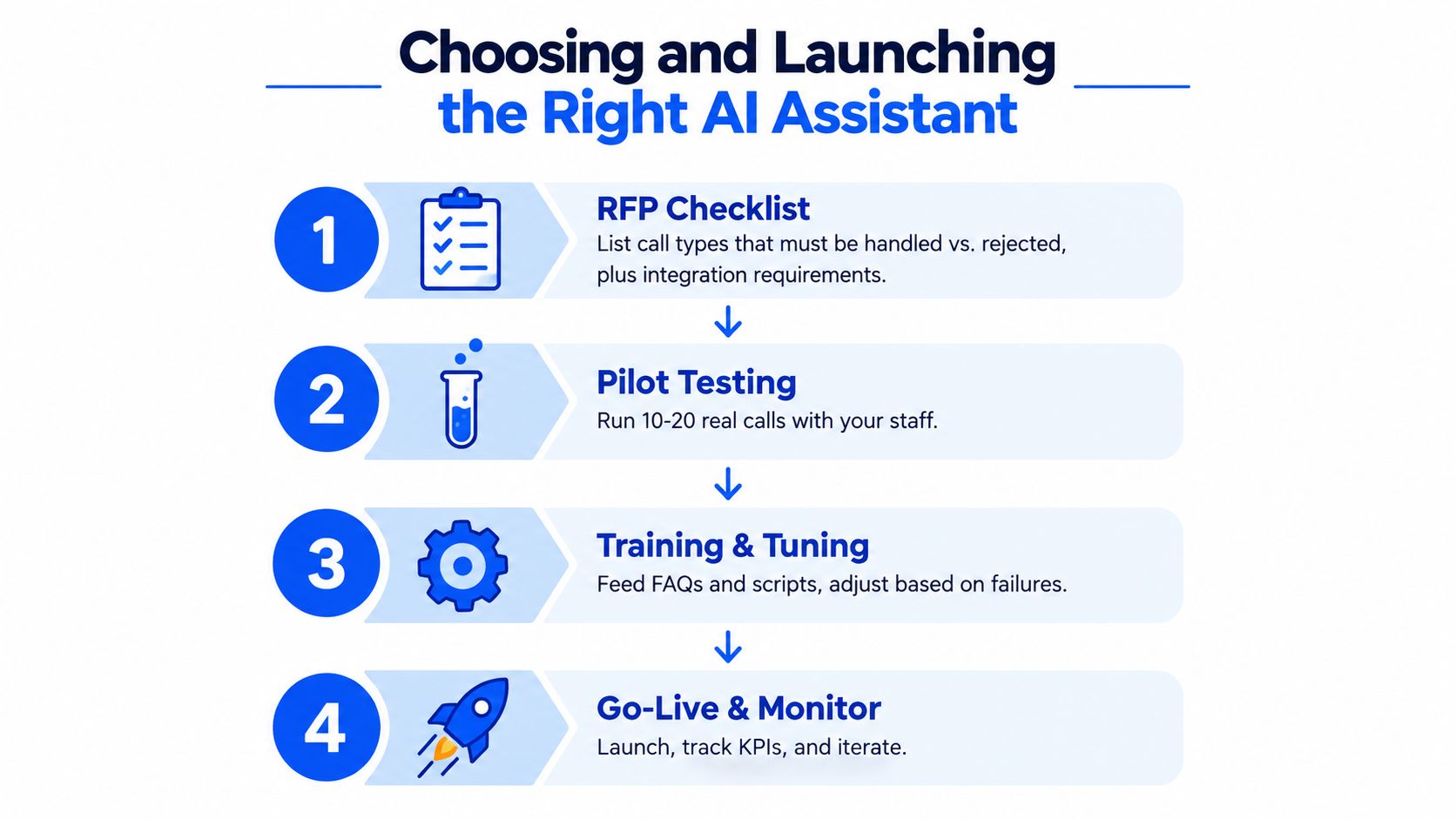
Start with a one-page request-for-proposal checklist. Write down the call types the assistant must handle, the requests it must escalate, the calendar or CRM it must update, the languages it must support, and the measures you'll review after launch. If a vendor can't answer those questions directly, the product isn't ready for your operation.
Use a narrow pilot
Choose one location, one phone channel, and a limited script. Begin with routine appointment requests, basic service questions, and message taking. Keep complex pricing, complaints, urgent cases, and anything requiring professional judgment outside the first release.
The launch sequence should look like this:
- Document the workflow: Record greetings, services, hours, booking rules, staff availability, and escalation triggers.
- Test real conversations: Have staff place calls using normal phrasing, interruptions, accents, background noise, and ambiguous requests.
- Review every early interaction: Listen to the first calls, compare AI outcomes with human outcomes, and correct knowledge gaps quickly.
- Set a decision gate: At the thirty-day review, expand the scope, retune the assistant, or replace it based on booking accuracy, handoff quality, unanswered requests, and staff workload.
Owner questions before signing
How much setup is reasonable? For a local business, the setup should be understandable to the owner or office manager. If every change requires a developer, routine maintenance will be skipped.
What should I measure first? Measure answered calls, completed bookings, escalations, failed transfers, incorrect answers, and staff time spent correcting records. Don't judge success by call duration alone.
How should I evaluate privacy? Ask where recordings and transcripts are stored, how long they remain available, who can access them, and how the vendor handles deletion and permissions.
What should the assistant cost? Compare the complete monthly expense with the value of recoverable appointments and the staff time saved. A low headline price can be expensive if it leaves staff copying every interaction into your calendar.
Heyline provides an AI phone receptionist for local appointment-based businesses that answers incoming calls, uses website information for business details, and books appointments through Google Calendar. Visit Heyline to review whether its short setup flow fits your phone coverage pilot, then test it against your own booking and escalation rules before expanding.


