The U.S. Small Business Administration's 2025 California profile counted approximately 4.3 million small businesses in California in 2025, representing 99.8% of all businesses in the state. Most run with thin front-desk cover, or none at all. An AI phone receptionist sounds like an easy fix for missed calls, but the key test isn't whether it answers. It's whether it books the right service, for the right length, with the right person, without creating correction work or privacy risk for your team.
What an AI Phone Receptionist Actually Does
Adoption is already well past early curiosity. In 2025, nearly half of small businesses were using AI and an additional 15% planned to adopt it within 12 months, according to the Federal Reserve's Small Business Credit Survey as summarised by the Federal Reserve Bank of San Francisco. An AI phone receptionist is a narrower tool than most of those uses. It's software that answers inbound calls in a natural voice, works out what the caller wants, answers questions from information your business has supplied, and books, reschedules or cancels appointments in your calendar.
Think of it as a receptionist who knows every service and price by heart, keeps the calendar open at all hours and never puts a caller on hold. The limit is judgement. When a caller wants an exception, a discount, or advice, it can't weigh context the way your staff can.
The three jobs, in order
- Answer: It picks up on your business number, greets the caller and stays available outside opening hours.
- Understand: It identifies whether the caller wants to book, ask about price or hours, reschedule, cancel, or raise something urgent.
- Act: It checks availability, writes the appointment, sends confirmation details, or passes the request to a person.
Say a barber is mid-cut when someone calls to move a Saturday appointment. Voicemail creates a callback loop, and the caller may ring a competitor instead of waiting. A rigid phone tree makes them press numbers and still leaves them without a new slot. The AI receptionist handles the reschedule during that first call, if the calendar rules allow it.
That gap matters because owners miss calls while cutting hair, treating patients, fitting a water heater, or seating tables. You don't need it to run your business. You need it to capture routine demand at the exact moment you're occupied with the work that pays.
An AI phone receptionist answers, understands and books. It doesn't replace the judgement of the people who run the business.
How an AI Phone Receptionist Handles One Call
A good booking works like a relay, with each stage passing clean information to the next. Weakness at any stage shows up later as a wrong time, a duplicate event, or staff time spent fixing the diary.
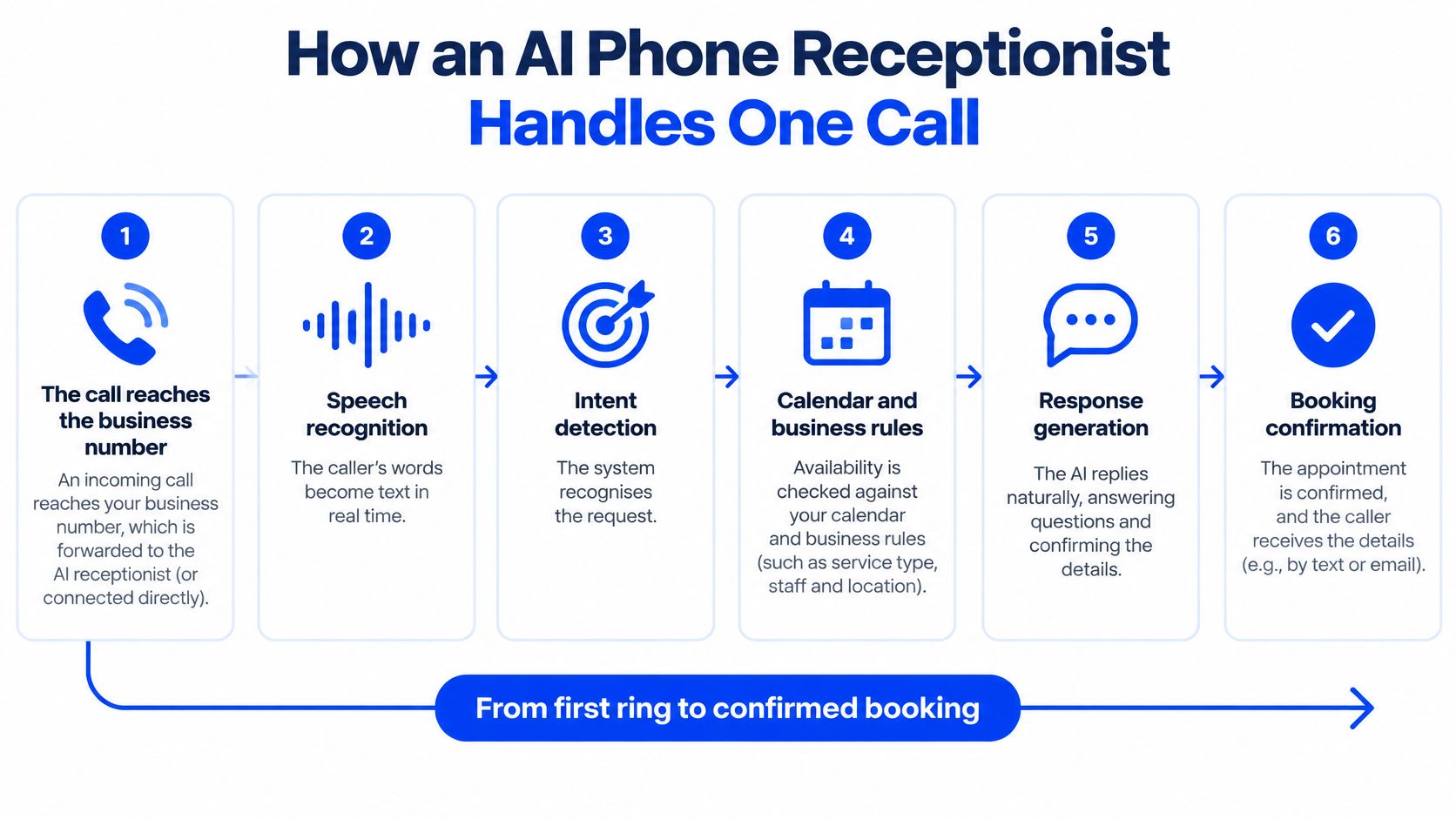
From first ring to confirmed booking
- The call reaches your number. Call forwarding or a connected number routes the caller to the system, a setup covered in this guide to how call routing directs inbound calls. Bad forwarding rules are the first failure point, because the AI never hears calls sent to the wrong place.
- Disclosure comes before booking details. The greeting states that the caller is speaking with an AI assistant and that the call may be recorded, and offers a way to continue without recording. Skipping this creates consent and trust problems before the conversation starts.
- Speech recognition turns words into text. It works in real time so the system can respond naturally. Noisy streets, speakerphone echo and overlapping talk can turn names and numbers into errors.
- The language layer identifies intent. It sorts the request into booking, question, reschedule, cancellation or urgent issue. Ambiguous phrases like "next Tuesday after the school run" need a clarifying question, not a guess.
- The knowledge layer supplies your facts. It pulls your configured service list, durations, prices and opening hours. If a duration was never entered, the system may book a long service into a short gap.
- The calendar check applies hard constraints. Closed hours, provider absence, minimum notice and service length decide whether a slot is serviceable. A final availability check immediately before the calendar write helps stop two callers receiving the same slot.
- It writes, then confirms. Only after the calendar returns success should the voice read back the date, time and service and confirm the booking. The caller hears confirmation of a saved appointment, not a promise made before the write.
- The call ends with a summary or handoff. Your team receives the booking details, and an unresolved request goes to a person with the caller's name and callback number. A timeout or retry must not create a second appointment for the same call.
The sequence looks simple when it works. Watching one complete call makes the handoffs between hearing, checking and confirming easier to judge.
Where It Helps and Where It Falls Short
Don't judge this tool by whether it sounds human. Judge it by how many routine calls it closes correctly and how cleanly it exits when a call stops being routine.
Where it earns its keep
- Any-hour cover: It answers evenings, weekends and peak periods when staff are busy.
- Consistent answers: Every caller hears the same hours, prices and booking rules you configured.
- No hold queue: A caller can book without waiting for someone to finish another conversation.
- Less phone tag: The appointment is made, moved or cancelled during the call instead of through callbacks.
- After-hours capture: Enquiries become bookings or logged requests instead of sitting in voicemail.
Where it falls short
- Multi-part requests: "Move my appointment, ask if my sister can join, and check that product" can produce one completed task and two missed ones.
- Difficult audio: Heavy background noise or strong accents can cause misheard names, dates or phone numbers.
- Emotional calls: Complaints need acknowledgement, discretion and sometimes a remedy an automated voice can't authorise.
- Clinical judgement: Symptoms and triage questions require qualified staff, not a booking script.
Two quieter failures cause more damage. First, stale information gets delivered confidently. If a salon raised colour prices last month and nobody updated the system, callers hear the old figure and staff inherit the argument at the till.
Second, a free calendar gap isn't always a bookable slot. A 90-minute colour service squeezed into a 30-minute opening looks successful in the call log and fails in the salon. The same applies when a procedure needs one specific provider.
Test what happens when it fails. If there's no clear route to a person, you've replaced voicemail with a more polished dead end.
Industry Use Cases for Salons, Clinics and Trades
The pattern is consistent across local services. The tool performs best where calls follow a predictable booking script, the rules can be written down, and a person is needed mainly for exceptions.
| Industry | Typical calls | What the AI handles well | Keep a human for |
|---|---|---|---|
| Hair salons, spas and barbershops | Bookings, service menu, price questions | Standard services, durations, add-ons | Colour corrections, complaints, pricing exceptions |
| Dental, medical and aesthetics clinics | New patient bookings, office hours, intake basics | Standard visits, intake fields, reminders | Symptoms, urgent triage, clinical advice |
| Law firms and professional services | Consultation requests, practice-area questions | Collecting intake details, booking consultations | Legal advice, conflict checks, urgent matters |
| Home services (HVAC, plumbing, cleaning) | Repair requests, quotes, service windows | Booking visits with travel time, capturing addresses | Emergency dispatch decisions, complex quotes |
| Restaurants and hospitality | Reservations, group bookings, hours, dietary questions | Table bookings within capacity rules | Large events, allergy-critical questions, complaints |
Two rules that decide success
In a salon, duration is the booking rule that matters most. A cut, full colour and treatment can't share one default appointment length. The calendar has to enforce service-specific times, processing gaps and stylist eligibility before the caller hears a confirmation.
For an HVAC contractor, travel does the same work. Two jobs may fit the clock but fail on the road if they're at opposite ends of a service area. The system should book within defined service windows and territories, capture the address and fault details, and let a dispatcher judge emergencies and complex quotes.
Clinical and legal settings need the firmest boundary. Use the receptionist to book standard visits and capture basic intake fields, as outlined in this overview of an AI receptionist for a medical office. Symptoms, urgent cases, conflict checks and legal advice stay with qualified staff every time.
Restaurants sit somewhere in between. A table for two on Friday is routine if capacity rules are current. A severe allergy, a buyout enquiry or an angry guest needs a person who can make decisions, not a voice that can only follow them.
AI Receptionist, Human Staff or Developer Tools Compared
Owners usually compare the wrong things first, voice quality and monthly price. The more useful comparison is cover, setup effort, control and who maintains the system when your services or hours change.
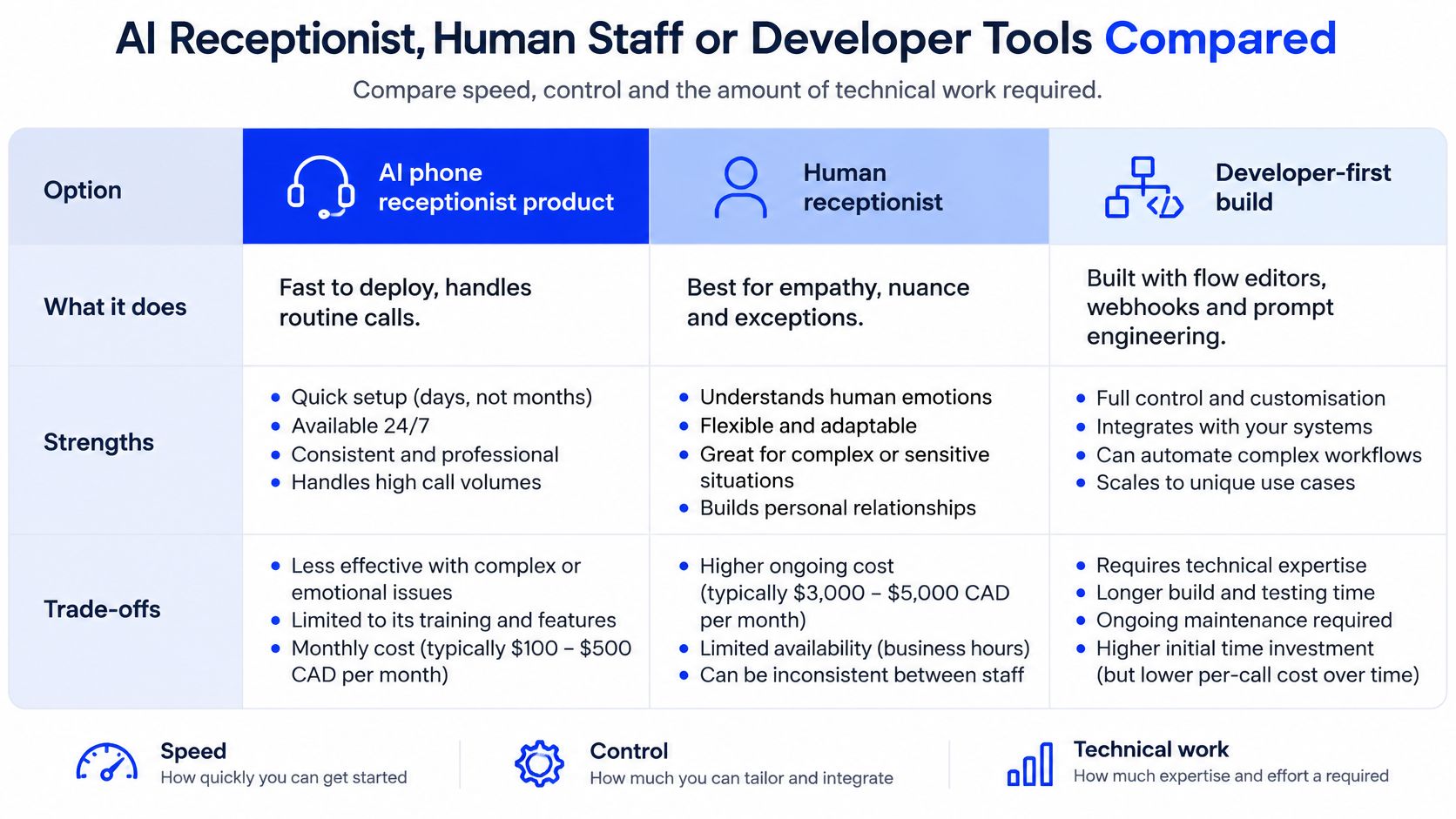
| Criterion | AI phone receptionist product | Human receptionist | Developer-first build |
|---|---|---|---|
| Hours covered | 24/7 | Shift hours only | 24/7 once built and hosted |
| Setup time | Minutes to days | Weeks for hiring and training | Weeks to months |
| Technical skill needed | Low, plain-language screens | Hiring and management skill for the owner | High for flows, webhooks and prompts |
| Control over call logic | Limited to product settings | Full, through judgement | Full |
| Ongoing maintenance | Handled by the vendor | Training, scheduling and cover | Your team or an agency |
| Cost structure | Subscription set by plan tier | Salary plus benefits | Build fees plus hosting and upkeep time |
A human offers warmth in person, reads a room and can solve a problem that doesn't match the script. Those strengths come with shift limits, recruitment, training and sick-day gaps. If you already have strong front-desk staff, an AI tool works better as overflow cover than as a replacement.
A developer-first build gives you full control through flow editors, webhooks and prompt engineering. That control is valuable for custom intake or unusual systems, but you're buying engineering time, hosting and ongoing fixes. Every edge case becomes your maintenance ticket.
An owner-focused product trades some control for speed. Heyline sits in that category, configuring itself from your public website, connecting Google Calendar through a three-screen setup, and offering optional one-to-one onboarding for founding businesses. You don't build flows or write prompts, but you also work within the settings the product provides.
My verdict by situation
A solo practitioner with after-hours overflow should start with the product option, limited to routine bookings. A multi-site clinic with complex intake should keep human control over exception handling and test automation on one narrow call type first. A company with engineering capacity and custom workflows can justify a developer build, provided someone owns it after launch.
Pricing and Return on Investment in Practice
Use your own call numbers, not a vendor's return claim. The core formula is:
Monthly recovered revenue = missed calls per week × 4.33 × recovery rate × average booking value
Subtract the monthly subscription to get the net gain. The recovery rate is the share of previously missed callers who complete a booking once the call is answered.
| Business type | Missed calls per week | Assumed recovery rate | Extra bookings per month |
|---|---|---|---|
| Hair salon | 12 | 25% | 13 |
| Dental practice | 10 | 20% | 9 |
| Plumbing or HVAC contractor | 8 | 30% | 10 |
| Law firm (consultations) | 6 | 20% | 5 |
| Restaurant (reservations) | 20 | 15% | 13 |
For the salon row, the maths is 12 missed calls × 4.33 weeks = about 52 missed calls a month. At a 25% recovery rate, that produces 13 extra bookings. Multiply 13 by your average booking value, then subtract the subscription. You can compare plan structures in this breakdown of AI receptionist pricing before you run the calculation.
Treat those recovery rates as assumptions to test. Public California-specific figures for AI receptionist conversion and no-show rates are scarce, so vendor performance claims aren't proof for your business. A cautious owner models a low rate first and replaces it with pilot results.
The simple formula also misses hidden cost. A wrong booking creates review, rescheduling and customer-service work, and some callers won't rebook after a poor first experience. Automation can shift labour into corrections instead of removing it.
Compare the subscription with the local salary and benefits you'd pay for added human cover. Enter your own rate rather than borrowing a national figure. Then judge value by completed bookings, booking-error rate and human-correction rate, not by answered calls alone.
Set Up Safely and Prove It in 30 Days
Setup is where booking accuracy and privacy are won or lost. Rushing the launch and fixing rules after callers hit them gives you a busy call log and a messy calendar.
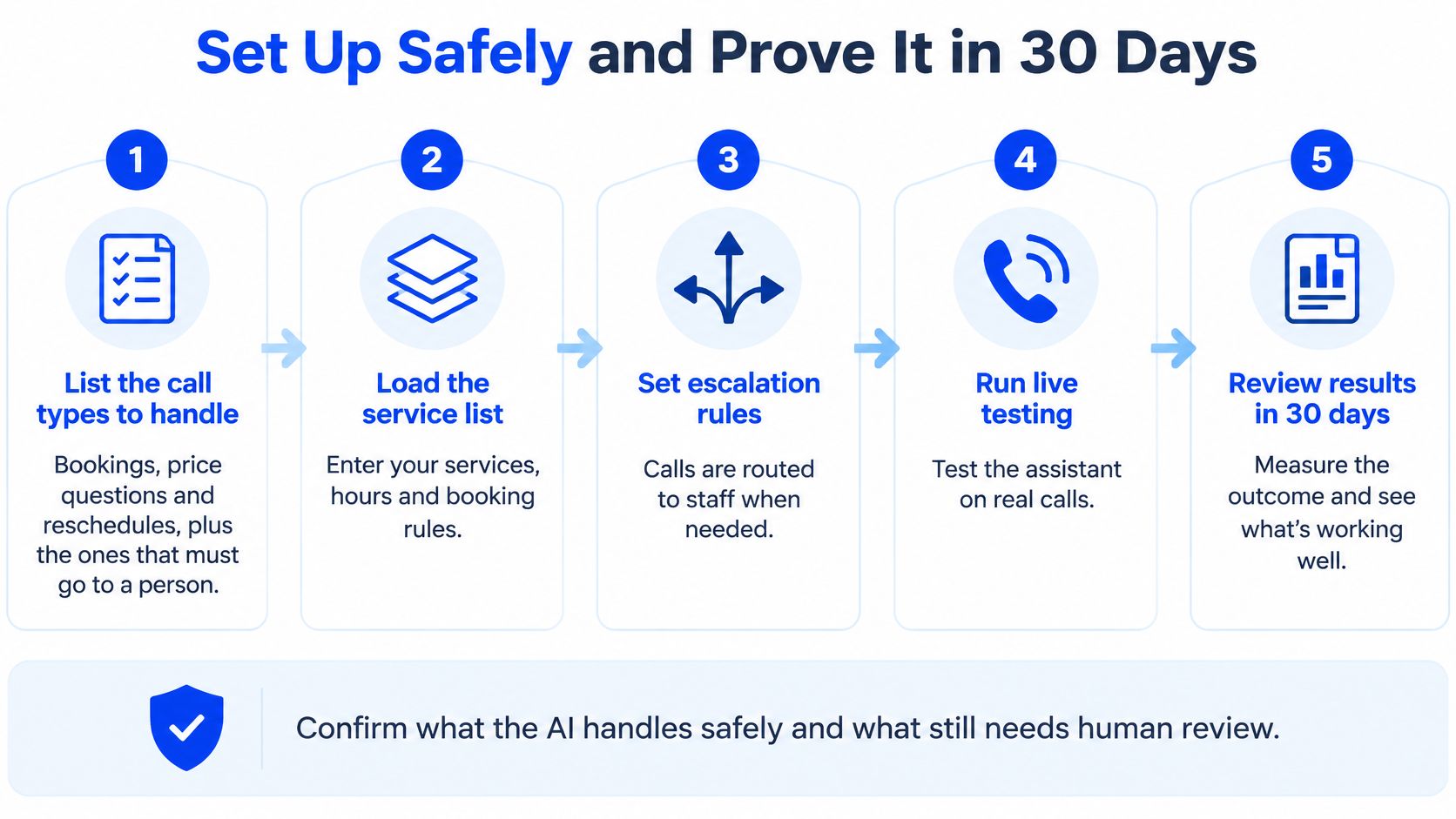
Set the boundaries before the first live call
- List the call types to handle. Include bookings, price questions and reschedules, then mark the calls that must go straight to a person. Write the boundary down before you touch any settings.
- Load an accurate service list. Enter services, durations, prices and opening hours, and remove anything out of date. Check the long services first, because duration errors create the worst diary clashes.
- Connect the calendar and set hard constraints. Add closed hours, provider absence, minimum notice and service-specific rules. A free slot should only become bookable after all of those checks pass.
- Set disclosure and recording defaults. Play a clear disclosure before substantive conversation begins, state that the call may be monitored or recorded, and offer an immediate option to disconnect or continue without recording. If the caller declines, disable recording and transcription where technically possible and keep only the fields needed to finish the booking, name, service, requested time and callback number.
California makes step four a design requirement, not a script preference. Under California's call-recording rules summarised by Justia, California Penal Code §632 generally requires consent from all parties before recording a confidential telephone communication, while §632.7 applies to calls involving cellular or cordless phones. The safer default is unrecorded operation with structured appointment fields rather than full audio retention.
Keep real-time speech processing separate from persistent storage, enforce consent state for each call, and block recordings or transcripts from being written before consent is established. If quality assurance requires recordings, store consent status with the call identifier, timestamp, disclosure version and caller response. California law provides civil remedies for violations, so recording everything and disclosing later is the wrong architecture.
- Define human handoff triggers. Send urgent symptoms, complaints, legal advice requests and emergency dispatch decisions to staff. Add a simple repeat rule too, such as a caller who asks for a person twice.
- Run 20 scripted test calls. Include normal bookings, edge cases, unclear dates, noisy lines and callers who decline recording. Check the calendar after every test, not just the call summary.
- Launch on after-hours overflow first. Extend into peak times only after the narrow rollout produces clean bookings. This gives you real calls at the lowest operational risk.
Small habits that prevent big cleanups
- Keep the greeting honest: Say it's an AI assistant and explain how to reach a person.
- Collect only needed intake fields: Extra questions lengthen calls and increase the personal information you must protect.
- Route emergencies explicitly: State the emergency path in plain words and don't let the booking flow absorb it.
- Audit durations weekly: Scan new bookings for services placed into gaps that are too short.
Run the 30-day pilot
Route one phone line for 30 days so you can compare like with like. Log every booking with its service, duration and provider, then count booking errors and human corrections each week. Add completed bookings, cancellations, after-hours booking share and handoffs, and compare the total with the same period before the pilot.
A solo operator who misses calls during service hours should start with after-hours and overflow routing, where the gain is clearest. A clinic or law practice should limit the tool to booking and intake, with qualified staff handling everything sensitive. A business with custom logic and engineering capacity may choose a developer-first build instead.
Check the pilot numbers against your recovery formula before expanding. Expand only if errors stay low, corrections don't eat the time saved, and recovered bookings cover the subscription with room to spare. I'd rather see a small, accurate rollout than a 24/7 launch your team spends the next month untangling.
Frequently Asked Questions About AI Phone Receptionists
Does an AI phone receptionist record my callers? It shouldn't do so without clear notice and consent. Disclose the AI and any recording at the start, offer a way to continue unrecorded, and keep only the booking fields if the caller declines.
Can it replace a human receptionist? For routine bookings, price questions and reschedules, it can cover the work. Symptoms, complaints, legal advice, conflict checks and complex quotes still need a person, so a reliable handoff isn't optional.
How does it avoid double bookings? It should check the authoritative calendar, write the appointment, and confirm only after the calendar returns success. That sequence, plus a final check before the write, stops two callers being told the same slot is free.
What happens when it cannot answer? It captures the request, logs the caller's details, and routes the caller to a person or arranges a callback under the handoff triggers you set. It shouldn't invent an answer or availability.
How much does it cost? You'll pay the plan subscription, and your true cost is that amount offset by net recovered bookings. Use your missed-call count, booking value and a cautious recovery rate rather than a promised return.
How long does setup take? Basic configuration can be finished in a day if your services, durations and calendar are clean. Give it a 30-day review before judging whether it's helping or creating corrections.
If missed calls are costing your salon, clinic, law office or trade business real bookings, Heyline can answer your line around the clock, use your own services and hours to respond, and book confirmed appointments into Google Calendar without a technical build. Set it up from your website, run test calls before launch, and measure the first 30 days by booking accuracy and corrections, not call volume alone.