A caller rings while you're finishing with a customer. The phone keeps ringing, voicemail asks them to leave a message, and you don't know whether they'll try again or book somewhere else. Telephone call answering isn't successful just because a call reaches a device. The caller needs to reach a booking, get a useful answer, or leave a message that someone can act on.
The right setup depends on where your current process breaks down: during busy periods, after closing, or between a caller's question and a confirmed appointment. Comparing the options by their coverage, booking ability and measurable outcomes makes that gap easier to identify.
Live, Automated and AI Answering Compared
| Option | Who answers | Hours covered | Main cost driver | Books appointments |
|---|---|---|---|---|
| Live in-house receptionist | Staff member | Staffed hours only | Wages and paid time off | Yes, if staff check the calendar |
| Outsourced answering service | Contracted operator | Contracted hours | Per-call or per-minute fees | Sometimes, if the service has calendar access |
| Automated voicemail or phone menu | Recorded message and keypad options | 24/7 | Low fixed cost | No, callers must call back |
| AI receptionist | Conversational AI voice | 24/7 | Subscription | Yes, with calendar connection |
A live in-house receptionist can adapt to a conversation, notice when someone is confused and clarify details naturally. The gap is coverage: the phone may go unanswered during lunch, outside staffed hours or when the receptionist is sick. In California, the average wage for receptionists and information clerks was $22.16 per hour in 2025, according to Bureau of Labor Statistics data cited for the state in Answering365's California overview. A live hire also brings paid time off into the staffing cost.
An outsourced answering service can extend coverage beyond your team's shifts, but the operator may not have access to your live calendar. If they can't confirm an available slot, they'll usually take a message for someone at your business to follow up. The caller reaches a person, but still may not get the appointment they wanted.
Voicemail and phone menus keep the line available without a receptionist. A recording can share hours or direct callers to keypad options, but it can't answer an unexpected question or secure a booking. Callers who need a conversation have to call back or wait for someone to return their message.
An AI receptionist is software that answers the line, understands a request made in natural speech, and either books an appointment or takes a message. The quality of its answers depends on what it knows about your business. For a helpful primer on how AI uses knowledge bases, consider how organised business information can support accurate responses.
Choose for the gap you need to close: coverage, booking, or cost. The rest of the decision comes down to whether callers actually reach a useful outcome.
How an AI Receptionist Handles One Call
A useful way to judge an answering system is to follow one call from the first ring to its final result. That shows what the caller experiences, what the system needs to know and where the business may need to follow up.
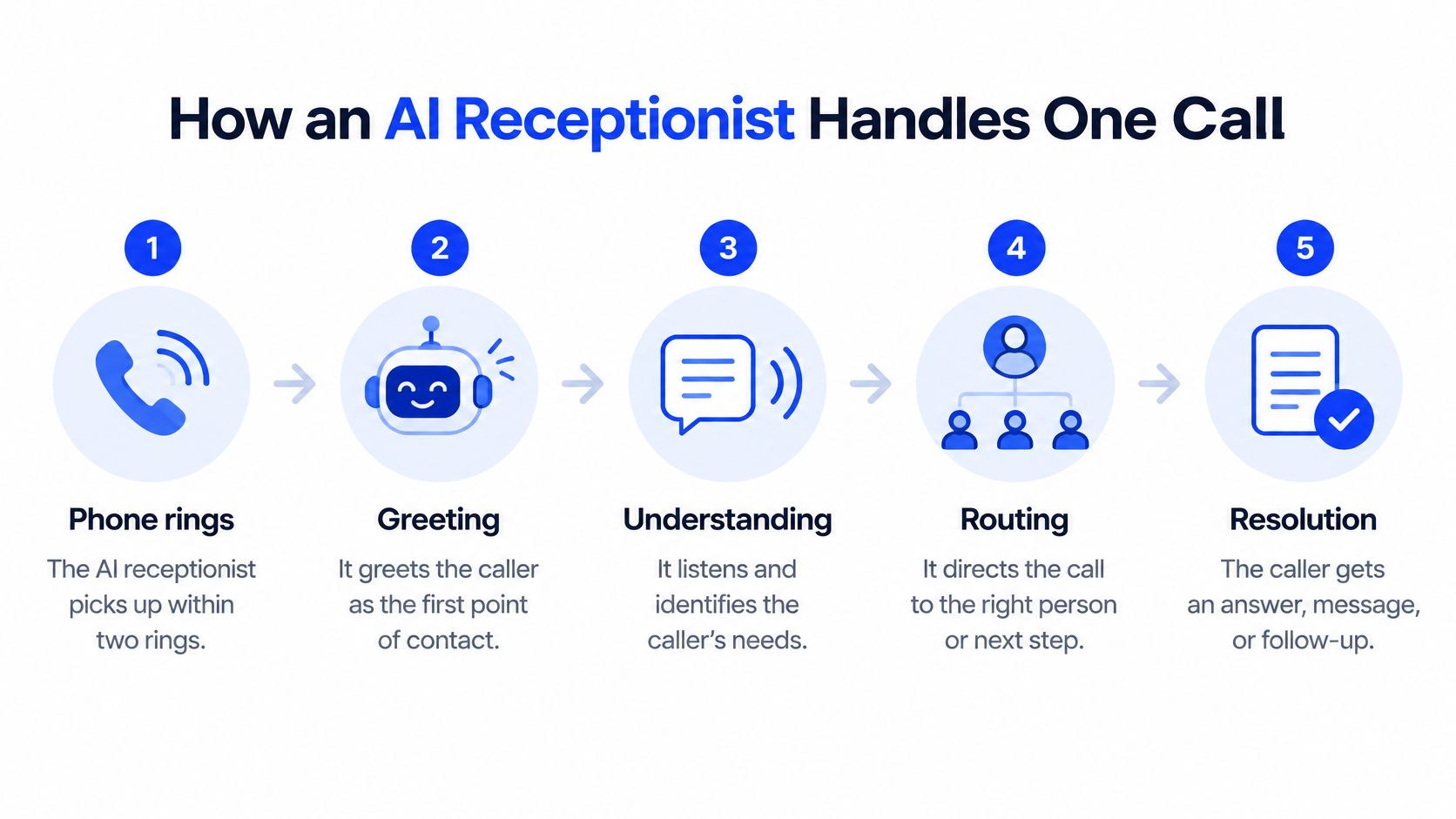
The phone rings. The AI receptionist picks up within two rings. A prompt answer means the caller isn't left wondering whether the business is open or whether anyone will respond.
The greeting identifies the system. It greets the caller as the business's AI receptionist, so the caller isn't led to believe they're speaking with a staff member. That disclosure sets an honest expectation for the conversation.
The caller explains what they need. Rather than pressing through a menu, the caller can say why they're calling. The receptionist responds in one to three sentences at a time, keeping the exchange manageable, and asks what the caller needs.
The system checks the next step. If the caller wants an appointment, the receptionist checks the calendar before offering a time. That prevents it from promising an unavailable slot; if the answer isn't in the business's notes, it should ask for details instead of guessing.
The call ends with an outcome. It may end with a booked appointment read back to the caller, a question answered from the business's notes, a message taken with a callback number, or a caller who hangs up. A message is still useful when the owner needs to provide the answer: the receptionist can collect the caller's name, number and question so the business has something concrete to follow up on.
The final outcome matters more than the sound of the voice. A polite greeting followed by no answer, no booking and no message still leaves the caller stranded. When you review any call log, ask whether each caller reached one of those outcomes and identify every call that ended without one.
Where Answering Calls Pays Off for Local Businesses
A caller usually rings because they need to settle something now: book a time, ask whether a service is available or explain what work they need. The value of answering depends on capturing that moment, not on whether the system is labelled live, automated or AI.
At a salon, spa or barbershop, the owner may have both hands busy with a client. A caller asking for a fade on Saturday can't wait for the barber to finish cutting, find the message and return the call. An answering line can collect the requested service and book an available time while the cut continues.
At a dental, medical or aesthetics practice, the front desk may be handling a queue of patients during a rush. A new patient calling to ask about availability can end up on voicemail if staff can't pick up. Answering the enquiry and confirming an appointment gives the caller a clear next step, rather than making them try another practice.
A law firm or professional service may receive intake calls while the person who handles them is in a meeting. If an answering system records the caller's name, number, matter type and reason for calling, the right person can follow up with the essentials already in hand. A message that says only “please call me” leaves more work for both sides.
For home services contractors, the missed call often comes while the owner is on a job site. A plumber who can't stop to answer a Sunday evening call may still need to capture the caller's address and the issue, so the request can be reviewed and scheduled. A useful intake is more actionable than a bare missed-call notification.
At a restaurant or hospitality business, dinner service can make it difficult to answer questions about hours or take reservations. Capturing a reservation request, or providing a reliable answer about opening hours, lets staff concentrate on the people already there.
Before choosing a system, list the three kinds of calls you miss most often each week. That list will reveal whether the real problem is coverage, intake, booking or follow-up.
If you're comparing ways to capture and manage enquiries, lead capture software is one related part of the process. The essential test is whether the caller's details lead to a clear next action for your business.
Routing Calls So They Reach the Answering Line
There are three basic ways to route calls. You can publish the answering line's number so it picks up every call, keep your business number and forward only unanswered calls, or use busy and no-answer forwarding so your phone rings first and the answering line receives calls you can't finish.
To explore how call paths fit together, see this guide to what call routing is. If you're comparing routing arrangements for a small business, SnapDial's small business call routing guide offers another useful reference.
Choose which calls should be forwarded. Decide whether the answering line should pick up every call or only missed calls. Busy and no-answer forwarding leaves you in control of calls you can take yourself.
Confirm the forwarding method with your carrier. Providers use different diversion codes and instructions, so use the list for your own phone plan rather than copying an unverified code. The code activates the route from your business line to the answering line.
Enable both busy and no-answer forwarding if you need both types of cover. With this arrangement, your business phone rings first, and the AI receptionist receives the call only when your phone can't finish it. This catches a second caller while you're already talking without making you give up your number.
Check voicemail on VoIP and internet phones. Turn off the provider's voicemail or set it to pick up after the answering line. If voicemail answers first, the caller leaves a message there and the answering line never gets the chance to respond.
Test both routes. Make one call while the business phone is busy and another that you leave unanswered. Confirm that the caller reaches the answering line and that any message arrives where your team can act on it.
A working setup gives the caller somewhere to go even when you're occupied. For example, if a second caller arrives while you're speaking with the first, the answering line can pick up and book that caller while your conversation continues.
Quality Metrics for Judging Every Answered Call
Count outcomes, not just incoming calls. A useful dashboard shows whether callers reach someone or something helpful, how long it takes, and whether the interaction ends in a booking or a follow-up task.
| Metric | What it measures | How to read it |
|---|---|---|
| Answer rate | Share of inbound calls picked up by a person or the AI | A low rate points to gaps in staffed or covered hours |
| Time to answer | Seconds from the first ring to the greeting | Longer waits drive callers to hang up |
| Abandonment rate | Calls that end before an answer, divided by calls entering the queue | Calls fully completed by automation stay out of the count |
| Missed-call rate | Calls that ring out with no answer and no message | Compare by hour to find coverage gaps |
| Callback completion | Share of messages returned, and how long each callback takes | Track elapsed hours, not just the count |
| Booking completion | Calls that end in a calendar-confirmed appointment | The clearest measure of whether answering converted |
Keep the denominator clear. California's state health-data programme definition of call abandonment counts calls that enter a queue and end before reaching a live agent, divided by all calls entering that queue. It excludes calls fully served by an automated response system. If you count those completed self-service calls as abandoned, your dashboard makes the queue look worse than it is.
A high answer rate paired with a long time to answer means callers are getting through, but may be waiting too long. Look at when the delay occurs and whether the same hours also show an increase in hang-ups. A strong top-line answer rate can hide a poor experience if callers wait through a lengthy greeting or queue.
A high answer rate with low booking completion points to a different issue. The answering system may be sharing information, but it isn't getting callers to an available time or confirming that an appointment was made. Check whether it has calendar access and whether the call log distinguishes a booking from a general enquiry. For a broader view of how customers evaluate service, use the questions in this customer service survey guide to shape your own feedback checks.
After-hours patterns help separate a coverage gap from a booking problem. If missed calls rise after closing, the business isn't providing enough cover at those times; if missed calls stay low but callback completion lags, follow-up needs attention. California managed-care telephone-access standards give a 60-second answer window for member calls and a one-business-day return target for non-urgent missed calls, as described in Health Net's California timely-access training. Treat those as borrowed reference points for a salon, clinic or contractor, not as legal targets for every business.
Review all six measures weekly during the first month, then monthly once the process is stable. Before changing your phone setup, pull one week of call logs and calculate each metric. That baseline helps you identify what needs fixing rather than guessing from total call volume.
Serving Callers Who Need More Than a Voice
A voice that sounds human can still exclude callers with hearing loss, speech differences, cognitive load or limited English or French. Replacing voicemail with conversational software doesn't automatically make the telephone channel accessible. Accessibility has to be designed into the interaction and tested in its outcomes.
In a Canadian survey of arts, heritage and entertainment organisations that communicate with customers by phone or in person, 25% also provided accessibility features such as visual aids, volume controls or speech-to-text services, according to Hill Strategies' communications accessibility report. Those organisations aren't a direct measure of salons or clinics, but the result signals why an ordinary voice experience shouldn't be assumed to work for everyone.
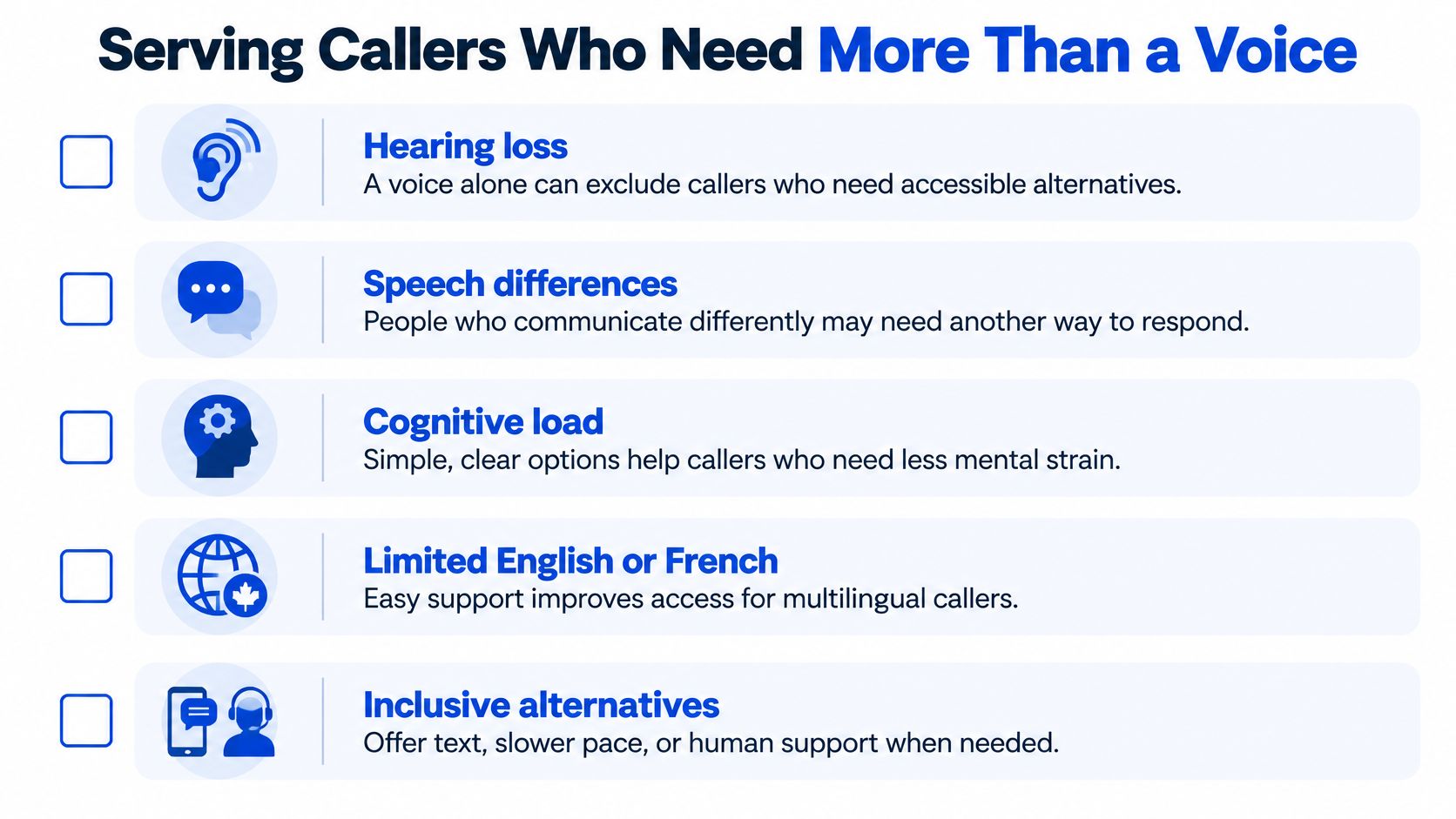
Use a test call to check each part of the interaction:
Disclose automation early. Let callers know they're speaking with an automated system, so they can decide how they want to continue.
Confirm important details aloud. Read back names, dates and appointment times, then ask the caller to confirm. This gives them a chance to correct a misunderstanding before it becomes a missed appointment.
Make repetition easy. A caller should be able to ask for a slower pace or a repeated detail without being made to feel they've done something wrong.
Keep language clear. Short, plain-language replies are easier to follow than long explanations. Limit each response to one to three sentences and give the caller a clear next step.
Offer another way to receive details. An SMS or email confirmation can help when spoken appointment information is difficult to retain or hear. The alternative should be optional, not a requirement for completing the call.
Set a realistic escalation path. If the caller asks for a person, or the answer needs the owner, collect their name, number, preferred callback time and reason for calling. A live transfer should happen only when the business has approved it for specific callers; otherwise, explain that the business will follow up and take a message. Some answering setups, including Heyline, take a message rather than transfer a live caller to the owner's mobile.
Measure successful completion, correction rates and human-escalation outcomes. Those measures reveal whether callers can finish what they called to do, not merely whether they stayed on the line.
Recording Consent and Retention Rules in Canada
For Canadian businesses, answering an inbound request is different from making an unsolicited outbound call. The CRTC's telemarketing guidance says CASL doesn't apply to unsolicited telecommunications, including live voice and automated telemarketing calls; those fall under the Unsolicited Telecommunications Rules. But when a business records or transcribes an inbound conversation, it still needs to consider notice, consent, purpose, retention, access and security.
Commercial call recording generally requires telling the caller and obtaining consent. Privacy obligations may arise under PIPEDA and provincial laws in Alberta, British Columbia and Quebec, so don't assume one setting or script works everywhere.
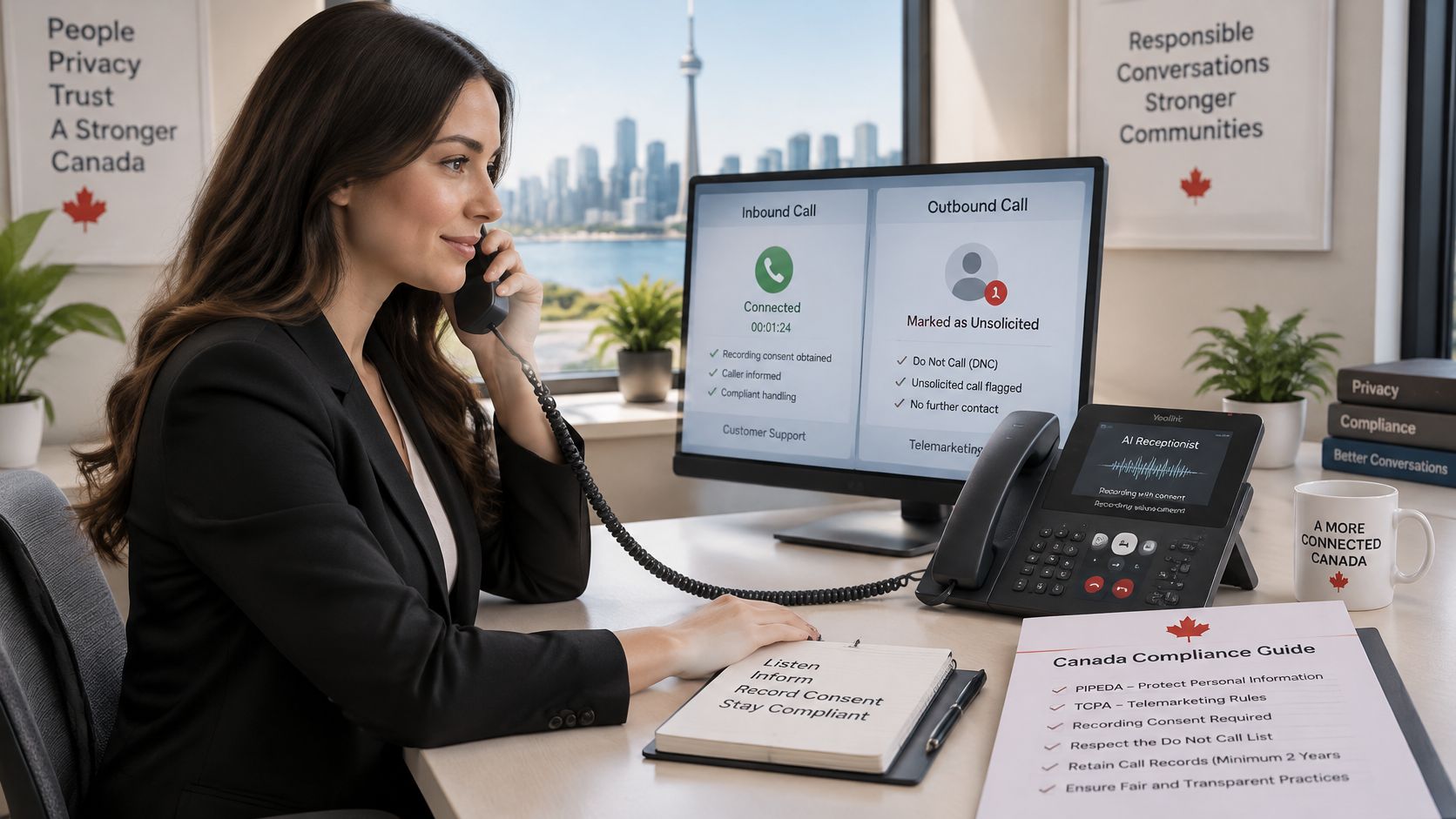
Use this checklist to set a clear process:
Give a short opening disclosure. Say that the call may be recorded or transcribed before collecting details. This tells the caller what may happen to the conversation.
Limit recording to a stated purpose. Turn on recording or transcription only when you have a defined reason, such as documenting an appointment request or supporting call follow-up.
Set a retention period. Decide in writing how long each type of stored call is kept, and apply that rule consistently rather than retaining recordings indefinitely.
Restrict access. Give access only to staff who need the information to perform their work. This matters especially when a caller discusses a health, legal or personal concern.
Provide a human escalation route. Make sure a caller can ask for follow-up from a person and that the business has a process for receiving and acting on the message.
Offer a no-recording alternative. Where practical, take a message without storing audio or a transcript. The caller may still need a way to reach the business without agreeing to recording.
Clinics, legal practices and aesthetics businesses can receive particularly sensitive details, so they should choose strict recording, access and retention settings. This is general information, not legal advice. Confirm the rules that apply in your province with a privacy adviser before you record or store calls.
Confirm Your Answering Option Before You Commit
Start with the gap that costs your business the most. It may be missed calls outside opening hours, enquiries that never become bookings, or staff time lost to playing phone tag. Choose the answering option that addresses that problem, then check whether it improves the six metrics and meets your accessibility and consent requirements.
A practical test is to enable forwarding for missed calls only for two weeks. Review answer rate, time to answer, abandonment rate, missed-call rate, callback completion and booking completion before you expand the coverage. Also confirm where recordings are stored, who can access them and how long they're kept before you publish a number to callers.
When comparing AI answering options, check whether the system can book against your live calendar. A line that only collects messages isn't the same as one that can confirm an appointment during the call. Heyline builds its receptionist from a customer's website address and can be ready to answer about sixty seconds later; the business can connect its calendar for appointment booking.
Write down one decision you'll make this week and the metric you'll use to judge it. That turns "improve the phones" into a change you can assess.
Heyline offers AI phone answering for missed calls, after-hours coverage, booking by phone and voicemail replacement. If you want to see whether a calendar-connected answering line fits your business, visit Heyline and consider how it would handle your most common calls.