At 10:14 a.m., a two-chair dental office can lose a new patient without anyone doing anything wrong. The receptionist is checking someone in, the hygienist is mid-procedure, and the office line rings once before sending the caller to voicemail. After four rings, a person with a cracked tooth hangs up and calls the next practice that answers.
That missed booking looks like a staffing problem, but it may be a call routing problem. The phone system had no useful rule for what to do when the front desk was busy. Call routing is the invisible set of decisions that determines whether a caller reaches a person, waits in a queue, hears information, leaves a message, or books an appointment.
For small businesses, the phone isn't just a communications tool. It's part of the sales and scheduling process. This guide explains what call routing means, how the main methods work, where each fits in a salon, clinic, or contractor's operation, and when an AI receptionist can replace several traditional layers.
The Booking Call You Did Not Know You Lost
The caller might have asked for a same-day emergency appointment. They might have wanted to know whether the practice accepts their insurance. They might have needed a cleaning. The front desk never learned which, because the system made a single decision, send the call to voicemail.
That distinction matters. A person can be answering calls reliably and still lose opportunities if the phone system routes calls poorly. A salon owner may be shampooing a client while a new customer calls about an available color appointment. A plumber may be under a sink when a homeowner calls about a burst pipe. A cleaning company may have every field technician assigned while new estimate requests arrive.
Practical rule: Treat every unanswered booking call as a routing event to investigate, not merely as evidence that staff need to work faster.
An observational dataset covering 85 businesses across 58 industries found that only 37.8% of incoming calls were answered live, while 37.8% went to voicemail and 24.3% received no response. In other words, about 62% of calls were unattended, and 70% of businesses answered fewer than half of their calls. The findings are summarized in this analysis of missed calls by industry.
For an appointment business, those figures aren't abstract telecom measurements. They represent a dental cleaning that never reaches the calendar, a salon consultation that goes to another stylist, or a contractor estimate that a competitor accepts instead. You can review how a Google Business Profile call reaches your team in this guide to handling calls from a Google Business listing.
The central question isn't just, “Who answers the phone?” It's, “What should happen when the preferred person can't answer right now?” Call routing supplies that answer.
What Call Routing Actually Means
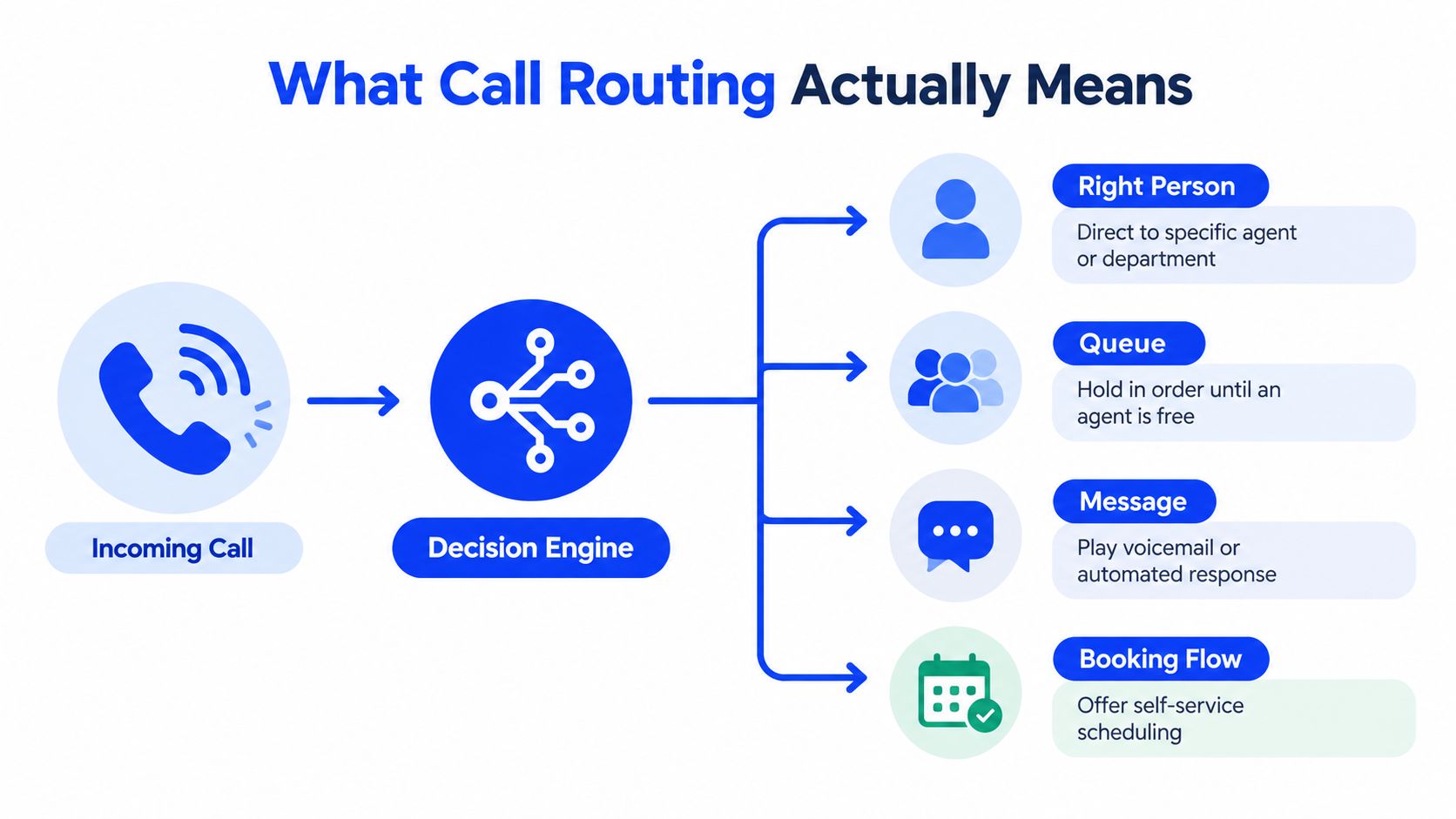
Call routing is the decision process that sends an inbound call to the right destination. That destination might be a person, a department, a queue, a voicemail box, an automated response, or a booking flow. The system checks conditions defined by the business, then chooses what happens next.
A useful mental model has four steps:
- A call enters. The caller dials a business number, a service-specific line, or a location number.
- The system checks conditions. It may look at the number dialed, the time, caller input, caller identity, queue length, or staff availability.
- The system selects a destination. It can ring one employee, several phones, a specialist group, an automated assistant, or a calendar.
- The call follows a fallback rule. If nobody answers, the system may try another person, place the caller in a queue, collect a message, or offer self-service.
Even a small shop uses routing. A two-line salon might ring the owner and receptionist at the same time. A medical practice might send appointment calls to a scheduling team and prescription questions to a clinical line. A multi-location contractor might route calls according to the service area or the office that manages a particular job.
The decision engine behind the ring
Modern call routing often sits on top of interactive voice response, or IVR, and contact-center software. These systems apply rules such as time of day, agent skill, queue length, and caller input to decide where an inbound call should go. Salesforce's explanation of call routing describes this broader role, where routing can direct a caller before a physical desk phone rings.
That means routing isn't just a transfer after someone answers. It can intercept the call first, ask what the caller needs, and avoid sending a booking request through a billing queue. For a clinic, “I need to reschedule my appointment” should lead to a scheduling path. For a contractor, “My boiler is leaking” may need an urgent service workflow rather than a general estimate line.
The same logic applies whether your system has one receptionist or many departments. The difference is the number of conditions and destinations it manages.
The Main Methods That Decide Where a Call Goes
Most routing setups combine several methods. A caller might first dial a specific number, then hear an IVR prompt, then enter a queue that rings available staff, with a time-of-day rule controlling the final fallback.
DNIS identifies the number the caller dialed
DNIS, or Dialed Number Identification Service, tells the phone system which business number received the call. That lets the same team answer differently depending on the number.
A salon could publish one number for appointments and another for wholesale product orders. The receptionist sees the intended purpose before answering and can use the right greeting or route the call to the appropriate person.
Local example: A skincare clinic uses separate numbers for new-patient consultations and existing-patient follow-up, so each call starts in the correct workflow.
IVR lets callers choose a path
IVR uses recorded prompts, keypad selections, or speech input. “Press 1 for appointments” and “Press 2 for directions” are familiar examples. A well-designed IVR removes simple questions from the front desk. A poorly designed one makes callers guess which internal department understands their need.
Keep the choices short and connected to customer language. A caller usually thinks “book a haircut,” not “select the intake and scheduling department.” For a deeper explanation of menu-based routing, see this guide to what a phone tree is.
Local example: A dental office lets callers request an appointment, hear office hours, or reach an existing-patient line.
Hunt groups look for an available person
A hunt group rings several extensions according to a sequence. The phones may ring one after another, or multiple staff members may receive the call simultaneously. The goal is simple, find someone who can answer.
This works well when staff have similar responsibilities. It becomes less useful when the first available person can't solve the caller's problem and must transfer the call.
Local example: A small barbershop rings the owner, manager, and front desk together during busy periods.
Skills-based routing matches the need to the right specialist
Skills-based routing uses information about the caller or the request to select an appropriately qualified employee. The relevant skill might be language, service type, location, product knowledge, or clinical role.
A clinic may route Spanish-speaking patients to a bilingual coordinator. A law firm may separate consultations by practice area. A home-services company may send a commercial HVAC request to a technician or coordinator who handles commercial work.
Local example: A beauty clinic routes laser-treatment questions to a specialist instead of a general receptionist.
Time-of-day routing changes the destination by schedule
Time-of-day routing applies different rules during business hours, lunch breaks, evenings, holidays, or seasonal closures. During open hours, the call might ring the front desk. During lunch, it could ring a mobile employee. After hours, it might reach an answering service, an AI receptionist, an emergency line, or a booking system.
Local example: A cleaning company sends weekday estimate calls to the office and evening inquiries to an on-call coordinator.
Five Call Routing Methods at a Glance
| Method | What It Checks | Local Business Example |
|---|---|---|
| DNIS | Which number the caller dialed | Separate booking and wholesale numbers for a salon |
| IVR | Keypad or spoken caller input | “Appointments,” “hours,” or “existing patients” at a clinic |
| Hunt groups | Which extensions answer first | Several barbers or receptionists ring together |
| Skills-based routing | Caller intent, language, service, or staff capability | A bilingual medical coordinator receives the call |
| Time-of-day routing | Business hours, breaks, holidays, or on-call schedules | After-hours contractor calls reach an on-call team |
For VoIP and SIP systems, these business rules operate within a technical call flow. A typical setup receives a SIP INVITE, resolves the destination, applies routing or failover logic, negotiates media settings, and carries audio through RTP or SRTP. The signaling and media layers remain separate, which allows a business to change route selection without redesigning the voice stream. This overview of VoIP call routing technology explains that architecture in more technical detail.
Matching Routing Methods to Local Business Needs
The right method depends less on the phone vendor than on the moment when calls become difficult to handle. A single-location salon with a small team has a different problem from a clinic with several specialties. A contractor may need the same basic phone number to behave differently at 9 a.m. and late at night.
DNIS fits businesses with multiple customer entry points. Use it when separate numbers represent locations, services, campaigns, or customer types. A dental group with different location numbers can identify the intended office immediately. A contractor tracking calls from different service pages can send each inquiry toward the responsible team.
IVR helps with predictable, simple requests. It can answer office hours, provide directions, or separate new appointments from existing-patient support. It shouldn't force callers through a long sequence before they can speak to someone.
Hunt groups suit small teams with shared duties. If any trained employee can book an appointment, simultaneous ringing may be enough. The method becomes weaker when staff members have different specialties or when nobody monitors the overflow destination.
Skills-based routing is useful when the first answer matters. Clinics, legal practices, aesthetic businesses, and technical contractors often benefit from matching a request with someone who understands it. This reduces unnecessary transfers, but only if the skill and availability information stays accurate.
Time-of-day routing protects coverage outside the normal schedule. It defines what happens during lunch, evenings, holidays, and unexpected closures. A rule that ends at the front desk after closing is incomplete. It needs a useful next step.
Choosing a Routing Method by Business Profile
| Business Profile | Best-Fit Routing Method | Why It Works |
|---|---|---|
| One location, shared front desk, straightforward requests | Hunt group with basic time-of-day rules | Any available employee can handle ordinary calls |
| Multiple services or published phone numbers | DNIS plus IVR | The system recognizes the caller's entry point and stated need |
| Several departments or specialist staff | Skills-based routing | Calls can reach people with the right language or service knowledge |
| Frequent after-hours inquiries | Time-of-day routing with live overflow | Calls have a defined destination when the office is closed |
| Appointment business with changing availability | Intent-based routing connected to a calendar | The conversation can lead directly to an available booking path |
Call volume, team size, and complexity should guide the design. More layers aren't automatically better. Every menu, transfer, and queue adds another point where a caller can abandon the process.
Routing should reflect how customers describe their needs, not how your org chart is arranged.
For many local businesses, the next step is combining several rules into one conversational front door. That's where an AI receptionist can absorb some traditional routing functions while leaving human handoffs in place for cases that need judgment.
How AI Receptionists Like Heyline Change the Equation
A traditional phone system asks the caller to select from options. An AI receptionist can start with the caller's purpose instead. The caller says, "I need to move my appointment," or "Can someone come out today because my furnace stopped working?" The system interprets the request and follows the matching business rule.
That doesn't mean every company should remove its existing phone system. The practical choice is often to replace the layers that create friction and keep the rules that provide useful control.
Start with the business information
An appointment business typically prepares the AI receptionist by providing:
- Business details: Services, hours, locations, pricing information, and common questions.
- Calendar access: The scheduling calendar shows which appointment times are genuinely open.
- Staff rules: The business identifies which employees or service types belong together.
- Phone connection: The business forwards or connects its number so calls can reach the receptionist.
- Fallback preferences: The owner decides when the system should transfer to staff, take a message, or arrange follow-up.
Heyline describes a setup based on a public website, a connected calendar, testing, and launch. Its stated product functions include website-based intake for services and hours, Google Calendar availability checks, voice selection, test calls, and editable knowledge fields. Businesses can review the AI phone receptionist for business before deciding which parts of their current system should remain.
Replace the layers that don't need a menu
A natural conversation can cover several jobs that traditionally require separate routing components:
- IVR replacement: The caller explains the need instead of pressing through a long menu.
- Time-of-day coverage: The receptionist can answer when the office is closed, subject to the business rules.
- Basic skills dispatch: The system can identify whether the request concerns a haircut, consultation, repair, or another service.
- Booking assistance: The system checks calendar availability and offers openings instead of recording a request for someone else to schedule later.
- Human escalation: Complicated, sensitive, or high-priority conversations can move to a staff member.
The calendar connection is especially important. A routing system that knows the service but not the actual appointment availability can create false promises. A calendar-aware assistant should offer only the openings available under the configured rules.
Keep traditional routing as a safety net
An existing IVR may still be valuable for regulated notices, dedicated departments, emergency instructions, or callers who need a known extension. A business can place the AI receptionist before the current system, after a missed call, or beside it as an overflow destination.
The decision depends on the failure you're trying to fix. If callers need simple answers and booking help, conversational handling may replace several menu steps. If the business has complex departments, strict escalation rules, or specialized call recording requirements, the AI can handle initial intent and then pass the call into the established routing structure.
The Real Cost of Weak Routing for Appointment Businesses
A missed call has a business meaning. It may be a lost dental cleaning, a cancelled cleaning estimate, an unbooked consultation, or an urgent repair that goes to a competitor. The phone system doesn't record the value of that opportunity unless the business connects call outcomes to bookings.
The callback behavior makes the problem sharper. Research cited in this overview of intelligent call routing says 85% of people whose call goes unanswered won't call back. That means voicemail isn't a reliable recovery strategy. It shifts the responsibility to the caller, and many callers move on.
A separate benchmark cited in the same source says businesses may lose an average of 22% of inbound calls across larger company samples. The small-business observational data is more severe in some settings, with only 37.8% answered live, as noted earlier. These figures come from different samples, so they shouldn't be blended into one universal benchmark. Together, they show why a local appointment business needs to examine its own answer and abandonment patterns.
Where the loss appears
- Peak-hour overflow: The front desk is occupied, and calls fall into voicemail without an alternate answer path.
- Long queues: A caller waits while staff finish another conversation, then abandons before reaching anyone.
- Misrouting: A new patient reaches a general line, gets transferred, and gives up before scheduling.
- After-hours gaps: A caller with a flexible schedule reaches a closed-office message instead of a booking option.
- Delayed follow-up: Staff return calls later, after the caller has already contacted another provider.
Extra staff can help, but staffing alone doesn't correct a system that sends every busy-period call to the same dead end. Better routing gives each call a defined next step, whether that means a person, a queue, self-service, or a useful message.
Failure Modes and How Smart Routing Prevents Them
Many owners assume that a call is “handled” once the phone system answers. That isn't enough. A caller can still reach the wrong queue, hear stale information, or lose an appointment opportunity after a technically successful connection.
The recurring breakdowns
- After-hours overflow: Calls reach voicemail when the business could have answered questions or accepted booking requests.
- Double-booking risk: Staff and callers act on stale availability, creating conflicts on a shared calendar.
- Urgent misroutes: A toothache, burst pipe, or same-day service request enters a general sales queue.
- Stale holiday rules: The phone system says the office is open when the team is away, or closes access during a special service period.
Smart routing addresses these failures by combining intent with current business context. It can associate a caller's request with the right service, location, priority, staff group, and calendar rule. The sophistication only helps if the underlying hours, staffing, and availability data stays current.
| Failure Mode | Traditional Result | Smart Routing Fix | Outcome |
|---|---|---|---|
| After-hours overflow | Voicemail or a generic closed message | Answering, qualification, booking, or defined escalation | The caller receives a useful next step |
| Double-booking risk | Staff rely on stale information | Live availability check before offering a slot | The booking reflects current calendar status |
| Urgent call misrouted | Caller enters a general queue | Spoken intent triggers priority or specialist handling | The request reaches the appropriate path |
| Stale holiday hours | Caller receives incorrect instructions | Maintained schedule rules and fallback coverage | The business avoids sending callers into a dead end |
A dependable design also needs fallbacks. If live staff can't pick up, the system can collect the request, send a follow-up message, or schedule a callback. Human handoff triggers should cover requests that are sensitive, complex, urgent, or outside the system's authority.
Choosing the Right Routing Setup for Your Business
A small appointment business doesn't need the same architecture as a large contact center. Start with the customer journey and the moments your team can't answer, then choose the simplest setup that protects those moments.
A single-location salon, spa, or practice with straightforward services may need only a short IVR and time-of-day rules. A multi-location clinic or specialty practice may need DNIS, skills-based routing, and calendar-aware availability. A home-services contractor with heavy evening demand may be a strong candidate for an AI receptionist to handle initial conversations, qualify requests, and book or escalate without relying on a single on-call employee.
Use this decision rule as a diagnostic: if more than 15% of calls go to voicemail, the routing layer may be the bottleneck rather than the staff. That threshold is a management heuristic, not a universal industry benchmark, so compare it with your own call logs, missed-call reasons, and booked appointments.
Before changing systems, audit every existing menu:
- Does this option use words customers say?
- Does it lead to a person or useful action?
- Is the destination staffed during the hours shown?
- Does the fallback preserve the booking opportunity?
- Can the calendar and holiday schedule be trusted?
- Is each menu step still earning its place?
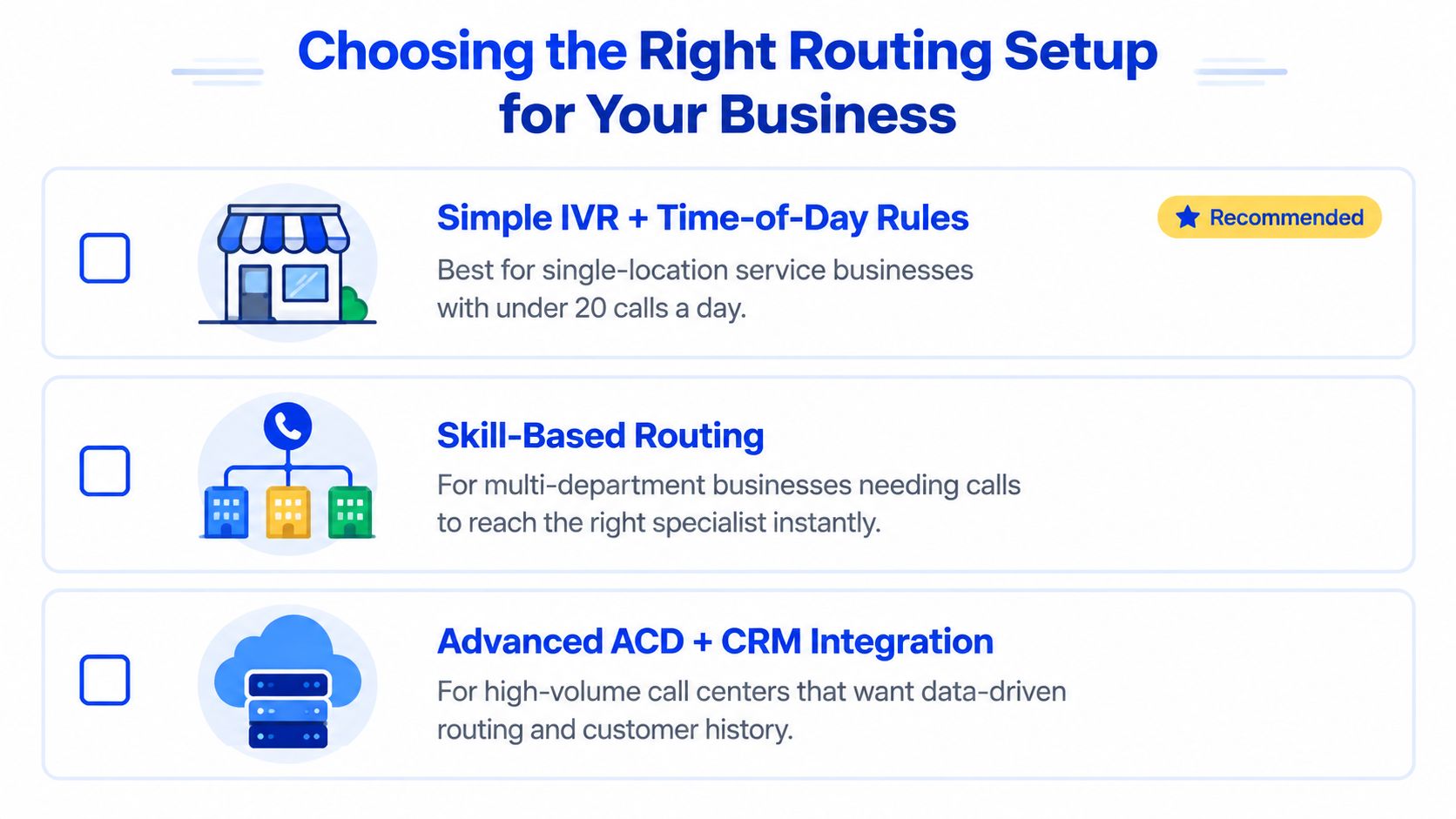
The best setup isn't the one with the most features. It's the one that gets a caller to the right next step with the least avoidable friction.
If your calls often arrive while staff are busy, Heyline can answer through an AI phone receptionist, use business information to handle common questions, and book appointments against a connected calendar. Visit Heyline to see whether a conversational front door can replace your weakest routing steps or work alongside the phone system you already use.