At 6:14 p.m., a caller rings your salon to book a colour appointment. The front desk is closed, the stylist is with a client, and the caller doesn't want to leave a voicemail. They hang up and try another business. Your calendar still looks organised, but it hasn't captured the booking.
That's the difference between software that displays open slots and a booking system that converts inquiries into appointments. Appointment scheduling software should capture a request, confirm an available time, prevent calendar conflicts, and help recover appointments that are at risk of going unused. If your business takes appointments by phone, web, or in person, those jobs matter more than a polished booking page.
This guide evaluates software by the moments that break a typical day: missed calls, unclear service requests, language or accessibility needs, rescheduling, no-shows, and healthcare access requirements. Use it to pressure-test vendors before you buy, rather than relying on a demo that shows only an uncomplicated booking.
The Phone Call Your Business Just Lost
A missed call isn't just a phone problem. It's a booking request your business didn't capture, and a potential customer who may not call back. A contact form doesn't solve the problem for someone who wants to ask whether a service is appropriate, how long it takes, or whether there's an opening today.
That's why appointment scheduling software belongs in your operations plan, not just on your website. A booking page can handle a caller who already knows the service and can choose from available times. It can't automatically help a person who's uncertain, needs a quick answer, or called after staff left for the day.

Start with the booking, not the calendar
A useful system turns an inquiry into a confirmed appointment in the calendar your team relies on. It should show accurate availability, gather the details staff need, tell the customer what's booked, and make changes easy to manage. If one of those steps depends on someone noticing a voicemail and calling back, the process still has a hole in it.
California's early evidence on online appointment scheduling shows the gap between interest and access. In a California HealthCare Foundation survey of 601 adults conducted in August and September 2007, more than half said they were very or somewhat interested in booking online, while 7% had done so. Security concerns and the lack of online scheduling from providers were among the leading barriers. A later California consumer health-technology report found 38% could schedule through a physician's website, while 57% expressed strong interest but lacked access (California HealthCare Foundation's report on health information technology).
The practical lesson applies well beyond clinics. A booking channel only helps when the business makes it available and keeps it connected to real capacity. For more on capturing customer inquiries before they disappear, see how lead capture software works.
What Appointment Scheduling Software Actually Does
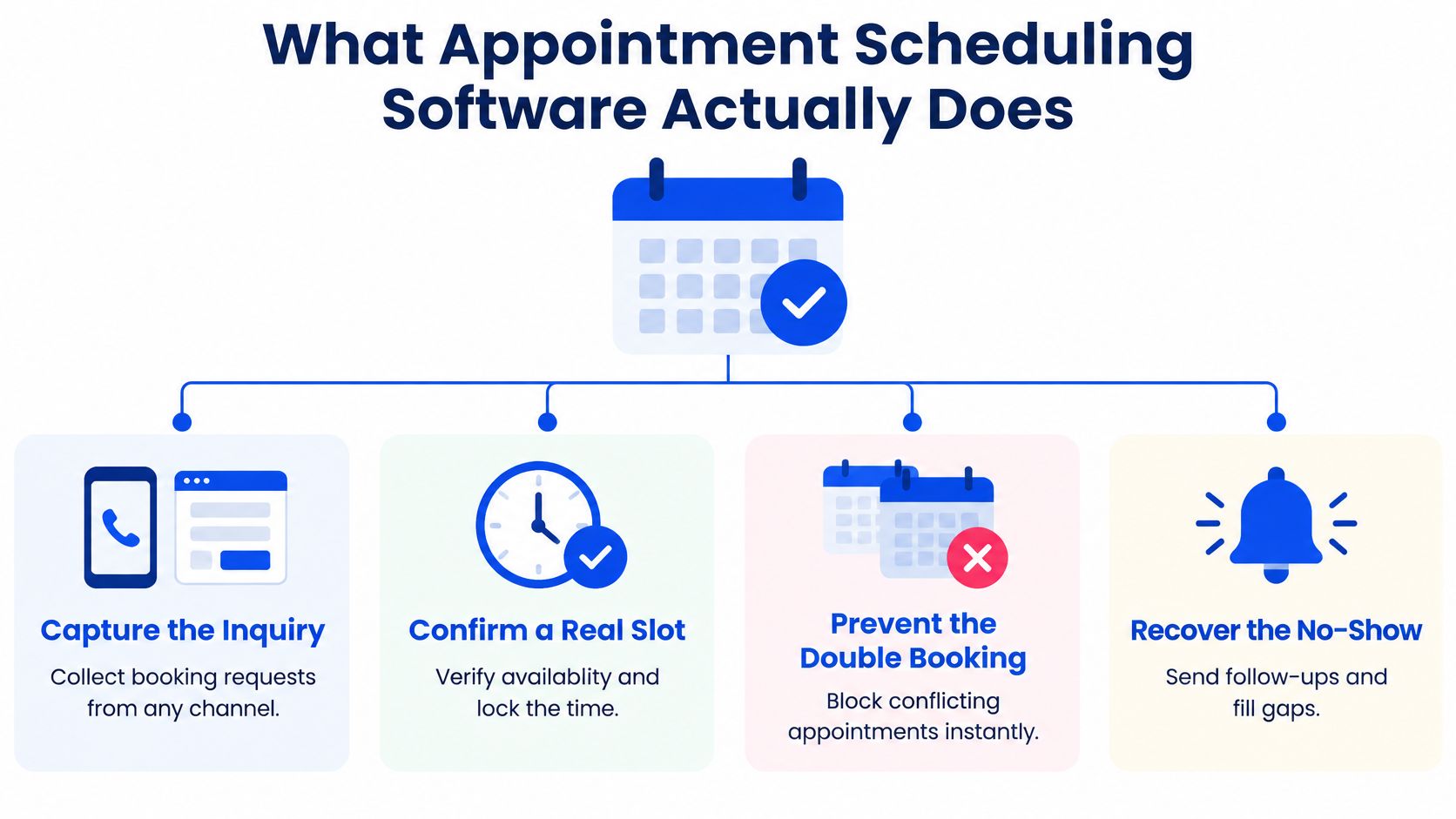
Ignore the vendor's feature labels for a moment. Appointment scheduling software has four jobs: capture the inquiry, confirm a real slot, prevent conflicts, and recover capacity when an appointment changes or a customer doesn't show. If the product can't do those jobs in your actual workflow, a long feature list won't rescue it.
Four jobs, one booking workflow
Capture the inquiry. Customers may start on your website, call, send a social message, or walk in. The software should preserve enough information to act on the request, whether that means booking immediately or passing it to a staff member.
Confirm a real slot. The system needs to check the right calendar, staff member, service length, and availability rules before offering a time. An open-looking slot isn't useful if the provider is unavailable or the appointment needs more time than the calendar allows.
Prevent conflicts. Reliable calendar synchronisation matters because your team won't stop using its existing calendar just because a new booking tool has been installed. A conflict check should happen when the customer books, not after the team discovers overlapping appointments.
Recover capacity. Confirmations, reminders, cancellations, and rescheduling all belong in the same workflow. A cancellation should make the slot available again, and a reminder should reflect the current appointment details rather than an outdated booking.
Features matter when they support a job
A shared calendar and availability rules are the foundation. Intake forms help collect relevant details before a visit, while payment processing can support deposits where missed appointments or reserved resources carry a cost. Reporting helps owners identify unanswered inquiries and booking patterns, but reports are only useful if the system captures the events that matter.
A solo barber may need straightforward staff availability, service durations, reminders, and an easy way to rebook. A multi-provider clinic may need separate schedules, intake questions, staff hand-offs, and controls for requests that shouldn't be booked without review. Don't pay for complexity your workflow doesn't need. Do insist on the controls that stop a routine booking from becoming an operational mess.
Practical rule: Test the awkward booking, not only the easy one. Ask the vendor to show what happens when the customer picks the wrong service, changes the time, or requests an appointment that needs staff approval.
Integrations and Pricing Models Explained
A booking tool that doesn't stay in sync with the calendar your staff use is a liability. Customers may see a time that's no longer free, or staff may have to reconcile bookings by hand. Before comparing features, test whether the software can keep availability accurate across your existing tools.
Pay attention to integrations that change the workflow
Calendar connections with Google Calendar or Microsoft 365 can help prevent conflicts, but ask how the connection behaves when a staff member edits or cancels an appointment elsewhere. Payment integrations matter when you take deposits or collect fees. Telephony or voice systems matter when a substantial share of inquiries arrive by phone, while a CRM can help staff recognise returning customers and access relevant history.
Review tools can support post-visit follow-up, but don't let a long integrations directory distract you from the essentials. A connection listed on a vendor's site isn't proof that it supports your specific process. Ask for a live demonstration using your calendar, services, and appointment rules. For a closer look at a common calendar workflow, read about appointment scheduling with Google Calendar.
Match the billing model to the way you book
Pricing often looks simple until you add users, locations, messages, or onboarding. Compare the full cost of the workflow you intend to run, including SMS and email limits, per-staff add-ons, setup fees, and charges tied to booking volume.
| Model | Best Fit | Watch For |
|---|---|---|
| Per user | A team where each staff member manages their own schedule | Costs that climb as you add staff, plus separate charges for advanced roles or features |
| Per location | Businesses operating from distinct sites with separate calendars | Whether each location includes all staff, services, and reporting, or whether add-ons apply |
| Per booking | Businesses with variable appointment volume | Fees that rise with bookings, definitions of a billable appointment, and charges for cancellations or reschedules |
| Flat all-in | Owners who want predictable billing and a bundled workflow | Usage caps, limits on locations or staff, and extra fees for messages, onboarding, or integrations |
Don't choose based on the cheapest headline price. Ask the vendor to model a normal operating month using your expected number of staff, locations, bookings, reminders, and integrations. If the answer depends on several add-ons, get the complete price in writing before you commit.
How Different Industries Use Scheduling Software
A generic calendar can record a time. It can't always determine whether that time is long enough, which staff member should take the job, or whether a human needs to review the request first. The right configuration depends on what the business is booking.
A salon or barbershop
A client asks for a colour service, but the appointment needs more time than a quick trim. If the booking page treats every service as the same duration, it can leave a stylist with an unusable gap or force the next customer to wait. Configure services with the right duration and staff eligibility, and test how the tool handles a client who wants to combine services.
If the client calls instead of booking online, the system should capture the service they're asking about and confirm a suitable opening. A calendar that only offers the next open time isn't enough if the booking length is wrong.
A dental or medical practice
A new patient may need to provide intake information, ask about insurance, or request a type of appointment that requires staff review. The practice shouldn't treat every request as an ordinary open-slot booking. Use forms and scheduling rules to collect relevant details, then route uncertain or urgent requests to a staff member rather than forcing the patient through a routine pathway.
California practices also need to take timely access seriously. A booking system can't establish compliance just by showing a free slot; the practice needs to know what appointment offer the patient received and what happened when the request didn't fit the standard workflow.
A law firm
A prospective client may know they need help but not know which service or lawyer to select. Ask what the intake process needs to establish before offering a consultation, such as the general matter type and whether the firm handles that work. Don't let an automated booking form imply that a lawyer has agreed to take a case. Route unsuitable or unclear requests to a person.
An HVAC contractor
A homeowner requesting a quote and a customer asking for an installation aren't necessarily booking the same kind of visit. A quote visit may require a location, a brief description of the issue, and a travel-zone check. An installation may need a longer time block and a qualified technician. If the software can't distinguish those appointment types, staff will end up correcting the schedule manually.
A restaurant
A reservation request can depend on party size, seating preferences, and whether a deposit is required. A waitlist can help the team manage demand when a requested time isn't open, but it shouldn't promise a table the restaurant can't provide. Set clear availability rules, capture the information staff need, and ensure cancellations release capacity for another booking.
Across all these examples, the same buying test applies: does the software understand the appointment, or does it only reserve a time? If staff must repair each booking afterwards, the automation is cosmetic.
A Buyer's Checklist Built Around Real Failure Modes
A reminder button isn't enough to make a scheduler reliable. Evaluate whether the software handles the situations that lead to failed bookings, missed appointments, poor access, or an inappropriate appointment being placed on the calendar.
At Zuckerberg San Francisco General Hospital, a retrospective study of 4,641 scheduled outpatient appointments found that 18.4% were missed and 29.9% of patients missed at least one appointment. Longer scheduling lead time remained independently associated with no-shows after adjustment for other variables (the study of outpatient appointment no-shows). That finding makes two demo questions essential: can the system offer the earliest feasible appointment, and can it send reminders as soon as a booking is created?
Take these tests into the demo
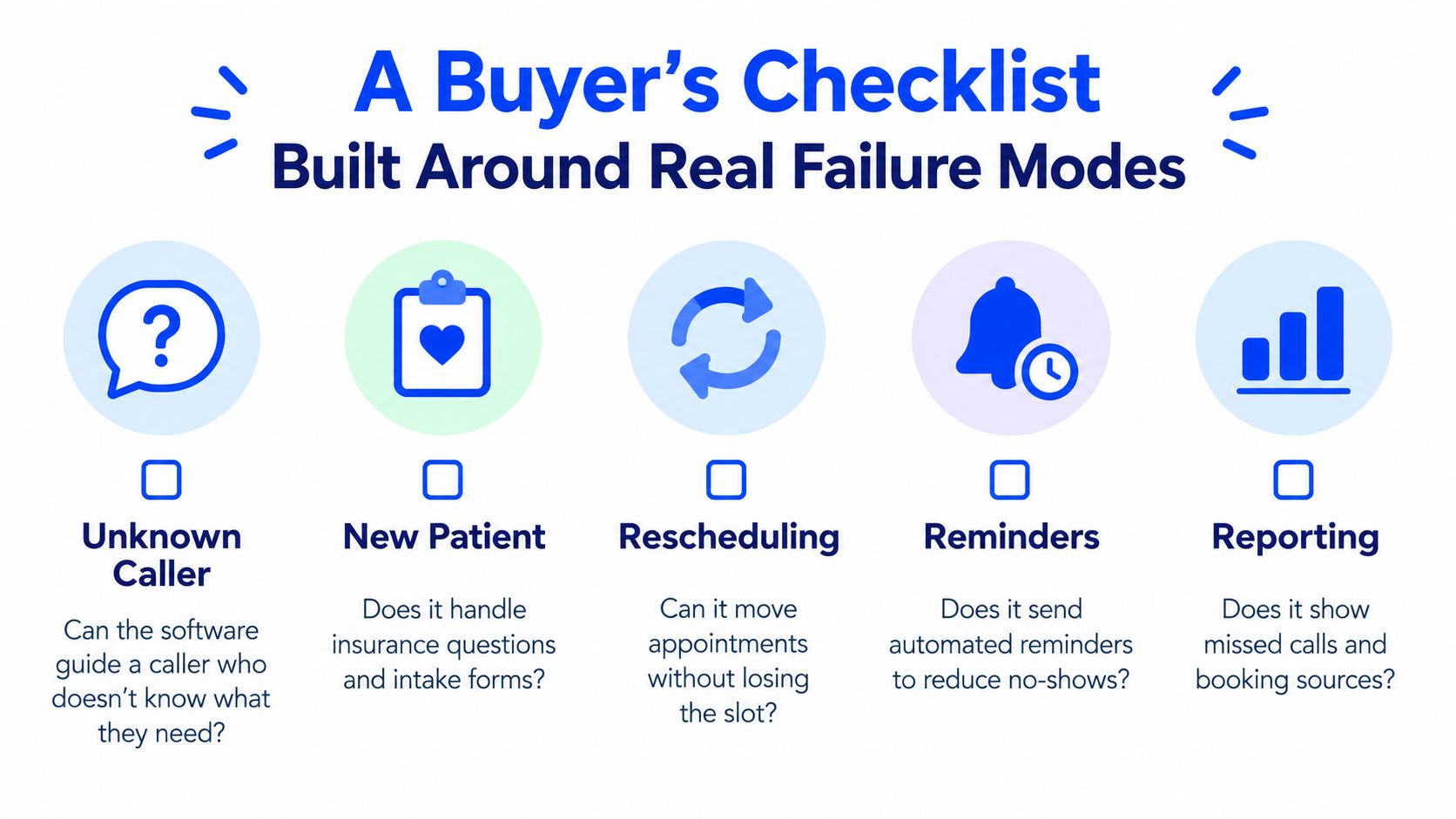
- Unknown request: Ask the vendor to demonstrate what happens when someone says they're unsure which service they need. Can the tool guide the caller or hand off cleanly?
- Language and accessibility: Test how a caller who needs another language or an accessible communication option can reach a person. An automated flow that only works for confident English-speaking customers may block the people it's meant to serve.
- Urgent request: For a healthcare workflow, ask how the system recognises that a request may need immediate staff attention. It must route exceptions, not make a medical judgement or offer an unsuitable routine slot.
- Rescheduling and cancellations: Move an appointment and check whether the change updates the calendar, customer confirmation, and any reminder. Ask how a newly open slot can be offered to another customer.
- Reporting and audit trail: Ask to see failed booking attempts, abandoned calls, staff escalations, and the appointment times offered. A completed-booking report alone hides the customers who couldn't complete the process.
For California healthcare practices, add a compliance test. The California timely-access framework says non-urgent primary-care appointments generally must be offered within 10 business days, specialist appointments within 15 business days, and urgent appointments within 48 hours when prior authorisation isn't required (California's timely-access guidance for providers). Confirm that the software can help staff configure relevant availability and escalation workflows, and preserve a record of what was offered. A calendar with an opening doesn't prove that the patient received an appropriate appointment offer.
Score the vendor against the workflow, not the sales presentation. If it books a routine appointment but can't handle an exception, it hasn't passed.
When the Phone Is the Real Booking Channel
Web booking works well when the customer knows the service, understands the choices, and can select a suitable time without help. The phone is where the exceptions show up: a caller who isn't sure what to book, needs information before deciding, or wants to speak in a language the form doesn't support. Treating phone coverage as an optional extra leaves those inquiries dependent on staff availability.
For a local business, conversational phone automation can add a booking path without replacing the people who handle complex decisions. A voice receptionist can answer common questions, collect appointment details, check calendar availability, and book a slot during the call. When the request needs judgement or falls outside the configured rules, it should pass to a staff member instead of improvising.
Buy for exception handling, not novelty
Developer-first phone stacks can support complex custom workflows, but they may require technical setup and ongoing maintenance. A smaller business should ask whether a non-technical owner can configure the service details, connect the calendar, test calls, and manage changes without building a bespoke system.
Heyline is one option for businesses looking for an AI phone receptionist that uses a company's public website to configure its answers, checks Google Calendar availability, and books appointments during calls. Learn more about how an automated phone booking system works.
Don't remove the human fallback. Set clear boundaries for what the system can book, what information it can provide, and which requests must go to staff. The point isn't to automate every conversation. It's to stop ordinary booking requests from disappearing when the team can't answer the phone.
Implementing Scheduling Software Without Disrupting the Week
A new system that staff don't trust will create extra admin and missed bookings. Roll it out in stages, test the actual workflow, and keep the existing process available until the new one proves dependable.
- Week 1: Run the software alongside your current process. Compare availability, confirmations, and changes.
- Week 2: Route one channel, such as after-hours calls, through the new system.
- Week 3: Add staff escalation rules and configure reminders. Test cancellations and rescheduling end to end.
- Week 4: Review booking completion, no-shows, calls answered outside business hours, repeat bookings, and staff time saved.
Before signing, confirm who owns calendar updates, which requests require staff review, what happens when integrations fail, and how you'll export appointment and customer data. Track the workflow your business needs, not a dashboard full of metrics nobody will use.
If missed calls are costing your business bookings, Heyline offers an AI phone receptionist that answers inquiries, checks Google Calendar availability, and books appointments during the call. Visit Heyline to see whether its phone-based booking workflow fits your business.