An AI receptionist is a software worker that answers calls, talks with callers in natural language, and books appointments straight into your calendar. In California, that idea already fits a real business shift: about 21% of California businesses have used AI in at least one business function, and the state also holds 11.0% of U.S. telephone answering service establishments, which helps explain why AI phone coverage now feels practical rather than futuristic.
If you're a small business owner, you probably know the exact moment this becomes interesting. You're with a client, your hands are full, the phone rings, and by the time you look down it's already gone to voicemail. You tell yourself you'll call back in ten minutes. Then the day gets away from you, and that caller books with someone else.
That is the problem an AI receptionist is trying to solve. Not as a vague piece of “automation”, but as a direct replacement for one narrow job: answering the phone when you can't, understanding what the caller needs, and moving that person towards a booking instead of a dead end.
The Moment a Missed Call Changes Everything
A salon owner is rinsing colour. A dental front desk worker is checking in a patient. A plumber is under a sink. The phone rings anyway.
Most owners don't lose business because they don't care. They lose it because live work and live calls collide. Independent benchmark summaries say small businesses may miss 25% to 60% of inbound calls, and a study of 85 businesses across 58 industries found only 37.8% of calls were answered live, while 37.8% went to voicemail and 24.3% got no response, according to PCN's missed call revenue summary.
What changes in that moment
A missed call isn't just a missed ring.
- A new customer moves on: Many callers won't wait around for a callback.
- Your first impression disappears: Voicemail feels slower and less certain than a live answer.
- The admin work comes back to you: Someone still has to listen, return the call, and find a slot.
An AI receptionist is a software worker that picks up the phone, holds a natural conversation, and places appointments directly onto the business calendar.
That definition matters because it separates an AI receptionist from older tools. It isn't just voicemail. It isn't just “press 1 for bookings”. It behaves more like the front-desk role you already understand, except the worker is software.
Practical rule: If your business loses calls because staff are busy doing the actual service, an AI receptionist addresses an operations problem, not a technology trend.
California makes this especially relevant. The state's existing answering-service footprint includes an estimated 113 businesses in NAICS 561421, representing 11.0% of U.S. establishments in that category, according to Fair Market Value's California telephone answering services industry page. That tells you something simple: California businesses have long paid for help covering the phone. AI is the newer version of that same need.
How an AI Receptionist Actually Works
Most confusion starts here. Owners hear “AI receptionist” and picture either a stiff robot voice or a mysterious black box. In practice, it's easier to understand if you follow one caller from ring to booking.
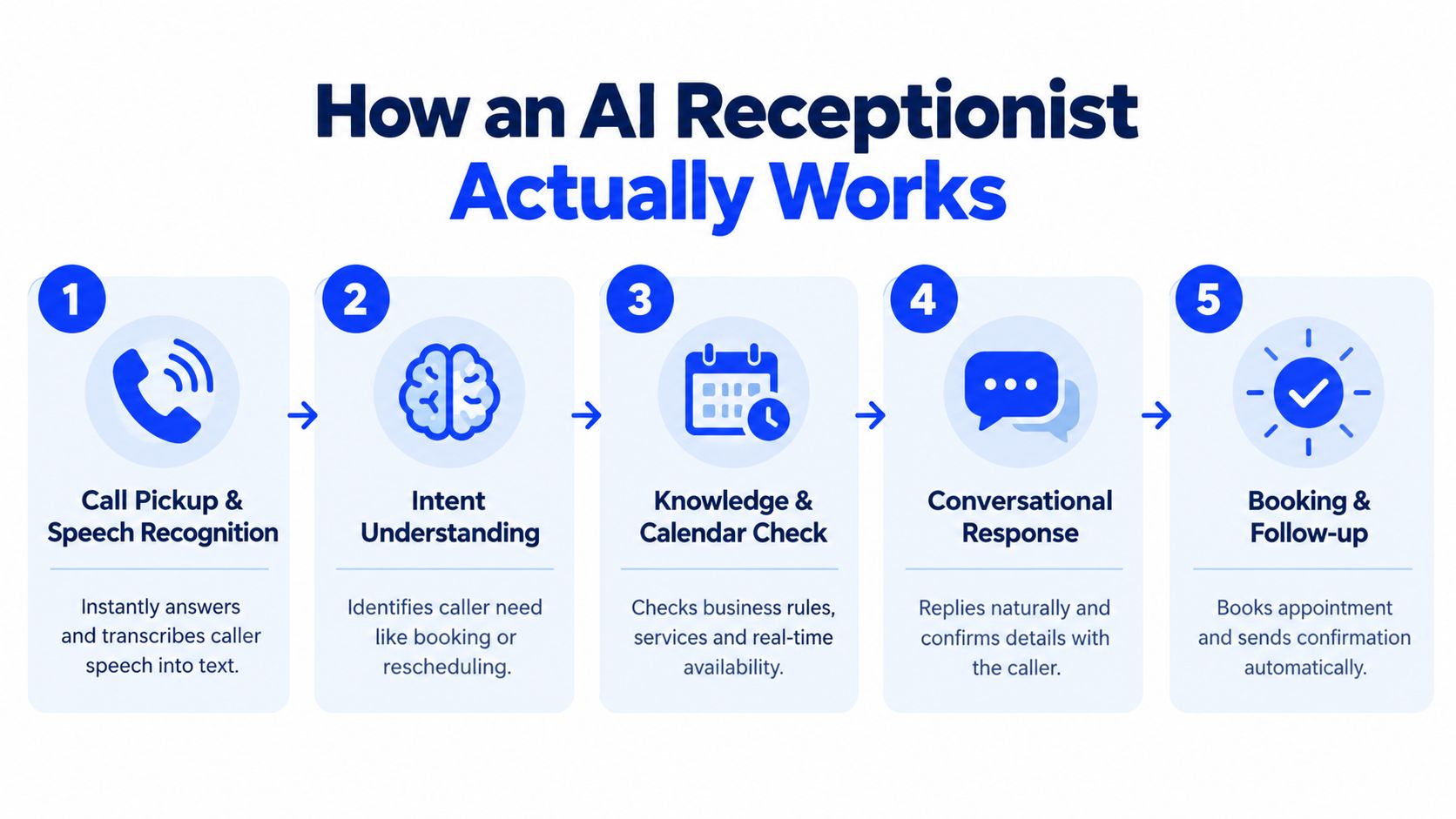
Step one through step three
A customer calls your business and says, “Hi, I need a haircut this Thursday after work.”
First, the system answers the call and turns speech into text in real time. Think of this as the ears.
Second, it interprets the request. It doesn't need the caller to use exact keywords. “Need a haircut”, “want to book”, and “can I come in Thursday evening?” all point to the same intent. This is why an AI receptionist feels different from a rigid menu. If you want to see the contrast, this guide on what a phone tree is is useful because it shows the older model AI is replacing.
Third, it figures out the job to be done. Is this a new booking? A reschedule? A pricing question? A cancellation? That part matters because each type of call follows a different path.
Later in the same flow, the caller experience makes more sense when you hear it in action.
Step four and step five
Once the system knows what the caller wants, it checks the tools behind the scenes.
- Business rules: Which services do you offer, during which hours, with which staff?
- Live calendar availability: Is Thursday at 5:30 open?
- Basic knowledge: Hours, location, pricing notes, preparation instructions, or intake details.
Then it responds in conversation. Not with a static script, but with a back-and-forth exchange such as, “We have 5:30 or 6:15 on Thursday. Which works better for you?”
If the caller confirms, the system writes the appointment into the calendar and can trigger a follow-up confirmation through the connected workflow.
The easiest mental model is this: speech comes in, meaning gets identified, business rules get checked, then an action gets taken.
That chain is what turns “someone called” into “someone is booked” without waiting for a human callback.
AI Receptionist Compared to Other Call Handling Options
Most owners don't compare an AI receptionist to nothing. They compare it to whatever they're already using, or whatever they're considering next.
Comparing the options
| Option | Cost per call | After-hours coverage | Books appointments directly | Scales during peak calls | Consistent brand voice |
|---|---|---|---|---|---|
| Voicemail | Low apparent cost, but follow-up is manual | Yes, but only as message capture | Usually no | Limited | Varies by callback |
| Human receptionist | Labour-based and staffing-dependent | Usually limited to staffed hours | Yes | Limited by one person's capacity | Usually strong, depends on training |
| Live answering service | Service-fee based | Often yes | Sometimes, depending on service setup | Better than one in-house person | Mixed, depends on agents and scripts |
| AI receptionist | Subscription or usage based, depending on provider | Yes, designed for continuous coverage | Yes, when connected to a calendar | Strong for simultaneous demand | High if configured well |
Where each option fits
Voicemail works if missed calls are rare and the callback burden is manageable. The weakness is obvious. The caller still has to wait, and your team still has to do the booking later.
A human receptionist is still the best fit for highly sensitive conversations, complex intake, or front desks that already carry a lot of in-person coordination. But one person can only answer one call at a time, and coverage usually ends when the shift ends.
A live answering service sits in the middle. It gives you human coverage, especially after hours, but often acts as a message taker first and a scheduling tool second.
An AI receptionist is strongest when most calls follow repeatable patterns. Bookings, reschedules, hours, location, simple intake, and straightforward service questions are where it tends to fit best.
If your staff's biggest phone problem is “we'll call them back later”, the real comparison isn't AI versus people. It's instant booking versus delayed follow-up.
The right choice depends on your call mix, your budget, and how much manual admin you can still absorb each day.
Practical Benefits for Appointment Based Businesses
The benefits make more sense when you tie them to moments owners recognise. Not theory. Actual phone situations.
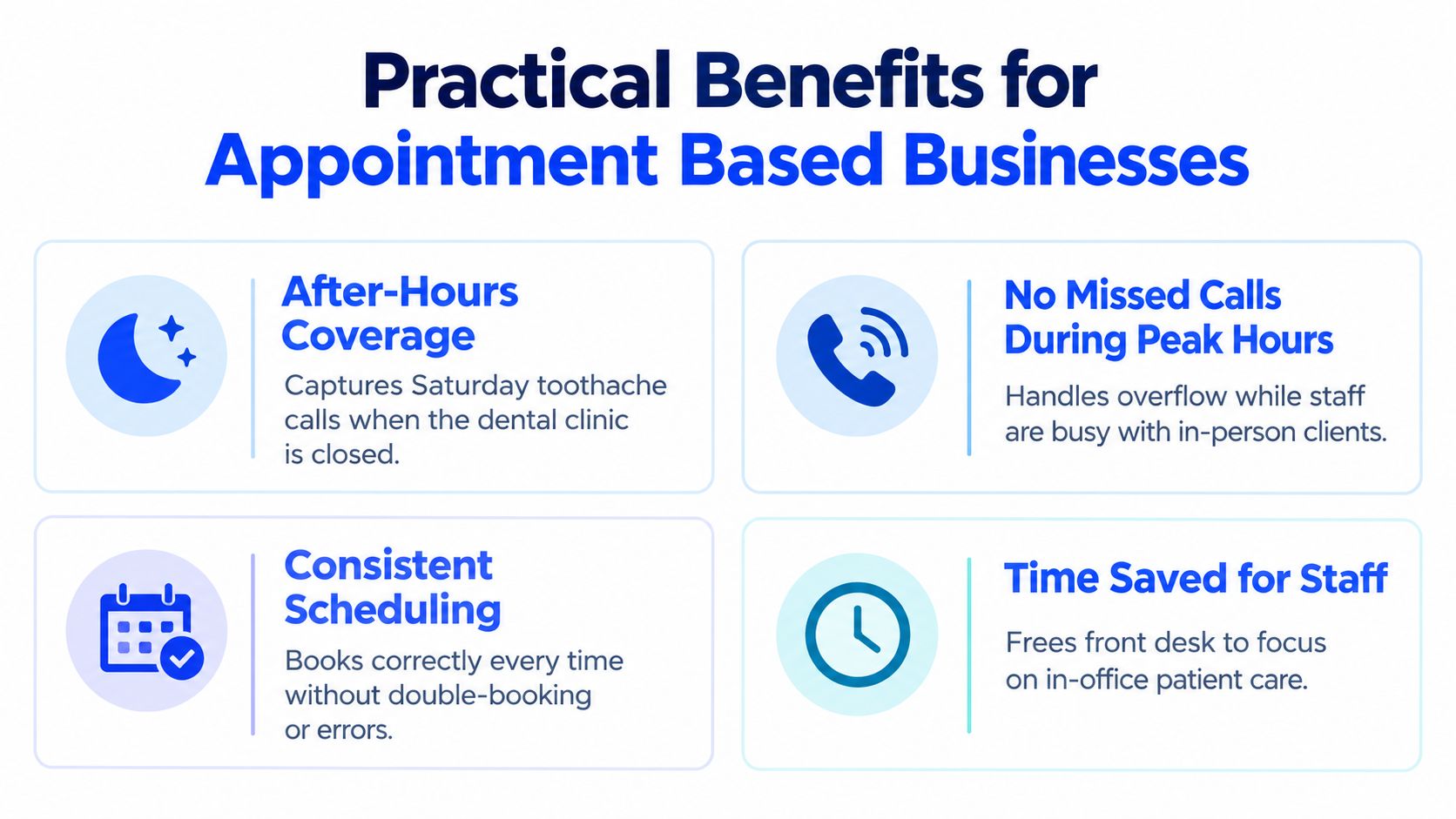
After-hours calls become bookable moments
A patient calls a dental clinic on Saturday with a tooth issue that isn't an emergency but can't wait long. With voicemail, that person leaves a message or gives up. With an AI receptionist, the caller can hear available times, choose a slot, and start Monday with a confirmed appointment instead of uncertainty.
That doesn't mean the software replaces clinical judgement. It means routine scheduling doesn't stop just because the office is closed.
Busy periods stop swallowing calls
A salon has two stylists working and the front desk is checking someone out. A third caller rings in at the same time.
Without overflow coverage, that call may drop into voicemail. With an AI receptionist, the business can still answer immediately, collect what the caller needs, and place the booking without interrupting the in-person customer standing at the counter.
The calendar stays cleaner
A good AI receptionist doesn't just “take a message”. It checks real availability before offering times.
That matters because many scheduling errors happen in the gap between phone note and calendar update. When the caller books directly into the live calendar, there are fewer chances for forgotten callbacks, duplicate slots, or mismatched times.
- Fewer hand-written notes: Staff don't need to decode rushed message scraps.
- Less phone tag: The appointment gets settled during the first call.
- More consistent confirmations: The same basic booking details get collected each time.
Callers get the same experience every time
A human front desk can be excellent one moment and stretched thin the next. That's normal. People get interrupted.
An AI receptionist gives each caller the same opening, the same key questions, and the same path to either a booking or a handoff. For businesses that rely on trust, that consistency matters more than owners often realise.
Limits, Trade offs, and Common Misconceptions
An AI receptionist is useful, but it isn't magic. Owners make better decisions when they understand where the edge of the tool is.
What it can't do well
It can't calm every angry caller. It can't make judgement calls that belong to a clinician, lawyer, or manager. It shouldn't handle emergencies as if they were routine bookings.
A caller with a billing complaint, a distressed patient, or someone asking for advice beyond policy and scheduling usually needs a human. The safest setup always includes an escalation path.
- Sensitive issues: Complaints, disputes, and emotional calls need a person.
- Professional judgement: Medical, legal, or technical advice shouldn't be improvised by a booking tool.
- Messy audio: Overlapping speech, background noise, and unusual phrasing can still cause friction.
What people often get wrong
The first misconception is that an AI receptionist is just voicemail with a fancier voice. It isn't. Voicemail captures a message after the call fails. An AI receptionist tries to complete the job during the call itself.
The second misconception is that it's a staff replacement in every sense. For most small businesses, it's better to think of it as a filter and booker. It handles routine demand so your team can spend more time on in-person work and higher-stakes conversations.
Some of the best deployments aren't fully automated. They're selective. The AI handles the repeatable calls, and humans take the complicated ones.
In California, trust and compliance matter too. If calls are recorded or transcribed, all-party consent rules matter, and covered outbound calls using an AI-generated voice require disclosure at the start under AB 2905, as explained in this overview of California AI receptionist disclosure laws. In practice, that means the phone flow should disclose the AI clearly and make it easy for callers to reach a human when needed.
A Simple Setup Path From Website to Live Calls
For a non-technical owner, setup sounds scarier than it usually is. Most systems follow a simple path.
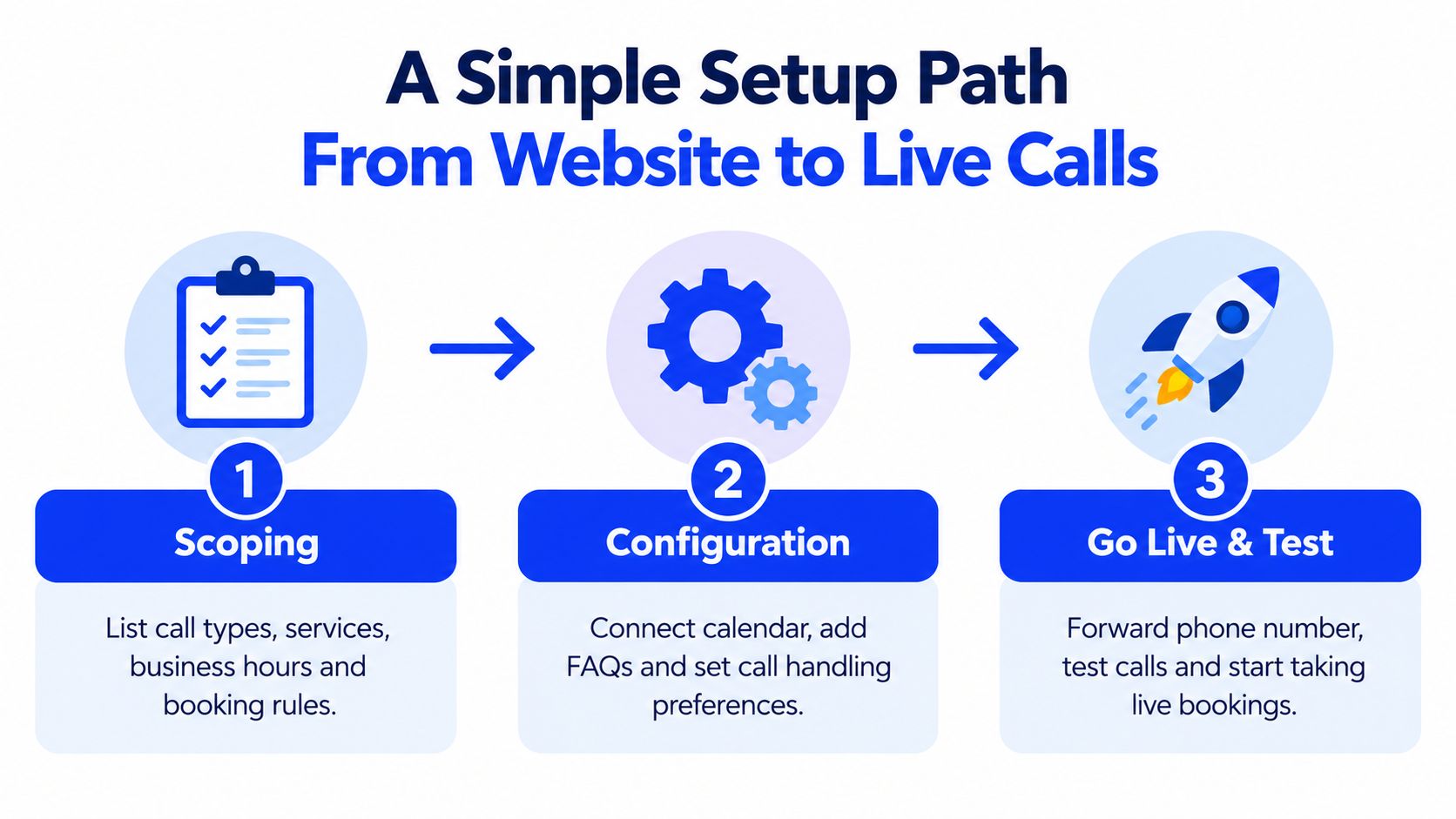
Stage one starts with scoping
Before you connect anything, list what the receptionist needs to know.
That includes your services, opening hours, booking rules, service lengths, location details, and the common questions callers ask. If your business has special cases, such as “new patients only on Tuesdays” or “same-day plumbing calls must be escalated”, those rules should be written down too.
Stage two is connection, not coding
The next step is linking the phone and calendar pieces. Usually that means forwarding your business number, connecting Google Calendar or another scheduling system, and adding the information base the receptionist will use in conversation.
Some providers make this more manual. Others reduce the work. For example, Heyline is one option that configures from a business website, connects to a calendar, and handles incoming calls for appointment-based businesses. If you want to understand the general process before picking a provider, this guide on how to set up an AI answering service lays out the steps in plain language.
Stage three is testing before trust
Don't go live cold. Make test calls first.
Try normal calls and awkward calls. Ask for a booking, a reschedule, your opening hours, and something slightly off-script. Then listen for where the conversation feels smooth and where it needs adjustment.
A simple testing list helps:
- Book a routine appointment and check that it lands in the right calendar slot.
- Ask a common question such as pricing or hours.
- Try an edge case such as a request outside business hours.
- Check handoff behaviour when the system shouldn't answer on its own.
Many owners also use onboarding help so they don't have to do the tuning alone.
Is an AI Receptionist the Right Fit for Your Business
An AI receptionist makes sense when you think of it as a practical staffing layer, not as a novelty. It answers calls, understands the reason for the call, and handles the routine next step. For many small businesses, that next step is getting the caller onto the calendar.
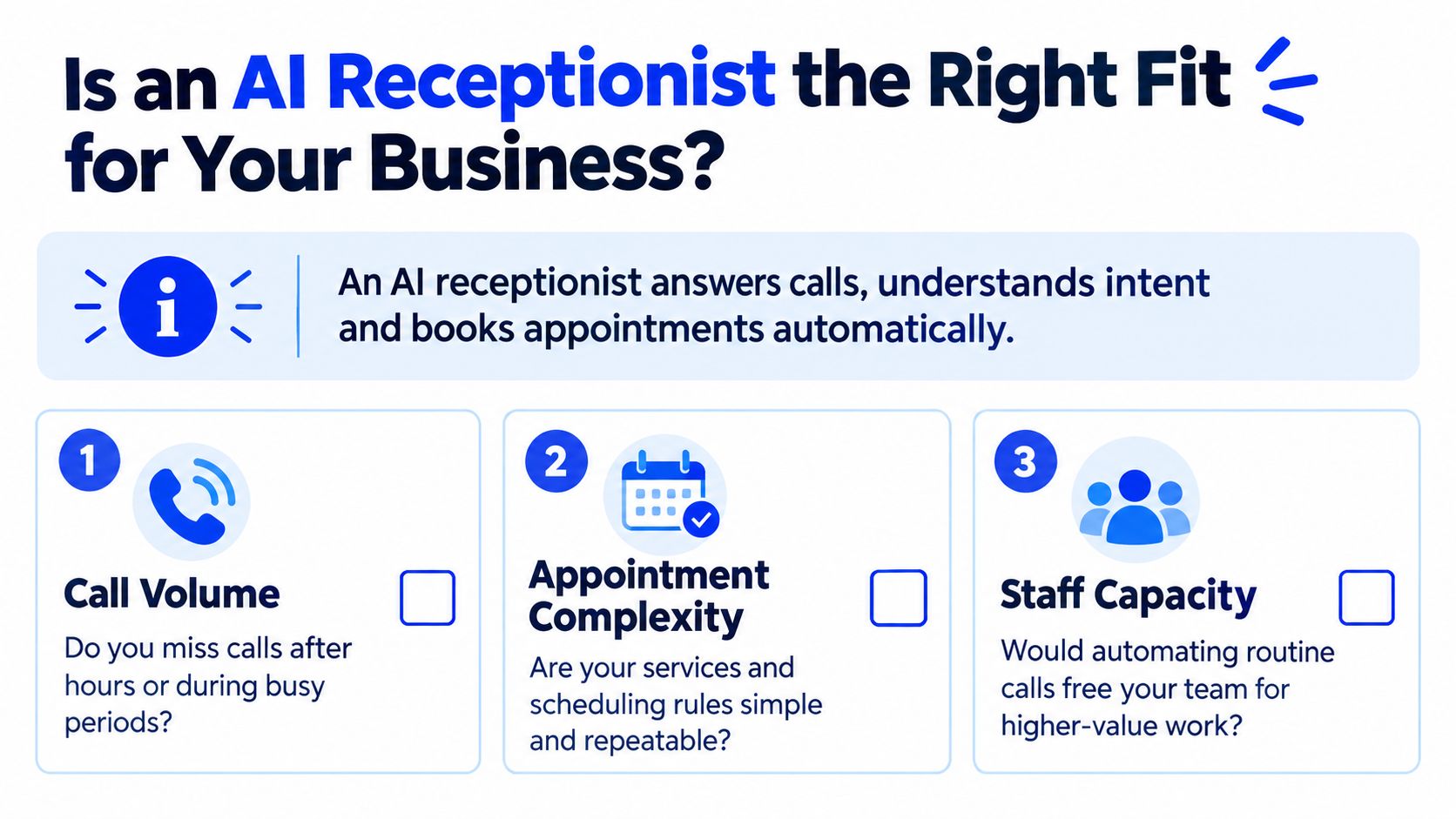
Three questions to ask yourself
Do you miss calls during busy periods or after hours?
If the answer is yes, you're not alone. California businesses are already moving into broader AI use. About 1 in 5 California businesses, or 21%, said they had used AI in at least one business function, which was close to the national 20% figure, according to the Otis College report on California business AI adoption. That doesn't prove every business needs an AI receptionist, but it does show the idea is now part of normal operations for a meaningful share of the market.
Are most of your calls predictable?
Bookings, reschedules, hours, directions, simple intake, reservation requests, and basic service questions are good signs. If most calls require judgement, negotiation, or emotional handling, you'll likely want AI only for overflow or first response.
Would your staff be better used elsewhere?
If your front desk or field team keeps getting pulled away from customers to answer repetitive calls, automation can relieve pressure even if you keep humans in the loop.
A calm rule of thumb
An AI receptionist is often a good fit when your business depends on inbound calls, your scheduling rules are repeatable, and missed calls create obvious friction.
It may be a weaker fit if every call is high-stakes, highly customised, or hard to handle without personal context. In those businesses, AI can still help by screening, routing, or covering after-hours gaps, but it shouldn't stand alone.
A simple decision test is this. If most callers want one of a few standard outcomes, software can usually help. If every caller needs nuanced judgement, keep a person close to the line.
Before you choose anything, estimate how many calls you're currently missing, what those missed calls usually mean, and how much manual follow-up your team is carrying. Then compare that against the likely cost of a tool using a provider's AI receptionist pricing breakdown. A short demo with one of your real caller scenarios will usually tell you more than a long feature list ever will.
If you want to hear what this looks like in practice, Heyline offers an AI phone receptionist for local appointment-based businesses that answers calls, talks with callers naturally, and books directly into your calendar. It's built for owners who want phone coverage without building a complicated system, so it's a practical next step if this article sounded like your day.