Roughly 6 in 10 inbound calls to small service businesses go unanswered, and only about 4 in 100 missed calls become bookings when the caller is left with voicemail. An AI phone answering service is worth considering when it recovers the specific calls your team can't answer, qualifies them accurately, and completes the booking instead of taking a message.
For a salon, clinic, law firm, or home-service company, the important question isn't whether AI can speak to callers. It can. The important question is which missed calls are recoverable, which calls require a human, and whether your receptionist can move a ready-to-book customer from a ringing phone to a confirmed appointment.
The opportunity is especially clear in California. The state has over 4 million small businesses, including healthcare practices, legal services, construction companies, and local consumer services, while Los Angeles alone has more than 500,000 small businesses, as described in California small-business answering-service coverage. That creates a large market of appointment-driven businesses where front-desk coverage is often fragmented across lunch breaks, busy periods, evenings, and holidays.
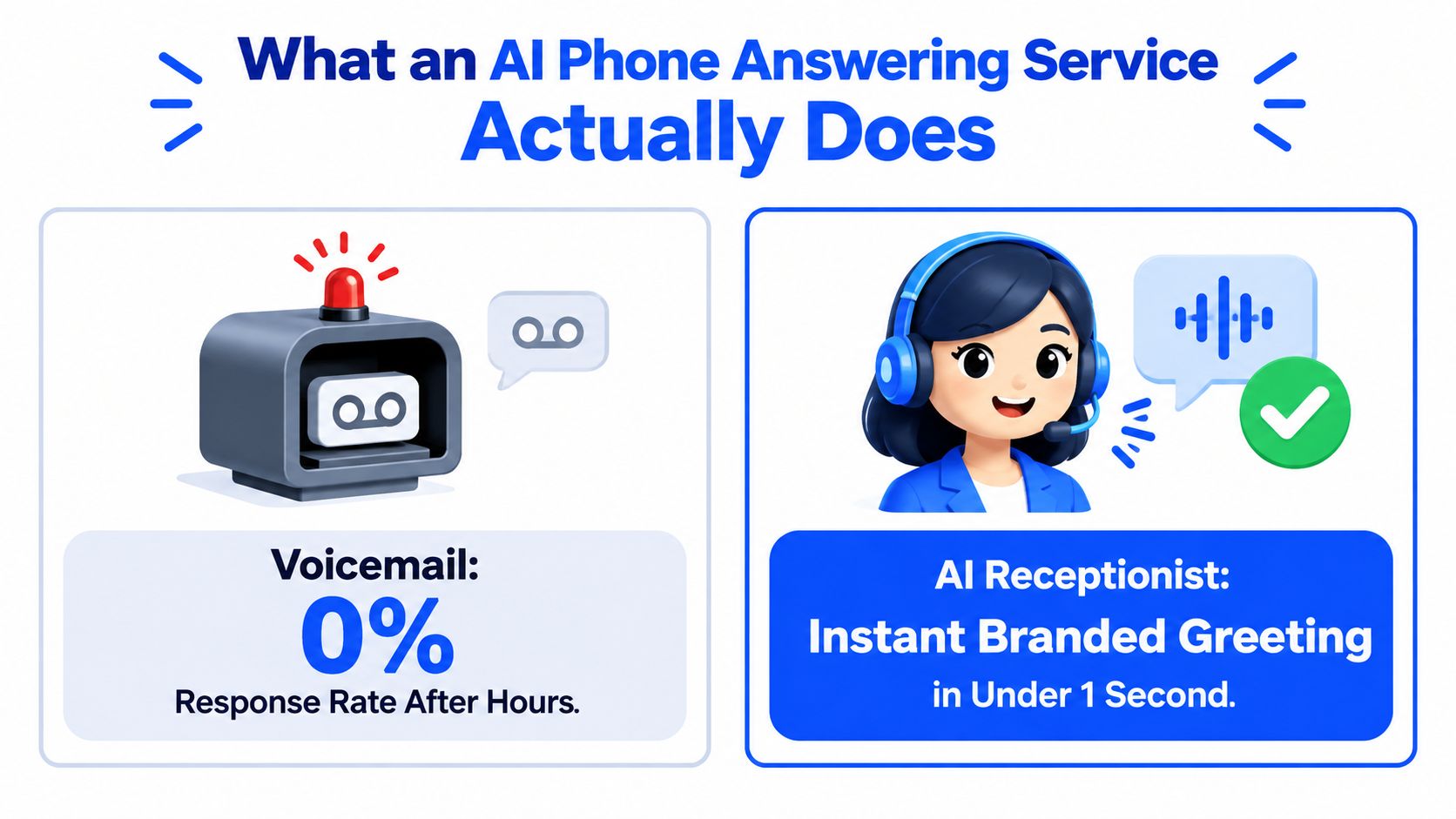
What an AI Phone Answering Service Does
The missed-call problem concentrates at predictable moments: the lunch rush, the last hour of the day, and the first hour after closing. A solo esthetician may finish appointments at 7 p.m. while a new client calls to book a Saturday facial. The owner is cleaning treatment rooms, the phone is on silent, and voicemail gives the caller no reason to wait.
Research on small-business missed calls shows why voicemail is a weak recovery path, as documented in small-business missed-call statistics. The useful question is which calls can still become appointments. A caller ready to choose a time is highly recoverable when someone answers, checks the right information, and completes the next step. A distressed patient, complex legal prospect, or technical service problem may require a human from the start.
Four ways businesses handle incoming calls
Voicemail records a message and transfers the work to the owner. It cannot answer a pricing question, offer an available Saturday slot, or reassure a nervous new patient. The caller waits, and the business must remember to call back.
A basic auto-attendant presents menu options such as “press one for sales” or “press two for appointments.” It can route calls, but it struggles with natural requests such as, “I need to move my appointment because my child is sick.”
An overseas answering service provides human coverage through scripts, training, and handoffs. It can take messages effectively, but the agent may lack calendar access or authority to resolve the caller's request. The owner can still inherit manual follow-up.
An AI phone answering service holds a live conversation in a natural voice. It can identify booking, rescheduling, service questions, urgent problems, and requests for a specific person. With the right configuration, it can book an appointment, route a call, or send a structured message.
A self-configuring receptionist suits owners who need a working call flow without hiring developers to assemble telephony, speech, calendar, and routing components. Developer-first stacks offer deeper control, but they demand technical setup and ongoing maintenance. Choose the level of control your operation can support.
Practical rule: Buy an AI receptionist only if it completes the next action your caller needs.
A system that says “someone will call you back” preserves the appearance of coverage while leaving the booking problem untouched. Require it to answer, identify recoverable requests, escalate calls that need a human, check availability, and confirm what happens next.
How an AI Receptionist Answers, Qualifies, and Books
A good call flow should feel simple to the caller. The customer shouldn't need to understand what happens behind the scenes, and they shouldn't be forced through a rigid phone tree to explain a straightforward request.
Step one starts with an immediate greeting
The customer dials the business number. The AI receptionist answers with the business name, a consistent voice, and the relevant hours or availability context. California-focused answering-service descriptions commonly highlight answering on the first ring or in under a second, along with live booking and calendar protection, as shown in California AI receptionist service examples.
The greeting should be short. “Thanks for calling Northside Dental, how can I help?” gives the caller room to explain the reason for calling. A long promotional message creates friction at the exact moment when the customer is deciding whether to stay on the line.
Step two identifies intent without menu gymnastics
The caller might say, “I want to book a balayage,” “Can I move my cleaning to next week?” or “There's water coming through the ceiling.” The receptionist should recognise the request and follow the correct path rather than asking every caller the same generic questions.
A booking caller needs availability. A rescheduling caller needs the existing appointment identified and changed. An urgent home-service caller needs escalation. A person asking about pricing may need an answer, a quote intake, or a human conversation.
Step three collects only useful qualification details
For a salon, that might mean service type, preferred stylist, and preferred day. For a clinic, it might include whether the caller is new or returning and what kind of visit they need. For a legal practice, the receptionist may need the matter type and a safe callback route, while sensitive or complex questions should move to a human.
The system then checks the connected calendar against the rules set by the business. It should offer available options, respect blocked time, and avoid presenting a slot that another booking has already taken.
Step four confirms the result
The AI reads the appointment details back to the caller, including the service, date, time, and contact information. It then writes the event to the calendar and sends the appropriate confirmation if that workflow is enabled.
Urgent, emotional, or ambiguous calls should not be trapped in automation. They should be forwarded to the owner or designated staff member with a concise text summary. A guide to screening phone calls provides useful context for separating routine enquiries from calls that need personal attention.
The practical flow is:
- Answer: Greet the caller immediately.
- Understand: Identify booking, rescheduling, information, or urgency.
- Qualify: Ask the questions that determine the right next step.
- Check: Validate availability or business rules.
- Complete: Book, transfer, message, or escalate.
- Confirm: Send the caller and owner a clear record of what happened.
A visual walkthrough can reinforce this flow for staff and owners:
Core Features That Matter for Appointment-Based Owners
A polished demo proves very little. The test is whether an AI phone answering service for small business can handle a live booking under actual business rules, then recognise which calls it can recover and which require a human.
Calendar control comes first
The receptionist needs two-way calendar integration, not a simple display of open times. It should account for blocked personal time, staff holidays, service duration, buffer periods, and appointments the team creates outside the phone system.
Ask the vendor to run two simultaneous booking tests. The system must recheck availability at the moment of booking and reject any slot that has just been taken. Collecting a preferred time for someone to approve later is an enquiry workflow, not a complete booking receptionist.
The best systems recover routine bookings, rescheduling requests, and straightforward service questions. A caller with an unusual request, a sensitive situation, or a decision that depends on professional judgement still needs a clear path to staff.
Coverage must match demand
After-hours and overflow coverage protect bookings when staff are serving clients, driving between jobs, taking lunch, or closing the premises. Holiday handling also needs a defined policy. Decide whether the AI may book during closed hours, take enquiries only, or route urgent calls to an on-call person.
Missed calls often cluster around lunch and after closing, when staff availability is weakest. That makes peak-period overflow as important as overnight coverage. An owner should review call patterns before choosing coverage hours, then test the system when the team is already occupied.
Routing needs clear boundaries
A receptionist should separate “I need to cancel my appointment” from “there's an emergency leak” and “I want to speak to my lawyer about a deadline.” Intelligent call routing can transfer the call, send an SMS summary, or create a follow-up task according to the caller's intent.
Review how call routing works for business phone systems before setting those rules. The practical test is simple: can the system send the call to the right person without forcing the caller to repeat the entire story?
Write escalation rules in plain language. Define the people, hours, and situations that trigger a transfer, message, or follow-up. If the rule is vague, the caller will experience that uncertainty directly.
Language and follow-up affect trust
Mixed-language markets may need multilingual support, but language availability alone does not prove good service. Test pronunciation of local names, service terms, and addresses, along with handoff behaviour in every language the business advertises.
Post-call summaries should record the caller's name, intent, outcome, requested service, and promised follow-up. Recordings can support quality review where lawful and appropriate. These records help owners find repeated confusion, missing information, or incorrect answers before those defects cost another booking.
| Feature | What It Does for the Owner |
|---|---|
| Two-way calendar integration | Books only into genuinely available time and reduces double-booking risk. |
| After-hours and overflow coverage | Handles enquiries when staff are busy, closed, or unavailable. |
| Intent-based routing | Sends urgent, sensitive, or complex calls to the right human. |
| Multilingual conversations | Supports callers who prefer a language other than English. |
| Call summaries and recordings | Gives the owner a usable record for follow-up and quality review. |
Self-Configuring Receptionist vs Developer-First Stacks
A small-business owner usually isn't choosing between two phone products. They're choosing between a short configuration task and an ongoing technical project.
A self-configuring receptionist typically follows a simple path. You connect or forward the business number, describe the services and policies in plain language, connect the calendar, set booking and escalation rules, test the conversation, and launch. The owner can edit a service description or correct a business-hour detail without opening a development queue.
A developer-first telephony stack starts somewhere else. Someone provisions the phone infrastructure, connects speech recognition and voice services, builds conversation logic in a visual node editor or codebase, writes prompts, configures calendar permissions, creates webhooks, and tests unusual caller behaviour. Those pieces can produce a powerful system, but each one becomes another component the business must maintain.
The difference is ownership of complexity
| Dimension | Self-Configuring Receptionist, such as Heyline | Developer-First Telephony Stack |
|---|---|---|
| Initial setup | Connect the number, add business information, connect a calendar, and test | Configure telephony, voice services, workflows, permissions, and integrations |
| Required skill | Plain-language business knowledge | Development, telephony, integrations, and conversation design |
| Booking workflow | Uses configured services, rules, and calendar availability | Built and maintained through custom logic |
| Changes | Staff can update services, hours, and escalation rules | A technical owner may need to edit flows, prompts, or integrations |
| Customisation | Strong for standard local booking workflows | Strong for complex routing and custom business logic |
| Maintenance | Vendor maintains the core service and reliability | Business or agency maintains the connected components |
| Best fit | Appointment-driven teams without technical staff | Teams needing deep CRM, telephony, or workflow customisation |
The developer-first option wins when a business needs unusual CRM actions, bespoke routing, outbound campaigns, or a tightly controlled internal workflow. It can also make sense when an in-house developer already owns the phone stack and can monitor it.
For a five-person clinic, however, the maintenance burden is usually the wrong trade. A brittle prompt, a delayed response between turns, or an expired calendar permission becomes a front-desk problem. The owner doesn't care which component failed. The owner cares that a patient couldn't book.
The right setup is the one your team can update after a service changes, a practitioner leaves, or opening hours move.
My recommendation is direct. Choose a self-configuring receptionist for routine appointment intake and coverage gaps. Choose a developer-first stack only when you have a clear custom requirement that a packaged receptionist cannot handle, and someone is accountable for maintaining it.
Real Scenarios Across Salons, Clinics, Law Firms, and Home Services
The same phone number can receive four completely different kinds of demand. A useful AI receptionist adapts the conversation to the business's rules instead of forcing every caller through the same script.
A salon needs availability, not a callback
A caller asks for a balayage on Saturday afternoon and prefers a particular stylist. The receptionist checks the service duration, looks for that stylist's openings, and offers available alternatives if the requested time isn't free. It can capture the client's mobile number and direct the caller to the required deposit process.
The important outcome isn't a pleasant conversation. It's a confirmed slot that doesn't require the salon owner to stop working, call back, and negotiate times manually.
A dental clinic needs intake and careful escalation
A new patient says they've chipped a tooth. The receptionist should identify that the caller needs prompt attention, check whether the clinic has a suitable emergency pathway, and offer an appropriate appointment or transfer. Insurance questions, clinical uncertainty, and requests for medical advice should be flagged for the front desk rather than answered with guesswork.
The system can collect basic contact details and send an intake form, while a human remains responsible for decisions that require professional judgement. Automation should reduce administrative delay, not pretend to replace clinical triage.
A law firm needs separation between routine and sensitive calls
An existing client calling about a deadline may need a message routed to the responsible solicitor. A new personal-injury enquiry may be suitable for an intake conversation that captures the incident type, location, and preferred consultation time.
The receptionist should never promise legal outcomes or improvise advice. It should identify the purpose of the call, protect sensitive information, and escalate anything outside the approved intake rules.
An HVAC contractor needs urgency detection
At 11 p.m., a caller reports that a heating system has stopped working. The receptionist should recognise the emergency category, ask the approved safety questions, and contact the on-call technician with a concise summary. A separate caller asking for a routine installation quote can provide property details and receive a next-day follow-up path.
Consider how 24/7 AI answering for service businesses becomes operationally meaningful. Round-the-clock answering only helps when the system knows the difference between an emergency and a routine enquiry.
The best vertical configuration has two layers:
- Automated completion: Booking, rescheduling, FAQs, contact capture, and confirmations.
- Human control: Clinical judgement, legal advice, emotional situations, safety concerns, complaints, and exceptions.
That boundary should be written before launch. If the vendor can't show how the receptionist handles an exception, don't trust the happy-path demo.
The ROI Math and What to Track After Launch
Don't judge an AI receptionist by the number of calls it answers. Judge it by the valuable calls it recovers and the work it removes from the owner without creating new mistakes.
Start with a simple calculation:
Recovered booking value = qualified missed calls × booking conversion × average completed sale value
Then compare that value with the monthly subscription, implementation cost, and any usage charges. Use your own call history and actual average sale value. Don't rely on a vendor's hypothetical revenue example, especially if your business receives many information calls that were never likely to become appointments.
The public-health definition of call abandonment treats the rate as a normalised value from 0 to 1, where 0 means no abandoned calls and 1 means all calls abandoned, as explained in California call-centre abandonment guidance. For a small business, that gives owners a useful operational lens: peak-time queue overflow is measurable, and faster answering with concurrent handling should reduce the number of callers who hang up.
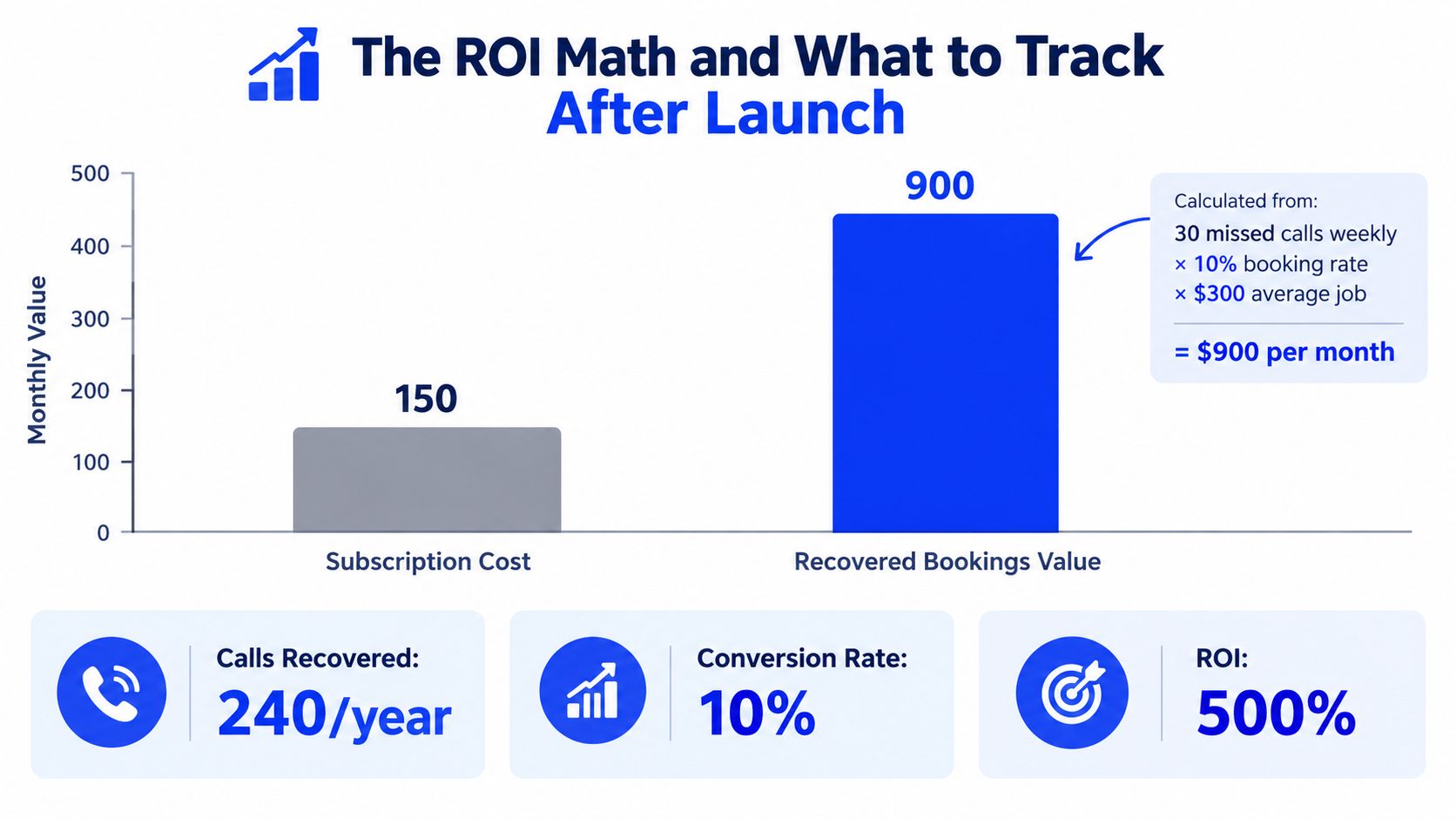
Track the signals that reveal real performance
- Answer speed: Review whether callers reach the receptionist promptly during busy periods.
- Booking conversion: Separate calls that resulted in a confirmed appointment from calls that only produced a message.
- After-hours recovery: Identify how many evening, holiday, and closed-hours enquiries received a useful next step.
- Human escalation: Check whether urgent and sensitive calls reached the right person without unnecessary transfers.
- No-show behaviour: Compare confirmed appointments with attendance and cancellation patterns after reminders.
- Fallback moments: Listen for repeated “I can't help with that” responses or unnecessary transfers.
A weak result doesn't always mean the product is wrong. It may mean the service menu is incomplete, the calendar rules are inaccurate, or the escalation wording confuses callers. Retrain the receptionist when the same question causes repeated fallback or callers ask for clarification at the same point in the conversation.
Review performance after the first month, then keep a regular monthly check. The owner should know which calls were recovered, which were escalated, and which still fell through. If the report doesn't answer those questions, it isn't giving you enough decision-making data.
A Pre-Launch Checklist for Owners Switching On an AI Receptionist
A launch checklist should protect the next booking, not confirm that the phone rings. Before switching on an AI receptionist, walk through the complete customer journey from greeting to calendar confirmation and then test the situations where automation must stop.
Pre-launch confirmation
- Greeting wording: State the correct business name and make the opening sound like your team, not a generic call centre.
- Service menu: Check every service name, duration, price statement, eligibility rule, and booking requirement.
- Business hours: Confirm regular hours, holiday closures, lunch coverage, and what the receptionist should do when the business is closed.
- Calendar connection: Verify that the right calendar is connected and that blocked time, staff availability, buffers, and time zone settings are accurate.
- Human transfer rule: Decide which words or situations trigger a live transfer, text alert, or owner callback.
- After-hours policy: Define whether callers can book, request a quote, leave a message, or reach an on-call person.
- Consent and compliance: Review recording notices, personal-information handling, and industry-specific requirements with the appropriate adviser.
- Test calls: Call from different numbers and use realistic requests, unclear phrasing, rescheduling, cancellations, urgent language, and a request outside the service menu.
The test should expose a bad assumption before a real customer does. If the receptionist offers a closed time, invents a service, or fails to escalate an urgent call, fix the knowledge and rules before launch.
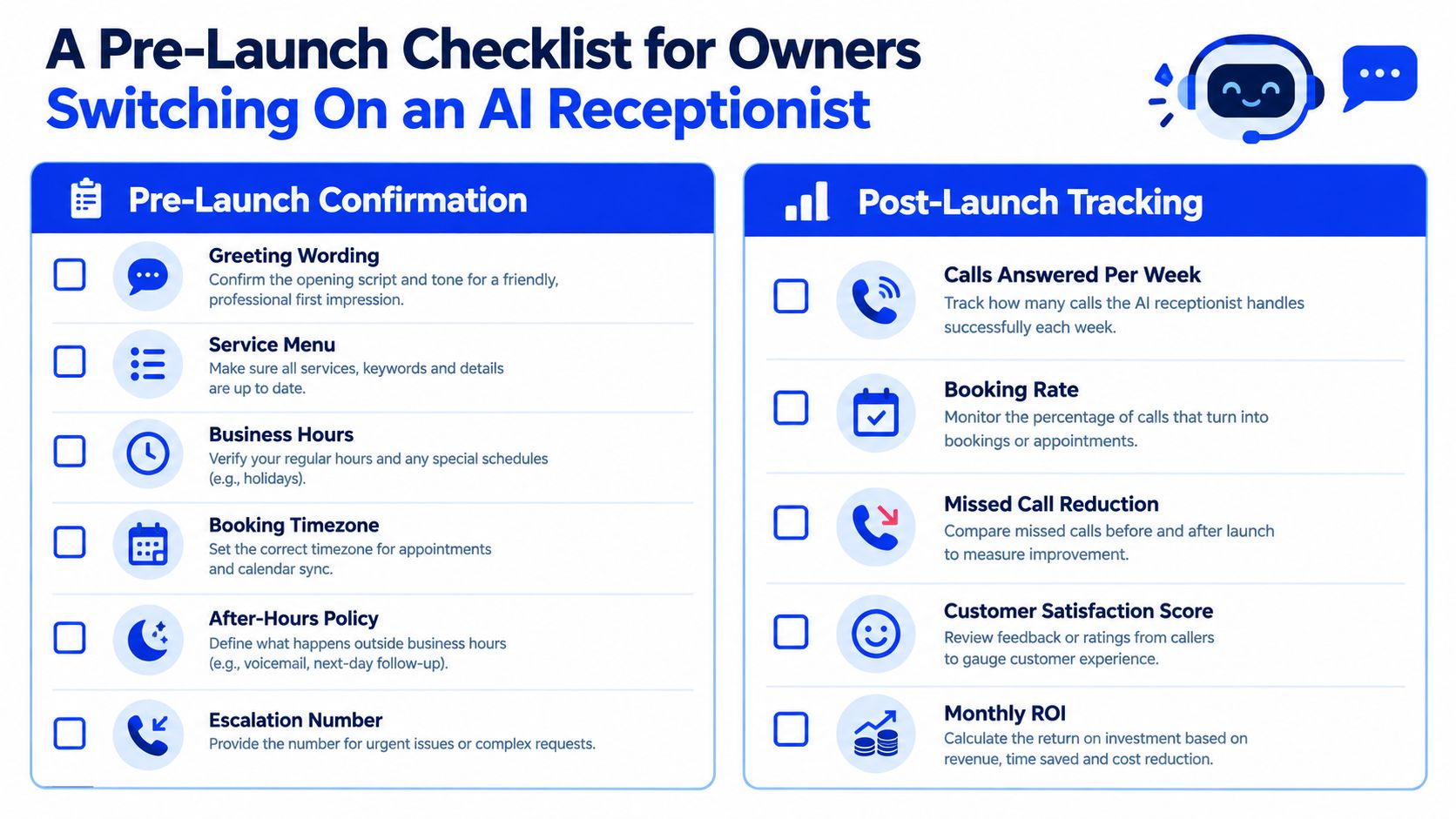
The first 30 days
Track the calls that would previously have reached voicemail or received no response. Then review the outcome, not just the volume.
- Calls answered: Check coverage during lunch, peak service periods, evenings, and holidays.
- Booked versus routed: Separate completed bookings from calls that required human follow-up.
- Recovery quality: Review whether the system captured the right details and created usable appointments.
- Escalation frequency: Look for both extremes, too many transfers and too few transfers.
- Conversation tone: Listen to recordings or summaries for awkward wording, incorrect pronunciation, and caller confusion.
- No-show flags: Identify whether confirmations and reminders are reaching customers and whether staff need a different follow-up process.
- Knowledge corrections: Update service details whenever staff notice a recurring question or inaccurate answer.
The first two weeks are a tuning window, not a verdict. Correct the receptionist's information, calendar rules, and transfer boundaries before deciding whether the approach works. After the first month, keep the system only if it recovers meaningful booking opportunities while giving humans control of the calls that need judgement.
Heyline provides a self-configuring AI phone receptionist for local appointment-based businesses, using website information to answer incoming calls and book appointments directly to a connected calendar. If voicemail is costing your business recoverable bookings, visit Heyline to review the setup and decide whether it fits your call-handling workflow.