A client calls your salon after hours, ready to book. Your AI receptionist answers, but it quotes an old treatment price and offers an appointment type you stopped providing last year. The caller loses confidence, the booking fails, and your team may never know why.
That problem often starts with information that looks harmless on a screen. A Google Knowledge Panel, Business Profile, website page, or AI receptionist may present an outdated phone number, incorrect hours, incomplete services, or an old policy. If you're learning how to edit knowledge panel information, you need to treat the task as an operational update, not just an SEO exercise. The same public facts that help people find your business can also help an AI phone agent answer questions and schedule appointments.
Why Your Business Knowledge Panel Dictates Bookings
A traditional Knowledge Panel gives searchers a compact view of an organisation, professional, or place. It can influence whether someone calls, visits a website, or decides that a business appears trustworthy enough to contact. For appointment-based companies, small inaccuracies can create friction at the precise moment a prospective customer is ready to act.
An AI receptionist makes the same information active. Instead of displaying your hours or service list, it uses available business information to answer a caller's question, explain an offering, and potentially place an appointment on a connected calendar. If the public website says one thing and the receptionist has learned another, the caller experiences the inconsistency directly.
Practical rule: Treat every customer-facing business fact as booking infrastructure.
This is why editing a panel should sit alongside call handling, calendar management, and website maintenance. A salon that publishes an old cancellation policy may receive avoidable disputes. A dental practice with unclear appointment types may send callers toward the wrong booking path. A home-service firm with an incomplete service area may lose an enquiry before a technician can qualify it.
The broader principle is simple: search visibility and phone conversion depend on reliable information. A searcher can disregard an imperfect listing, but a caller who receives a confident, incorrect answer may not give your team another opportunity. The practical approach is to establish one accurate source of truth, then check how that information appears across Google and the AI tools connected to your customer journey. This guide to lead capture software provides further context on why missed enquiries need to be handled as part of the conversion process.
Claiming and Editing Your Google Knowledge Panel
A panel can show the right business name but the wrong phone number, hours, or website. Fix ownership first, then correct the individual facts that influence search actions and the information an AI phone agent may retrieve from public pages.
Start with the identity check
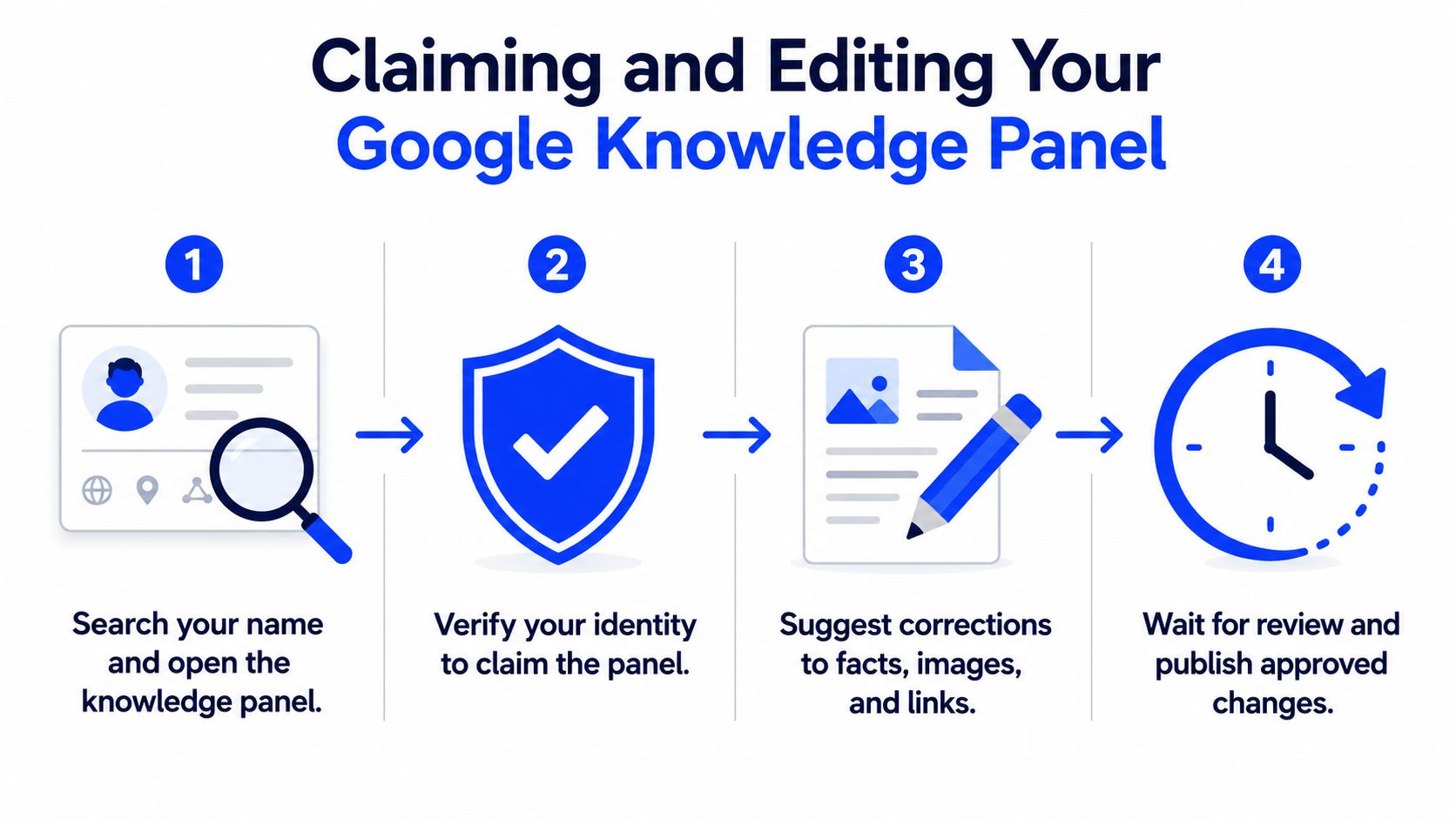
Search for the business or entity while signed in to the account used for official management. If a Knowledge Panel appears and you are the authorised representative, select “Claim this knowledge panel.” Google's official Knowledge Panel claiming guidance explains that verification requires an official account connected to a supported service, such as YouTube, Search Console, X/Twitter, or Facebook.
Claiming the panel gives you a path to manage it, but individual facts may still require review. Select Feedback beside the incorrect item, propose the correction, and provide direct web links that support it. A public page stating the current phone number or hours gives Google clearer evidence than a general request to fix the panel.
Verify the Business Profile before chasing isolated facts
For a local business, the Google Business Profile is the stronger operational starting point. Google says an unverified profile may still allow changes to core fields, including the business name, category, address, hours, phone number, and website. Full editing access requires verification, and verified owners can manage information directly from the profile.
Open the profile, choose Edit profile, update the relevant field, and save. The Google Business Profile editing instructions describe this workflow and apply across business types, including salons, clinics, law firms, and contractors.
Google's guidance on correcting Business Profile information supports a practical sequence that applies to any verified profile:
- Use the correct account: Sign in with the account that verified the entity or profile.
- Correct the verified profile: Update the name, hours, phone, website, address, and other available core fields.
- Support each panel correction: Provide detailed evidence and a direct public link for every disputed fact.
- Use feedback when ownership is unavailable: If you are not the official representative, suggest edits through the panel's feedback link. Direct owner control is unavailable.
Update the website, Business Profile, and relevant official pages before submitting a panel correction. Consistent public information gives Google a clearer record and also reduces the chance that an AI voice agent pulls an outdated answer while handling a booking call.
Updating the Heyline AI Knowledge Editor
Google's panel is public, but an AI receptionist also needs an editable internal knowledge base. Heyline reads information from a business website, then turns that material into fields that can be reviewed and refined before calls are handled. That distinction matters because a website scrape can identify a service name without understanding whether the service is currently available, how long it takes, or which callers qualify.
Begin with the source, then correct the interpretation
The setup flow is designed around three practical screens. Paste the website, connect the calendar, then test and launch. The first screen supplies the raw business information. The knowledge editor is where you correct gaps, add plain-language notes, and establish boundaries that a public webpage may not state clearly.
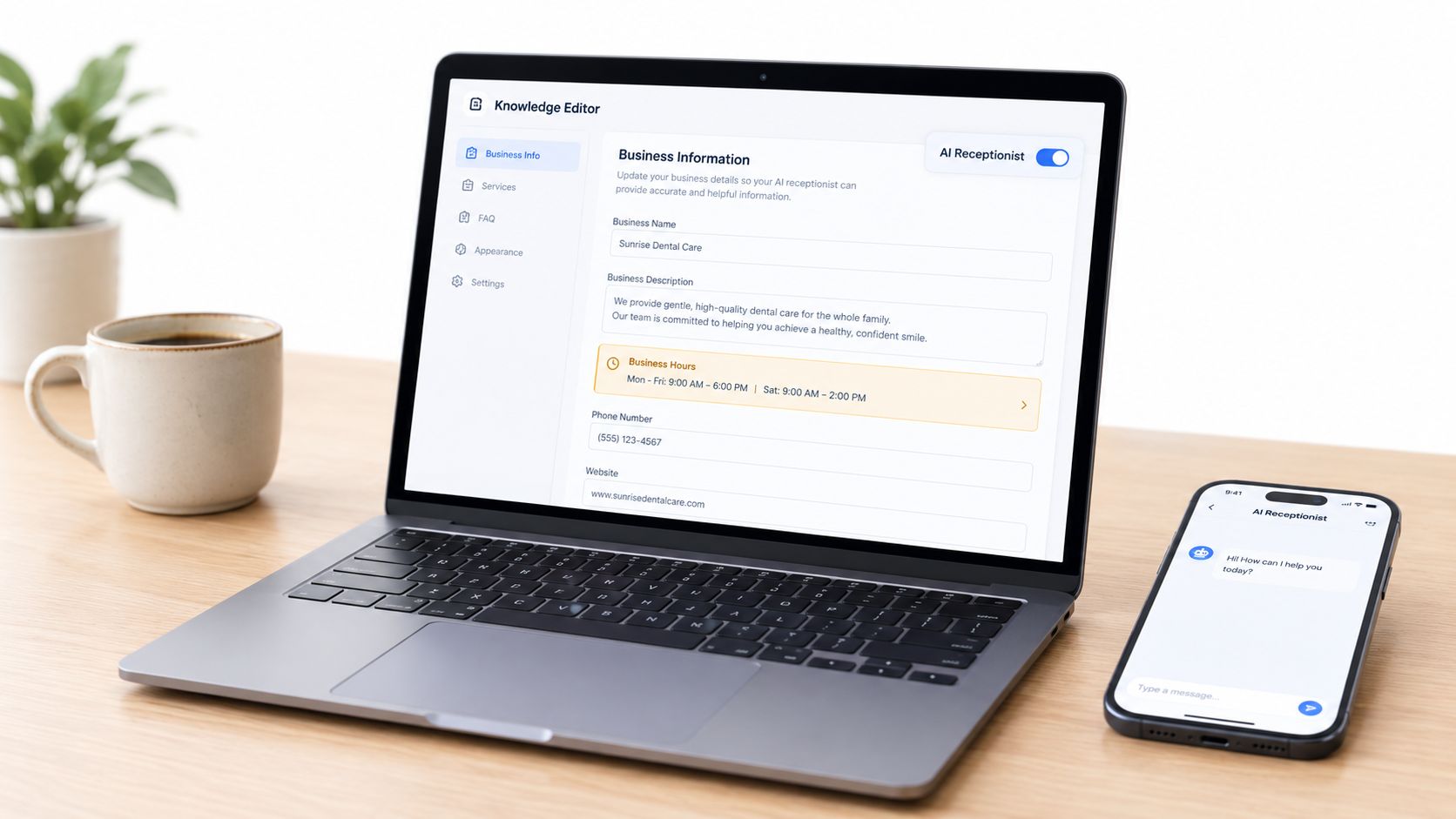
Review the fields that affect a caller's decision first:
- Services: Remove discontinued treatments and distinguish similarly named appointments.
- Hours: Add the hours callers can reach the business, not just the hours staff are physically present.
- Quick facts: State parking guidance, location details, accepted payment methods, or other recurring questions.
- Question-and-answer pairs: Add approved answers for pricing, consultations, cancellation rules, and eligibility.
- Booking boundaries: Clarify which appointment types can be booked automatically and which require staff review.
Plain language works better than trying to write a complex prompt. “Book a new patient consultation only when the calendar shows an available consultation slot” is more useful operationally than a broad instruction such as “help patients book.”
Test the conversation before routing real calls
A polished knowledge field still needs a live test. Ask the receptionist the questions your staff hear repeatedly, including an ambiguous service request, a pricing question, a request outside normal hours, and a caller who wants an appointment that isn't available. Confirm that the answer is accurate, appropriately cautious, and connected to the correct calendar slot.
This setup guide for AI answering services covers the broader configuration process. The important operating habit is to test after every meaningful change, particularly when you alter services, booking rules, or calendar availability.
Heyline is one option that combines website-based intake, editable knowledge fields, calendar-aware scheduling, voice selection, and test calls. The tool should reflect your policies, not invent them. If the editor can't support a clear answer, update the source page or route that question to a human.
Critical Fields to Align Across All Platforms
Editing one platform in isolation creates contradictions. A Google listing may show that your clinic closes in the afternoon while the AI receptionist offers bookings later. Your website may advertise a treatment that the calendar doesn't support. Callers don't distinguish between these systems. They see one business and expect one answer.
Use the website as the detailed reference, the verified Business Profile as the local discovery record, and the AI knowledge editor as the conversational operating layer. Every change should be checked against all three.
High-stakes knowledge fields
| Data Field | Google Profile Impact | AI Receptionist Impact |
|---|---|---|
| Business name | Shapes how the business appears in Search and Maps | Determines how the receptionist identifies the business |
| Address and service area | Helps local customers understand where the business operates | Helps the agent explain coverage and appointment eligibility |
| Opening and holiday hours | Sets expectations before a visit or call | Controls whether callers receive an after-hours response |
| Phone number | Directs searchers to the intended line | Determines where calls are routed |
| Website | Provides a public evidence source for business facts | Supplies material for the initial knowledge intake |
| Services | Helps customers understand available offerings | Guides answers, qualification, and booking choices |
| Pricing and policies | Sets expectations before contact | Prevents unsupported promises about cost or discounts |
| Appointment duration | Supports a clear booking choice | Helps the calendar avoid unsuitable or overlapping slots |
The highest-risk fields are the ones that connect marketing language to calendar logic. A dental practice should distinguish a consultation from a follow-up. A law firm should separate an intake call from an existing-client appointment. A plumber should define which jobs are covered by the service area before the receptionist offers a booking.
Keep call routing equally deliberate. If you change the public phone number, update the connected destination and test an actual inbound call. This explanation of phone-number routing is relevant when a profile correction also changes how calls reach your team or receptionist.
Operational insight: A correct fact that isn't connected to the booking workflow can still produce a bad customer experience.
Troubleshooting Rejected Edits and Sync Failures
A website update alone does not guarantee that Google or an AI system will replace its current business record. Each platform applies its own ownership checks, review process, intake timing, and interpretation of public information.
Google may reject a correction when evidence is weak, conflicting, or not tied to an official source. As noted earlier, the verified Business Profile is the strongest starting point for correcting core panel data. Confirm that the website also displays the same current details, then check whether the rejected value appears on another public page.
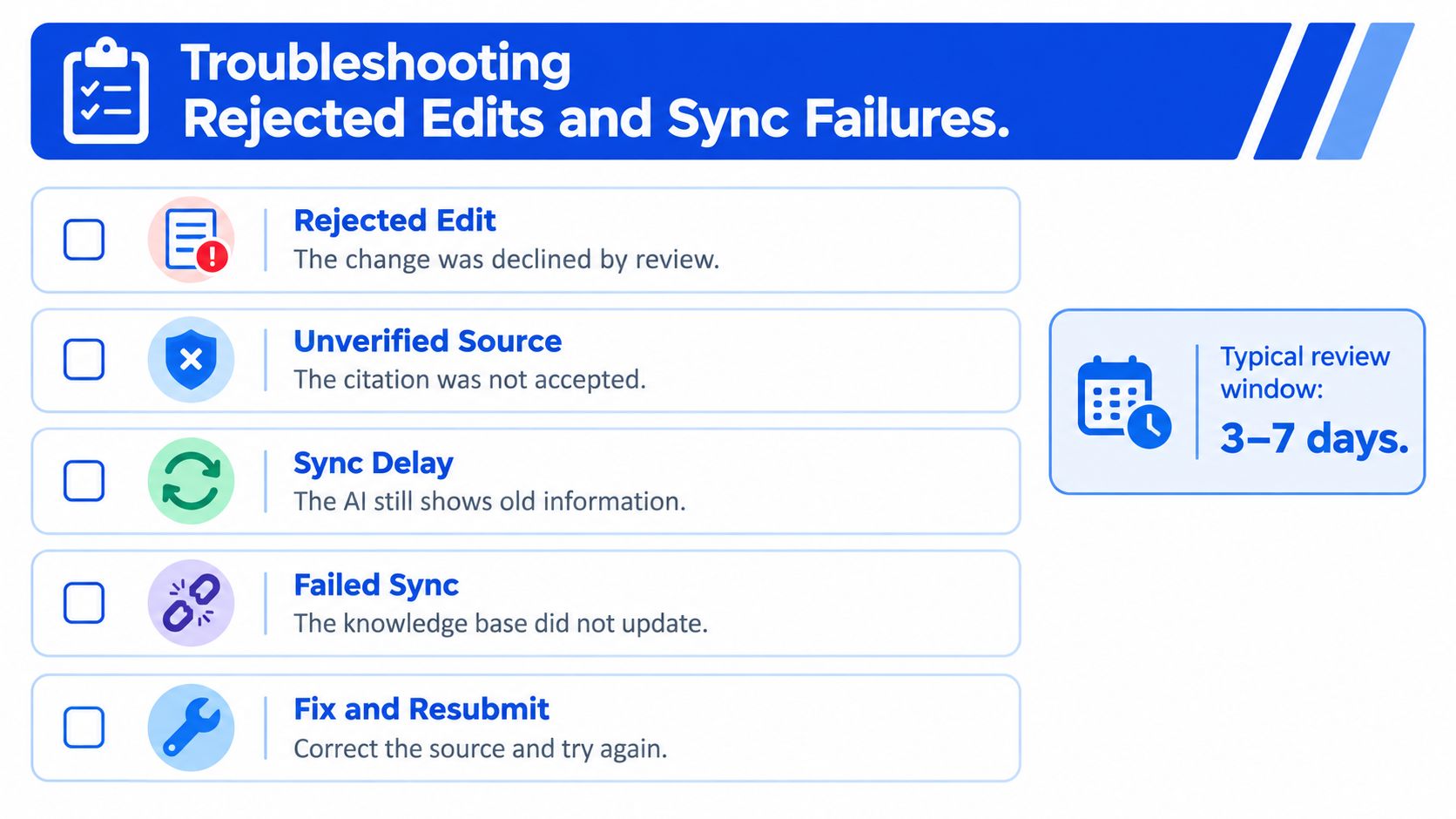
Diagnose the failure instead of resubmitting blindly
Work through three diagnostic questions:
- Is ownership confirmed? Without verification, you may be limited to suggesting an edit through feedback.
- Which source still shows the old value? Compare the website, verified Business Profile, and official contact pages, then identify the lagging system. That is where the correction belongs.
- Did the AI interpret the source correctly? Accurate wording may still leave the receptionist without clear instructions about exclusions, service names, or booking conditions.
Record the old value, intended value, supporting page, and change date for each system. This gives your team a usable audit trail and helps separate a rejected Google edit from an outdated intake or unclear operating instruction.
If an AI receptionist still gives the old answer, inspect its knowledge editor instead of assuming the public panel controls the response. Refresh the source intake if that option exists, review the editable fields, and place a test call. If the answer remains wrong, rewrite the instruction in direct language and repeat the exact caller question.
The same check matters for voice agents such as Heyline. They may draw from public business information while also using their own editable knowledge base, so correcting Google does not automatically correct the phone experience.
Do not let callers receive information the system cannot verify. For frequently changing prices, instruct the receptionist to say that staff will confirm the current amount. If a service requires qualification, collect the relevant details before offering a calendar slot.
Building a Routine for Ongoing Knowledge Maintenance
A knowledge panel stays accurate only when someone owns the maintenance work. That person might be an office manager, salon coordinator, practice administrator, or business owner. The role doesn't require technical expertise, but it does require a clear trigger for reviewing public and AI-facing information.
Use an event-driven routine rather than trying to inspect every field constantly. Update the record whenever you launch or retire a service, change a price, alter opening hours, move premises, change the main phone line, or revise booking rules. Review holiday and seasonal hours before publishing them anywhere customers may rely on them.
A practical review rhythm
At the start of a maintenance cycle, compare the website, verified Business Profile, and AI knowledge editor. Ask a staff member to place a test call using a real customer question, then check whether the answer and available appointment match current operations.
A compact checklist keeps the work manageable:
- Service changes: Remove old services and define the new appointment type.
- Price changes: Update public wording and the approved phone response.
- Hours changes: Check regular, holiday, and after-hours behaviour.
- Calendar changes: Confirm durations, availability, buffers, and booking eligibility.
- Contact changes: Verify the website, Google listing, call route, and voicemail destination.
- Policy changes: Add clear answers for cancellations, deposits, consultations, and eligibility.
Staff should record the date of each update and the person who approved it. That simple ownership step prevents a former manager's notes or an old webpage from becoming the unofficial source for customer conversations.
The best standard is not “the panel looks right.” It's a caller can find the business, receive the same facts, and book the correct next step without staff repairing the interaction afterward.
Heyline provides an AI phone receptionist that reads your website, lets you edit services, hours, and business facts, and books appointments through a connected calendar. Visit Heyline to review how it can keep your phone conversations aligned with the information customers find online.