Your hands are full, a customer is in front of you, and the phone rings for the third time this morning. You can interrupt the person paying you, let the call go to voicemail, or hope the caller tries again later. Most small shops choose voicemail and tell themselves they'll call back between jobs, but the caller often books with the next business that answers. That's the problem a small business phone system has to solve first. The monthly fee matters, but it's usually smaller than the value of the bookings you lose while you're busy doing the work.
Phone System Types Small Businesses Compare
Start with fit, not features. Match your headcount, where your team works, and how often calls go unanswered to one row, then ignore the rest until you've priced that option properly.
Phone System Types Compared by Fit, Cost and Effort
| System type | How it works | Best fit | Typical monthly cost | Setup effort | Who answers calls |
|---|---|---|---|---|---|
| Hosted VoIP business phone | Calls travel over your internet connection, run by a vendor | Offices with 2 to 50 staff and desk phones | About $20 to $35 per user | Low, hours to a few days | Staff, or forwarding to a mobile |
| Virtual number and app | A business number that rings your mobile or app | Owner operated shops with 1 to 3 people | About $15 to $40 per line | Very low, under an hour | Owner, or forwarding when busy |
| Traditional on-premise PBX | Hardware in your office connected to analog or digital lines | Multi-site firms with IT support | $1,000 to $10,000+ upfront, plus per-seat fees | High, often weeks | Staff, with auto-attendant menus |
| AI receptionist | Answers calls, takes messages and books appointments | Appointment based businesses losing calls | Plan based monthly fee | Very low, minutes | AI first, with human escalation rules |
| Live answering service | Trained operators take messages or book for you | Businesses that want a human voice after hours | Often $200 to $1,000+ per month | Low | Human operators |
Those costs are typical ranges, not quotes. Region, contract length, taxes, and how many numbers you need move the final price, so don't compare one vendor's headline rate against another's all-in bill.
The One Line Verdict on Each Row
Hosted VoIP suits an office where several staff share desk phones, need extensions, and can answer during the day. If your team already sits near phones, it's the sensible default, and business telephony insights from Finchum Fixes IT are useful when you're weighing hosted service against older PBX hardware.
A virtual number and app suits an owner who works alone and wants business calls kept separate from personal calls without buying hardware. It doesn't solve missed calls by itself. It only decides which phone rings.
An on-premise PBX makes sense only where you have IT support, several sites, or a specific reason to own the hardware. For a four person shop, the installation and upkeep usually outweigh the control you gain.
An AI receptionist fits when calls go unanswered during busy hours or after closing, and most callers want a booking, a price range, hours, or directions. A live answering service fits when callers expect a person, the conversation is sensitive, or you want human judgement on every call, and you're prepared to pay for that coverage.
Practical rule: pick the row that matches who can realistically answer at your busiest hour, not who answers on a quiet Tuesday morning.
Core Features That Change What Callers Experience
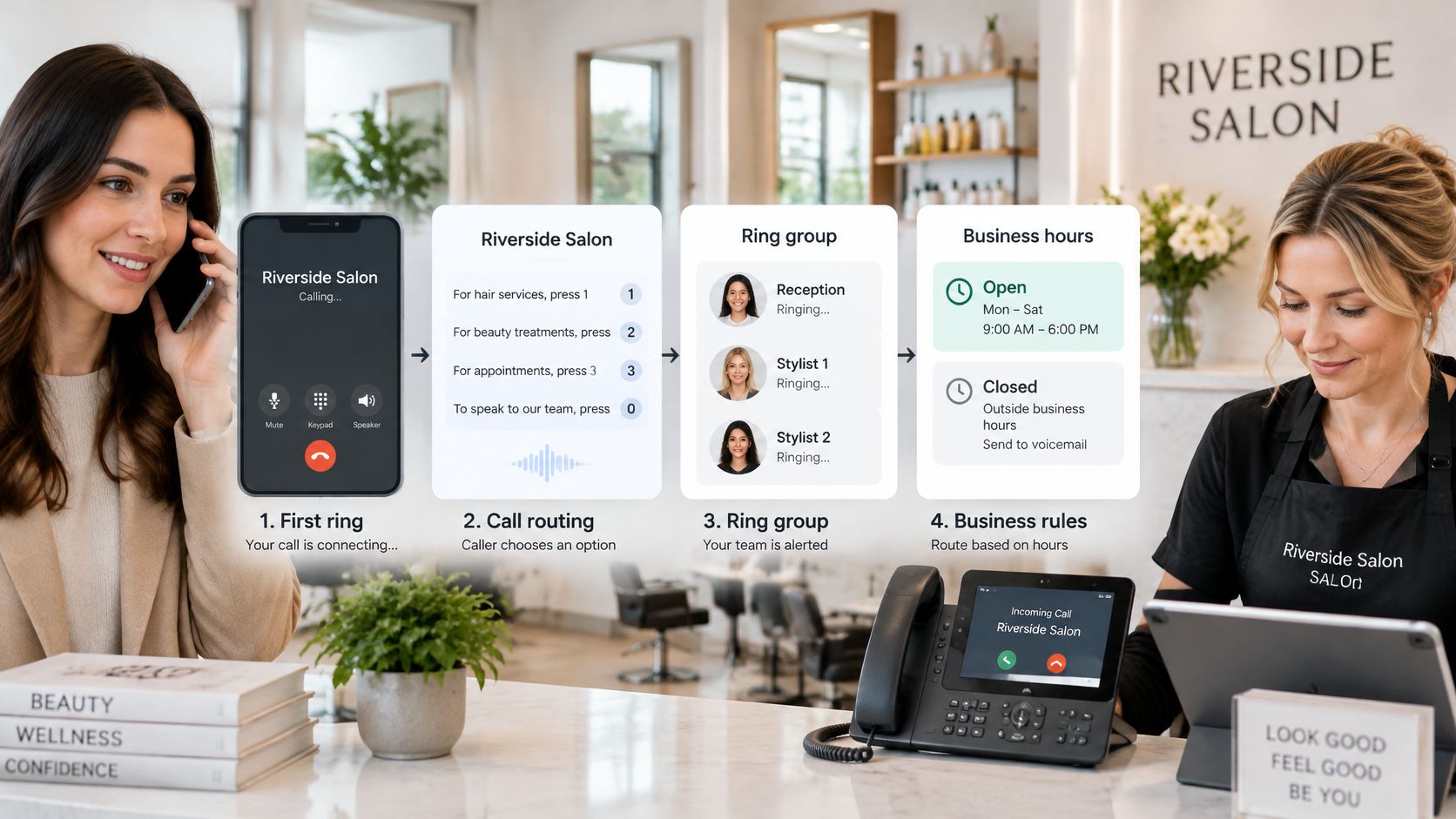
Features sound similar in a sales list, but callers experience them in a strict order. First the call has to reach someone or something useful. Then the caller has to explain what they need. Then the business has to capture the booking or message without losing the details.
This diagram shows that sequence for a salon, from first ring through to a confirmed appointment or a message for staff.
Routing Decides Who Gets the First Chance
Call routing sends a call to a ring group, a sequence of phones, or a set of business hour rules. Say a salon owner rings her own phone first, then a stylist's phone, then an overflow answerer. That order protects the owner's control without letting the call die if she's with a client. Our explainer on how call routing directs incoming business calls breaks down simultaneous, sequential, and time based patterns in more detail.
Keep the chain short. Every extra ring gives the caller more time to hang up, and every extra phone creates another chance for staff to assume someone else answered.
Menus Suit Predictable Questions, AI Suits Open Ones
An interactive voice response menu, or IVR, lets callers press a number for bookings, billing, or emergencies. It's cheap and predictable. A two receptionist dental office could use three options only, such as new appointment, existing appointment, and urgent pain. That's enough. Deep menus frustrate callers because they force people to translate a real problem into your department labels.
AI answering works differently. It understands natural speech, answers from your business details, and can book an open slot. When a caller asks, "Do you do same-day crowns?", a menu can't answer. An AI receptionist can say whether you offer that service, ask about pain or timing, and then offer an available consultation if that's your rule. That flexibility helps only if the underlying information is accurate, so edit services, hours, and boundaries before launch.
The Records After the Call Matter Too
Ask what you receive after each call, because memory is where small teams lose bookings.
- Voicemail transcription: lets you scan a message between customers instead of listening to a long recording.
- Call recording and logs: show who called, when, what was discussed, and whether a booking was made.
- Text or email follow-up: confirms the appointment and gives the caller something to check later.
- Reporting: shows answered, missed, transferred, and booked calls so you can spot weak hours.
Finish with a simple test. Write your three most common caller questions, then check which feature answers each one without staff help. If a feature doesn't answer a real question, reduce dead ends, or produce a useful record, don't pay extra for it.
Monthly Costs and the Fees That Add Up
A low per user price can still produce a disappointing first invoice. Numbers, hardware, minutes, taxes, and exit terms sit outside the headline rate, and vendors don't always present them in the same order. Request the same line items from every vendor, including the items in this table.
Cost Components to Request in Every Quote
| Cost item | What it covers | Typical range | What to check |
|---|---|---|---|
| Per-user or base fee | Core service for each person or account | $20 to $35 per user per month | How the price changes as headcount grows |
| Phone number | Each local business number | About $1 to $3 per month | Toll-free numbers usually cost more |
| Calling minutes | Domestic outbound calls | Often included, with overage per minute | Included minutes and the overage rate |
| International calling | Outbound calls abroad | Set per country on the vendor rate card | Per-country rates on your call list |
| Porting fee | Moving your existing number to the new provider | One-time carrier charge, quoted per number | Whether the fee is charged to you or the vendor |
| Desk phone hardware | Handsets for each seat | About $50 to $200 per phone | Purchase or lease, and the total over three years |
| Setup or onboarding | Configuration and training | Free to a few hundred dollars | Whether setup is included in the first month |
| Contract terms | Length, cancellation and early exit | Monthly or annual commitments | Early termination fees |
Run the Arithmetic for Your Headcount
Per user pricing looks harmless until you add staff. For example, three staff at $25 each cost $75 a month, while eight staff at the same rate cost $200 a month. That's before numbers and fees, so price the team you expect to have next year, not only today's roster.
Say a four person clinic chooses hosted VoIP at $25 per user, with two numbers and four desk phones at $150 each. The users cost $100 a month. Two numbers add about $4 a month if they're priced at $2 each. Hardware adds $600 one time, plus applicable taxes and emergency calling fees. A competing quote that looks $20 cheaper each month can cost more in year one if setup and leased handsets are buried in the term.
I would scrutinise per minute overage, international rates, contract lock-in, early termination fees, and leased hardware. A lease that feels painless monthly can exceed the purchase price over three years, and you may still have to return the phones. If you're comparing live coverage against software, our guide to what answering services cost each month helps you separate operator time from platform fees.
Don't sign until one quote lists users, numbers, minutes, hardware, setup, taxes, and exit terms on a single page.
Internet Requirements and a Setup Checklist
Cloud phones fail in ordinary ways. The internet is good enough for email, the router is in a back room, and calls turn choppy at lunch when everyone is online. Voice is less forgiving than browsing because the audio has to arrive in order and on time.
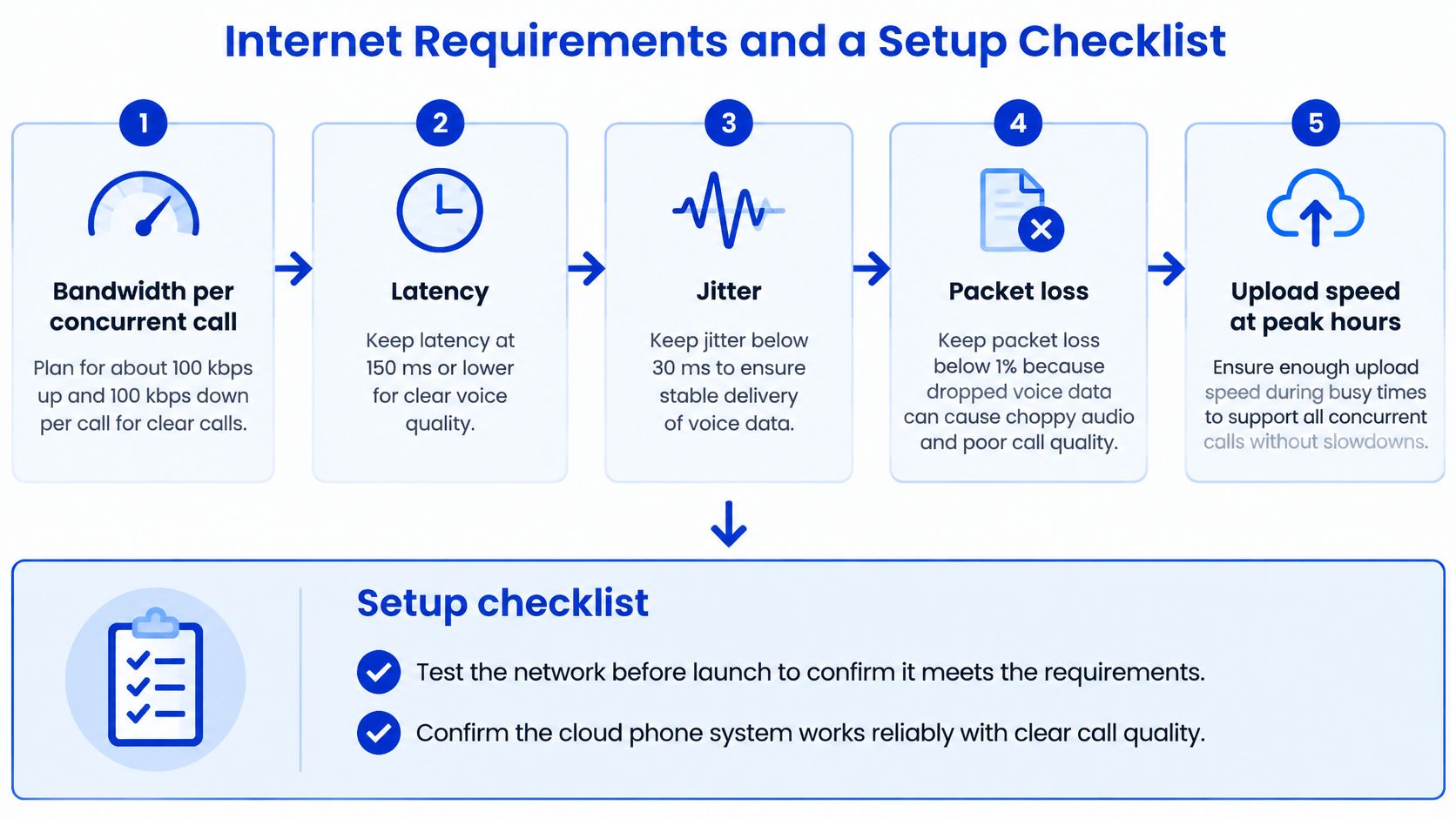
The infographic below groups the measures worth checking before you blame the phone vendor for poor audio.
Network Targets for Clear Business Calls
| Measure | Target for clear voice | What breaks when it is missed |
|---|---|---|
| Bandwidth per concurrent call | About 100 kbps each way | Dropped or choppy calls at peak times |
| Latency | Under 150 ms one way | Talk-over and awkward pauses |
| Jitter | Under 30 ms | Robotic or clipped audio |
| Packet loss | Under 1 percent | Missing words and broken sentences |
| Upload speed | Tested at peak hours, not only off-peak | Calls degrade when the office is busiest |
Bandwidth is rarely the whole story for a small office. Latency creates pauses where both people start speaking at once. Jitter means packets arrive unevenly, so words sound robotic or clipped. Packet loss removes small pieces of speech entirely. Test during your busiest period, with your normal computers, card terminals, and streaming habits running, because an early morning test can hide the problem.
Check service at your exact address as well. The FCC National Broadband Map reports the access technology and advertised download and upload speeds for individual locations, which is more useful than assuming county coverage means your shop has a reliable wired option.
Set It Up in This Order
- Confirm the internet at your exact business address: run a speed test during busy hours, because that's when callers and staff compete for capacity. The common slip is testing once in an empty office.
- Choose a wired connection where available: wired service is usually steadier than relying on weak Wi-Fi in a treatment room or workshop. Move desk phones onto Ethernet where you can.
- Add cellular failover for outages: a secondary path keeps calls moving if the main connection drops. Without it, a local outage can make a healthy cloud system unreachable from the premises.
- Choose a new number or port your existing one: decide which number customers will see and keep the old line active until the transfer completes. Cancelling early can strand the number you want to keep.
- Set business hours and routing rules: define who rings first, how long each step lasts, and what happens after closing. Vague rules create long rings and accidental voicemail endings.
- Make a test call from an outside phone before switching on forwarding: call the system as a customer would and listen to the greeting, questions, and booking logic. Forwarding first is the expensive slip, because live callers reach an untested setup.
- Check that the call reaches the system and not voicemail: confirm the number, routing, and calendar result before you publish anything. With our setup, you ring your own business number from another phone, and when the call reaches Heyline instead of voicemail, the setup is live.
That final test is not paperwork. It's the first real caller experience, and it catches wrong hours, old voicemail settings, and numbers that haven't finished moving.
Stopping Missed Calls From Costing Bookings
Start with the uncomfortable benchmark. The Leverly missed call analysis reports that in available small-business call datasets, only 37.8% of inbound calls were answered live, while 37.8% reached voicemail and 24.3% were unanswered entirely. That benchmark isn't California data, so don't treat it as your rate. Treat it as a design target and measure your own answer rate.
The mechanism is simple. When staff are serving customers, performing treatments, driving between jobs, or handling patients, one line becomes a queue bottleneck. A caller who reaches voicemail may try another provider before anyone calls back, especially when they need an appointment today.
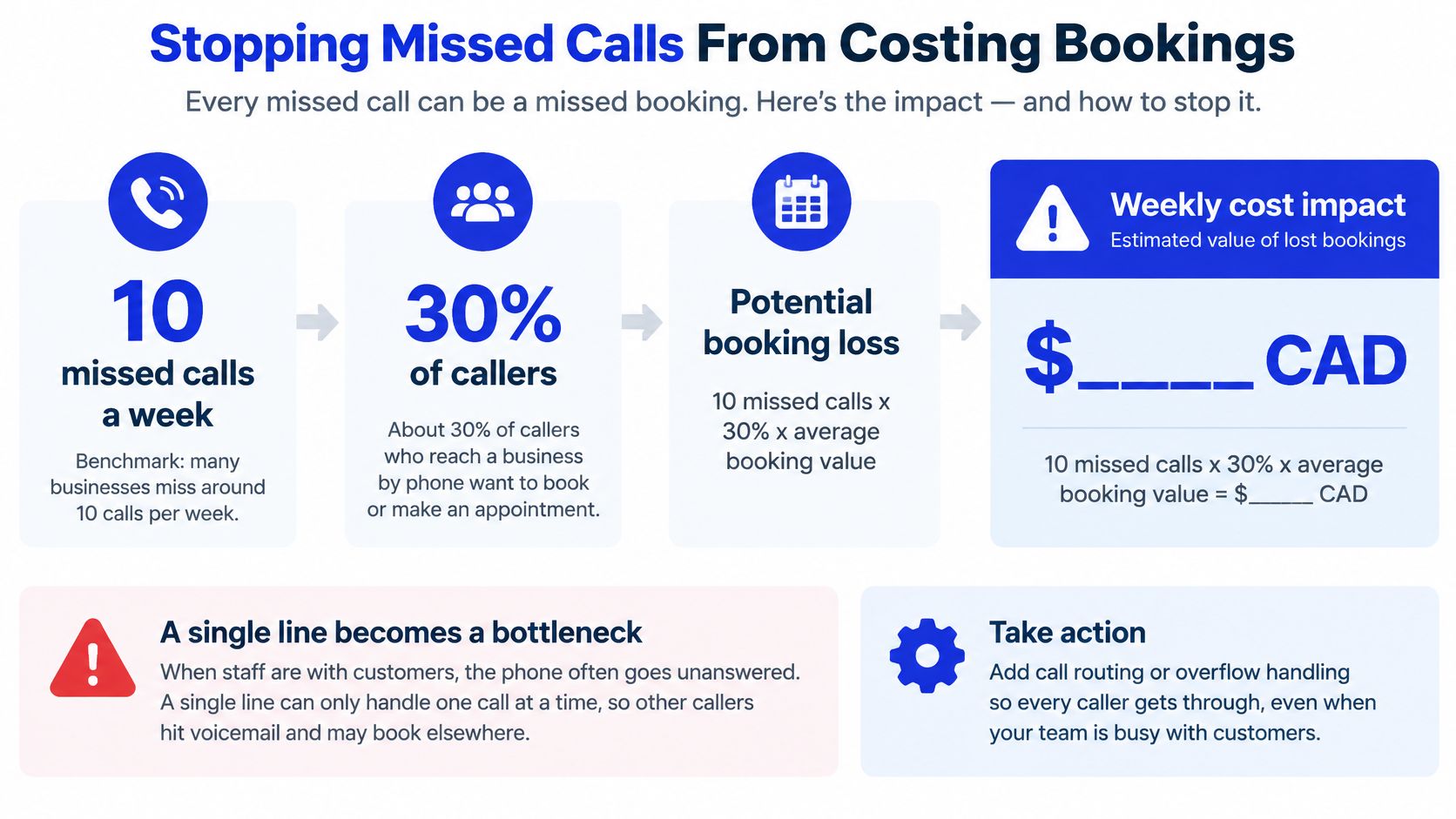
The infographic below turns that missed call problem into a booking calculation you can repeat with your own ticket size.
Price Your Own Missed Calls
Use a salon as a worked example. Say it misses 10 calls a week, 30 percent of those callers would have booked, and the average ticket is $80. That's 3 lost bookings and $240 a week. Over 50 working weeks, it's about $12,000 a year. Change any input and the answer changes, which is exactly why you should use your call log instead of a vendor's generic return on investment claim.
Booking capture works only when the system checks real calendar availability before confirming. It should collect the caller's name, number, service, and reason, avoid double bookings, and send a confirmation or recap. Answering concurrently matters too, because the second caller shouldn't receive a busy signal while staff finish the first conversation.
Overflow Is Often Better Than Replacing Your Phone
With busy and no-answer forwarding on, the business's own phone rings first, and Heyline only receives the ring that the business's phone cannot finish. With conditional call forwarding, the business owner chooses whether to answer a call personally or let it ring through to Heyline. That preserves the owner's judgement on calls they can take, while giving overflow callers an answer before they try another shop.
For practical patterns on ring timing and overflow, call routing fixes for service businesses are worth reviewing before you redesign the whole line. Our guide to screening phone calls without blocking real customers also helps when spam and genuine enquiries arrive on the same number.
Track five measures monthly, namely answer rate, time to human escalation, booking completion rate, duplicate booking incidents, and after-hours conversion. You'll know the system is working when booked calls rise, voicemail falls, and double bookings don't appear.
When a Human Should Take the Call
Automation shouldn't be the answer to every ring. The useful position is simple, namely AI for availability and humans for judgement. Define the exceptions before launch, while you're calm, instead of after an upset caller has already been handled badly.
This image captures the other half of a good setup, a staff member who can take over when the call needs reassurance or a decision.

Give Each Sensitive Call a Specific Action
Medical or safety emergencies need an immediate instruction to use emergency services where appropriate, plus an urgent message to staff. Upset or distressed callers need a flagged urgent message or a route to a staff line. Complex legal or medical intake, cancellations, and billing disputes usually need a person because the next question depends on facts the system shouldn't guess. Callers who use relay services because they're deaf, hard of hearing, or have a speech disability also need a clear, patient path rather than a dead end.
For medical practices that need people behind the phone workflow, Hire Medical Virtual Assistants is one route to add trained human support for intake and follow-up. With our system, Heyline never transfers a live caller to the business owner's cell phone. If the answer needs the owner, it says so and takes a message instead. That boundary should be stated plainly so callers aren't promised a transfer that won't happen. We also make no outbound calls or text messages to the business owner, so the recap workflow has to be checked as part of daily operations.
The short video below is worth watching before you write your own escalation wording, because the exact sentence a caller hears matters when a person isn't available.
Recording, Consent, and Sensitive Details
In two-party consent states such as California, announce that the call is recorded. Our system lets call recording be switched off per business, controlled by the business, which gives you a practical choice instead of a platform default you can't change.
Privacy notice belongs in the opening too. The California CCPA statute effective January 1, 2026 requires oral notice during the call when personal information collected by phone is sold or shared, and similar oral notice when sensitive personal information is collected or used beyond permitted purposes. Set health details, legal matters, and payment data to route to trained staff, and don't collect more than the booking requires.
Write a one page rule set, then test it with three sample calls covering a routine booking, an urgent problem, and a dispute. If any call ends without a booking, a clear message, or a human path, fix the rule before launch.
Choose Your Phone System This Week
You don't need a procurement project. You need two weeks of evidence, one system type, an all-in price, and a test call made before real customers are exposed to the new setup.
Six Steps for the Coming Week
- Count missed and after-hours calls for two weeks: use voicemail counts and call logs, and note the hours where calls cluster. This tells you whether you have a coverage gap or a general call handling problem.
- Pick one system type that fits your headcount and missed call count: a solo owner with few missed calls may only need a virtual number, while a busy clinic may need hosted VoIP plus overflow answering.
- Write the three questions callers ask most: check which features answer each one accurately, and remove anything that doesn't serve a real caller task.
- Request an all-in quote with every line item: include users, numbers, minutes, hardware, setup, porting, taxes, and early exit terms so vendors compete on the same bill.
- Run a test call from an outside phone before forwarding: listen as a customer, try to book, ask an awkward question, and confirm the calendar entry is correct.
- Review the first 30 days: check answer rate, booked calls, and double bookings, then adjust ring timing, business hours, knowledge, and escalation rules.
For appointment based businesses such as salons, clinics, law firms, contractors, and restaurants, the free browser trial is the lowest risk start. You can try Heyline for free in the browser by pasting your website and talking to your receptionist, so you hear the greeting and booking questions before anything goes live. A dedicated number is provisioned when the system goes live, so testing in the browser doesn't require buying a number or changing your published line first.
Stop pricing phone systems only by the monthly fee and start by hearing how your own callers would be answered when your hands are full. Paste your website into Heyline, test a booking conversation in your browser, and check whether the calendar, message, and escalation rules match the way your shop works. Visit Heyline to run that free test before you forward a single live call.